Codecam
László VáradiPhoto & VideoApp StoreCodecam revenue and downloads, last 30 days
How we got this (12 inputs)
- signals
- ratings ÷ age
- ratings/day
- 0.01
- monetisation
- photo ARPD 1; IAP not collected yet
- bound
- revenue per download ceiling: $15/download × downloads high (modelled downloads)
- range
- 80% interval from out-of-fold residuals (×1.12 scale, 90 products)
- likelyLow
- 115.47
- likelyHigh
- 418.19
- observed days (of 30)
- 6
- bound
- revenue per download ceiling at the downloads mid: at most $15 per download × 15 downloads (the 30-day downloads mid); the window's revenue read 1.61x more
- low confidence because
- the figure rests on the revenue-per-download ceiling (an assumption), not on a revenue signal
- confidence
- low
- rough
- order of magnitude
As of Nov 21, 2026.
How we got this (14 inputs)
- signals
- ratings ÷ age ÷ ratings per download; lifetime→current drift ×/÷4.12 (135278 measured Play counter deltas)
- spread
- measured on downloads ground truth (downloads ground truth: 48 App Store milestones, 33 platform splits, 13 drift points)
- ratings
- 24
- ratings/day
- 0.01
- ratings per download
- 0.015 (non-games, measured on 44 products)
- range scale
- ×0.88 (coverage scale on 9 ground-truth rows; publication is decided before it)
- note
- outer range 62x: only a lifetime signal; a rating-count change between days, dated reviews or a free-chart position would narrow it
- likelyLow
- 3
- likelyHigh
- 49
- confidence
- low
- rough
- order of magnitude
- observed days (of 30)
- 6
- measured days
- 0
- scaling
- observed days, scaled to 30
As of Nov 21, 2026.
How we got this (13 inputs)
- method
- installs in the window (all active on install day) + earlier installers active in the month (published retention ÷ the category's DAU/MAU stickiness) + the retained base of installers older than two years
- downloads per day
- 0.5 (0.03 to 4.7, the published worldwide figure)
- retention
- day 1 / 7 / 30: 23.9% / 8.3% / 3.7% (iOS benchmark × 1 for the category; AppsFlyer Q3 2024 day-1/7/30 retention, via getstream.io/blog/app-retention-guide (read 2026-11-16); category: OneSignal 2024 day-30 retention by category, via getstream.io/blog/app-retention-guide (read 2026-11-16))
- active days per install
- 10.38 over 730 days (age 4448 days; the curve is used to 730)
- stickiness
- 15% DAU/MAU, Media & Entertainment median (MWM DAU/MAU medians, US iOS, May 2026 (mwm.ai/glossary/dau-mau, read 2026-11-16))
- parts
- window installs 15 (the published 30-day downloads), earlier installers 26, retained base 87
- retained base
- 1126 installers older than 730 days (lifetime from 24 ratings ÷ 0.0161 ratings per download (non-games, measured on 44 App Store products)) × 7.69% active in a month (between 4.19%, the benchmark curve held flat, and 14.1%, median disclosed MAU ÷ lifetime installs of Duolingo, Snapchat and Grindr (company filings, data/ground-truth-active-users.csv; chosen on these rows, scored leave-one-product-out)); range ×/÷2 past each (widened after the leave-one-product-out check)
- spread
- downloads ×/÷11.87, retention ×/÷3, tail ×/÷1.69, stickiness ×/÷1.8, retained base ×/÷9.76 (assumptions; not fitted)
- ratings per download (recorded, not used)
- 0.01315
- chart persistence (recorded, not used)
- 0 day(s) on a chart in the window; fewer than 7 live days exist
- tier
- modelled: retention and stickiness are published benchmarks, not measured on this listing
- confidence
- low
- rough
- order of magnitude
As of Nov 21, 2026.
Daily active users
Modelled from this app's downloads and a published retention curve for its store and category, not measured. Read it as an order of magnitude.
History
Daily readings as we observed them, last 30 days worldwide. Free shows the last 30 days.
One reading so far: history starts Nov 15, 2026, and a trend line appears after the next daily reading.
Downloads per day
Observed by us since Nov 15, 2026.
Revenue per day
Observed by us since Nov 15, 2026.
Monthly history: we have found no public-archive copy of this store page from the last 12 months, so monthly readings start with our own in Nov 2026.
Create a free account to save apps; Pro shows full history.
Chart positions
Where this app ranks on the top free, paid and grossing charts we capture.
Search terms
No search terms read for this app yet. Terms are read from its title and the searches it shows up in, and appear here once ranked.
In-app purchases
Prices
In-app purchase ladder, price changes and paywall terms
No in-app prices recorded yet. We read them from the store listing: either this app sells none, or its listing has not been read yet.
Ratings and reviews
Rating distribution
No rating distribution read yet.
Recent reviews
Marketing
Paid ads, organic videos and onboarding captured for this app.
Paid ads
No Meta, Google or TikTok ads tied to this app yet. We check the public ad libraries daily.
Organic videos
No YouTube, TikTok or Instagram videos tied to this app yet.
Change history
Versions, price changes, rank jumps and listing edits, as we observed them.
Details
- Developer
- László Váradi, 1 app
- Bundle id
- com.codeair.codecam
- Category
- Photo & Video
- Price
- Free
- Released
- Sep 17, 2014
- Updated
- Jun 3, 2021
- Version
- 3.7
- Size
- 19.7 MB
- Content rating
- 4+
- Website
- Not available
- Contact email
- Not available
- Privacy policy
- Not available
- Languages (1)
- English
- Charted in
- United States, United Kingdom, Germany, France, Japan, Brazil, India, Canada, Australia, South Korea, Italy, Spain, Netherlands, Switzerland, Austria, Belgium, Ireland, Turkey, Mexico, Indonesia, Thailand, Taiwan, Saudi Arabia, United Arab Emirates
- First seen
- Nov 15, 2026
- Listing read
- Nov 15, 2026
Show store descriptionShow less
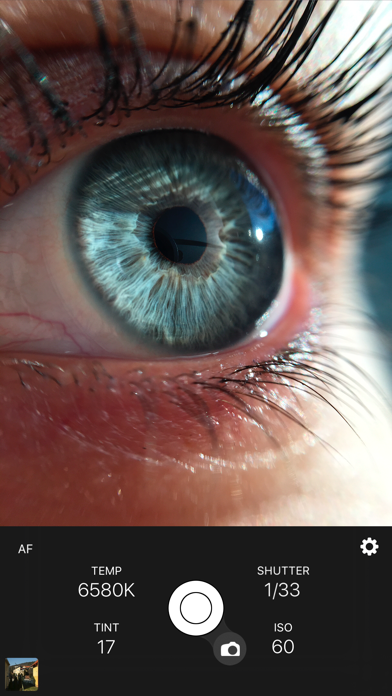
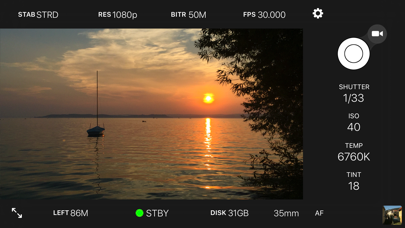
All the power of the iPhone camera at your fingertips! With the incredibly capable camera that is your iPhone, and Codecam, the most simple, easy to use, yet very powerful app, you can enjoy the unlimited possiblities that the complete control over your iPhone's camera can provide! Photo features: - shoot in JPEG, like the stock camera app, or shoot JPEG+RAW, which also records a DNG file next to your jpeg (it will still look like a single photo in the photos app). You can import the DNG to you computer, or edit it on your iPhone with an app that supports DNG raw files. - manual shutter speed, ISO. Lock your exposure by picking a new value, or by long pressing the automatically selected one. Long press again to go back to auto. You can also swipe up and down on the screen to apply an exposure compensation while in automatic exposure mode. - manual white balance: temperature and tint. You can lock the current value just like the exposure, or pick the exact values. White balance presets are also available: Daylight, Cloudy, Shade, plus two Incandescent and Fluorescent presets. - manual focus: switch between auto an manual focus by tapping the button, or by tapping an area on the image to focus on it. A slider to manually focus is also available. Video features: - video zoom: you can zoom by pinching the image, up until the point where upscaling would occur. For 4K, you can override this behaviour to allow zooming until the 1080p crop. The approximate focal length for the given zoom is also shown on the screen (converted to the equivalent focal length of a Super 35 or Full Frame sensor). - the same manual controls for shutter speed, ISO, white balance and focus as in photo mode. Smooth autofocus using Focus Pixels on the iPhone 6 or newer is available. - compressions supported: 15 Mbit, 25 Mbit, 50 Mbit, 75 Mbit, 100 Mbit, 200 Mbit, 400 Mbit in H.264 (or H.265 in newer devices) with selectable IPB or ALL-I modes, and MPJEG compression with either optimal (9/10 or 8/10 for 4K) or full quality (10/10) setting (note: the displayed bitrate in MJPEG mode is an estimation of the maximum possible bitrate) - frame rates supported: 1080p24, 1080p25, 1080p30 - additional frame rates supported by iPhone 5s: 720p50, 720p60 - additional frame rates supported by the iPhone 5s and the iPhone 6: 720p120 - additional frame rates supported by the iPhone 6: 1080p50, 1080p60, 720p240 - additional frame rates supported by the iPhone 6s and 7: 1080p120, 2160p30, 2160p25, 2160p24 - additional frame rates supported by the iPhone 8, X, 11, 11 Pro: 1080p240, 2160p50, 2160p60 - video stabilization is supported, you can toggle between on, off or cinematic, depending on availability on your device - show shutter angle instead of shutter speed - cinematic 1:2.35 overlay: crop mark option is available in the settings menu to switch between 16:9 and cinemascope. This feature is for composition only, the image that will be recorded is the full 16:9 frame. Additional features: - automatic save to camera roll: all images and supported videos are saved to the camera roll - gallery: You can see the images and videos you took in a grid or loupe view, with full metadata. You can also share them, or delete them right in the app.
More like this
- Top Photo & Video on App Store by estimated revenue
- Codecam alternatives
- Codecam vs Retromatic 2.0
- Codecam vs Recrop
- All top charts and categories
Similar apps
 Retromatic 2.0Peta Vision4.4 ★ (24)
 RecropAdva-Soft4.8 ★ (24)
 HairLabsSaid Daudov4.4 ★ (24)
 Format FinderOne Peak Creative3.5 ★ (24)
 AI Hairstyle Try On - NoirifyECO MOBILE JOINT STOCK COMPANY3.8 ★ (24)
 Hairstyle Try On Hair AIMuntean Holding AS4.8 ★ (24)
 DSLR Camera Effect Auto FocusPatel Ravjibhai4.4 ★ (24)
 Similar Face - AI Face MatchHeeyun Hwang4.6 ★ (24)