Color Timer - Visual Countdown
Seulki EomUtilitiesApp StoreColor Timer - Visual Countdown revenue and downloads, last 30 days
How we got this (10 inputs)
- signals
- ratings ÷ age
- ratings/day
- 0
- monetisation
- utilities ARPD 0.8; IAP not collected yet
- low confidence because
- the figure rests on 0 App Store ratings summed over the storefronts read, through the ratings relation alone
- range
- 80% interval from out-of-fold residuals (×1.12 scale, 90 products)
- likelyLow
- 240.47
- likelyHigh
- 1381.06
- confidence
- low
- rough
- order of magnitude
- observed days (of 30)
- 6
As of Nov 21, 2026.
How we got this (18 inputs)
- signals
- Play twin's installs × platform ratio; lifetime→current drift ×/÷4.12 (135278 measured Play counter deltas)
- spread
- measured on downloads ground truth (downloads ground truth: 48 App Store milestones, 33 platform splits, 13 drift points)
- ratings
- 0
- ratings/day
- 0
- ratings per download
- 0.015 (non-games, measured on 44 products)
- Play twin installs
- 1671
- iOS per Android (measured)
- 2.06
- note
- 0 App Store ratings across the 1 storefront read: rating counts are per storefront, so this says little about worldwide installs; the matched Play twin is used instead
- low confidence because
- App Store downloads read from the Play twin through the measured iOS per Android ratio (a prior), not from this listing's own ratings
- range scale
- ×0.88 (coverage scale on 9 ground-truth rows; publication is decided before it)
- note
- outer range 70x: only a lifetime signal; a rating-count change between days, dated reviews or a free-chart position would narrow it
- likelyLow
- 28
- likelyHigh
- 306
- confidence
- low
- rough
- order of magnitude
- observed days (of 30)
- 6
- measured days
- 0
- scaling
- observed days, scaled to 30
As of Nov 21, 2026.
Active users: not estimated for this app (too uncertain to show).
History
Daily readings as we observed them, last 30 days worldwide. Free shows the last 30 days.
One reading so far: history starts Nov 15, 2026, and a trend line appears after the next daily reading.
Downloads per day
Observed by us since Nov 15, 2026.
Revenue per day
Observed by us since Nov 15, 2026.
Monthly history: we have found no public-archive copy of this store page from the last 12 months, so monthly readings start with our own in Nov 2026.
Create a free account to save apps; Pro shows full history.
Chart positions
Where this app ranks on the top free, paid and grossing charts we capture.
Search terms
No search terms read for this app yet. Terms are read from its title and the searches it shows up in, and appear here once ranked.
In-app purchases
Prices
In-app purchase ladder, price changes and paywall terms
No in-app prices recorded yet. We read them from the store listing: either this app sells none, or its listing has not been read yet.
Ratings and reviews
Rating distribution
No rating distribution read yet.
Recent reviews
Marketing
Paid ads, organic videos and onboarding captured for this app.
Paid ads
No Meta, Google or TikTok ads tied to this app yet. We check the public ad libraries daily.
Organic videos
No YouTube, TikTok or Instagram videos tied to this app yet.
Change history
Versions, price changes, rank jumps and listing edits, as we observed them.
Details
- Developer
- Seulki Eom, 67 apps
- Bundle id
- com.hydroponicglass.fullTimer
- Category
- Utilities
- Price
- Free
- Released
- Oct 13, 2024
- Updated
- Oct 10, 2026
- Version
- 1.4.0
- Size
- 46.9 MB
- Content rating
- 4+
- Website
- hydroponicglass.com
- Contact email
- Not available
- Privacy policy
- Not available
- Languages (2)
- English, Korean
- Charted in
- Australia, Canada, Germany, Spain, France, United Kingdom, Ireland, India, Italy, Japan, South Korea, Mexico, Netherlands, United States
- First seen
- Nov 15, 2026
- Listing read
- Nov 15, 2026
Show store descriptionShow less
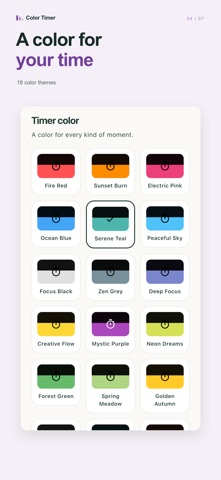
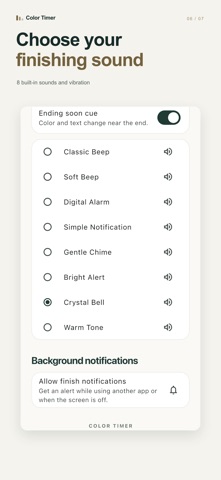
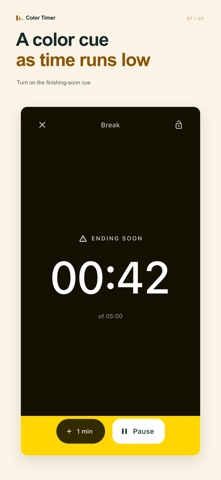
See how much time is left at a glance. Color Timer is a visual timer with a full screen countdown. As time passes, the colored area shrinks, giving you a clear sense of the time remaining. Set it on your desk for a study session, glance over while cooking, or keep your next presentation on time. A clear screen for your countdown Large numbers and vivid color fill the timer screen. There are no ads on the countdown screen and no full screen ads to wait through before starting. Keep the timer open and your screen stays awake while the countdown runs. Save it once. Start with one tap. Save your favorite timers with a name, duration and color, then start them directly from the home screen. Choose 1, 5, 10 or 25 minutes with quick duration buttons, reuse a recent duration, or set your own hours, minutes and seconds. Big numbers, in portrait or landscape Use your phone or tablet upright on your desk or sideways for a meeting, presentation or class. Choose from 18 color themes. Turn on the finishing-soon cue for a change in color and an on-screen message as time runs low. Pause, adjust and keep going Pause and resume, add a minute, or restart when you need to. Lock the controls to avoid accidental taps. Adding a minute to a running countdown leaves your saved timer's duration unchanged. Choose how your timer ends Preview and choose from 8 built-in alarm sounds. Switch sound and vibration on or off separately. In a quiet space, turn both off and use the visual display. Time for everyday moments • Study and work: set aside time for one task. • Cooking and tea: check the time with a quick glance while your hands are busy. • Presentations, meetings and classes: share an easy-to-see countdown. • Stretching and breaks: make room for a few minutes away from your desk. For a simple Pomodoro routine, start a 25-minute focus timer, then start a 5-minute timer for your break. No account is needed. The timer itself works offline. The app interface follows your device language, with Korean and English supported. Ads appear only on the home screen. Allow notifications to receive an end-of-timer alert while the app is in the background. Sounds and vibration depend on device capabilities and system settings.
More like this
- Top Utilities on App Store by estimated revenue
- Color Timer - Visual Countdown alternatives
- Color Timer - Visual Countdown vs Desky - Desktop Mode Switching
- Color Timer - Visual Countdown vs SoulTuner
- All top charts and categories
Similar apps
 Desky - Desktop Mode SwitchingVincent Neo0.0 ★ (0)
 SoulTunerTechné Media0.0 ★ (0)
 XPipe: Pipe Fitter CalculatorJakub Trytek0.0 ★ (0)
 Driver License & ID ScannerMaciej Bis0.0 ★ (0)
 DuoMiniMac君 盛0.0 ★ (0)
 Sound test for Dolby AtmosNative IT0.0 ★ (0)
 Construction Calc Pro 2Snappy Appz Inc.0.0 ★ (0)
 RadioDesk - Show PlannerBilaal Rashid0.0 ★ (0)