HingeTime
Mitch FurrierUtilitiesApp Store$0.99HingeTime revenue and downloads, last 30 days
History
Daily readings as we observed them, last 30 days worldwide. Free shows the last 30 days.
Ratings (United States)
Observed by us since Nov 19, 2026.
Monthly history: we have found no public-archive copy of this store page from the last 12 months, so monthly readings start with our own in Nov 2026.
Create a free account to save apps; Pro shows full history.
Chart positions
On 1 chart at the latest capture. Charts are swept every 6 hours.
| Country | Top paidUtilities |
|---|---|
| United States | #517places up |
Change is against the previous capture of the same chart.
Top paid, Utilities, United States
Observed since Nov 15 11:31 UTC.
Search terms
No search terms read for this app yet. Terms are read from its title and the searches it shows up in, and appear here once ranked.
In-app purchases
Prices
In-app purchase ladder, price changes and paywall terms
No in-app prices recorded yet. We read them from the store listing: either this app sells none, or its listing has not been read yet.
Ratings and reviews
Rating distribution
No rating distribution read yet.
Recent reviews
Marketing
Paid ads, organic videos and onboarding captured for this app.
Paid ads
No Meta, Google or TikTok ads tied to this app yet. We check the public ad libraries daily.
Organic videos
No YouTube, TikTok or Instagram videos tied to this app yet.
Change history
Versions, price changes, rank jumps and listing edits, as we observed them.
- Nov 22, 2026New icon

 , US
- Nov 22, 2026New version 1.0 → 1.1, US
Details
- Developer
- Mitch Furrier, 1 app
- Bundle id
- com.mitch.OpenTimeUSReportLab
- Category
- Utilities
- Price
- $0.99
- Released
- Nov 16, 2026
- Updated
- Nov 22, 2026
- Version
- 1.1
- Size
- 13.1 MB
- Content rating
- 4+
- Website
- Not available
- Contact email
- Not available
- Privacy policy
- Not available
- Languages (1)
- English
- Charted in
- United States
- First seen
- Nov 19, 2026
- Listing read
- Nov 23, 2026
Show store descriptionShow less
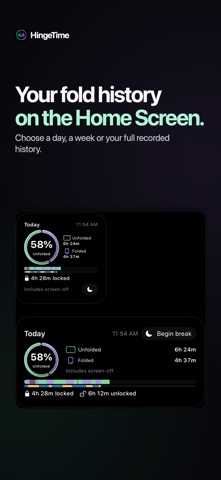
You can read on your Duo while it’s folded. You can also leave it open on the charger. HingeTime helps you see what happens in your day and when. It puts recorded folded and unfolded time alongside the stretches when your phone was locked or unlocked to help you understand how you use your phone on a daily basis. Open Overview to see time in each position. Mint marks unfolded time and purple marks folded time. The second band shows observed locks in amber and unlocked stretches in blue. Tap Lock details to see how much of each fell within folded or unfolded time. If a lock boundary is missing, the breakdown shows that time as unknown. Look back over a day, a week, or your full recorded history. Turn on the Hinge checks layer to see individual readings. If you choose to log app openings with Shortcuts, you can also see which apps you opened in each position. Check your folded and unfolded totals on the Lock Screen. Choose today, the last seven days, or all-time, then tap the widget to open Lock details for that period. Small and medium Home Screen widgets show your totals too. When you put the phone away, you can start a StandBy break from the app or a Home Screen widget and end it when you return. HingeTime measures time in a position, including idle and screen-off time by default. You can exclude observed locks from your totals. Your history is stored on your device. No account is required. Automatic fold tracking uses the Opened and Closed automations in Shortcuts on a compatible iPhone Duo. HingeTime includes both shortcuts and walks you through enabling them. The app requires iOS or iPadOS 27 or later. On devices without hinge triggers, positions can be recorded manually.
More like this
- Top Utilities on App Store by estimated revenue
- HingeTime alternatives
- HingeTime vs Desky - Desktop Mode Switching
- HingeTime vs SoulTuner
- All top charts and categories
Similar apps
 Desky - Desktop Mode SwitchingVincent Neo0.0 ★ (0)
 SoulTunerTechné Media0.0 ★ (0)
 XPipe: Pipe Fitter CalculatorJakub Trytek0.0 ★ (0)
 Driver License & ID ScannerMaciej Bis0.0 ★ (0)
 DuoMiniMac君 盛0.0 ★ (0)
 Sound test for Dolby AtmosNative IT0.0 ★ (0)
 Construction Calc Pro 2Snappy Appz Inc.0.0 ★ (0)
 RadioDesk - Show PlannerBilaal Rashid0.0 ★ (0)