ImgRef
文荣 李Graphics & DesignApp StoreImgRef revenue and downloads, last 30 days
How we got this (8 inputs)
- signals
- ratings ÷ age
- ratings/day
- 0.2
- monetisation
- design ARPD 0.8; IAP not collected yet
- range
- 80% interval from out-of-fold residuals (×1.12 scale, 90 products)
- likelyLow
- 2204.36
- likelyHigh
- 10411.78
- confidence
- medium
- observed days (of 30)
- 6
As of Nov 21, 2026.
How we got this (14 inputs)
- signals
- ratings ÷ age ÷ ratings per download; lifetime→current drift ×/÷4.12 (135278 measured Play counter deltas)
- spread
- measured on downloads ground truth (downloads ground truth: 48 App Store milestones, 33 platform splits, 13 drift points)
- ratings
- 128
- ratings/day
- 0.2
- ratings per download
- 0.015 (non-games, measured on 44 products)
- range scale
- ×0.88 (coverage scale on 9 ground-truth rows; publication is decided before it)
- bound
- below the free chart threshold
- likelyLow
- 171
- likelyHigh
- 1674
- confidence
- low
- rough
- order of magnitude
- observed days (of 30)
- 6
- measured days
- 0
- scaling
- observed days, scaled to 30
As of Nov 21, 2026.
Active users: not estimated for this app (too uncertain to show).
History
Daily readings as we observed them, last 30 days worldwide. Free shows the last 30 days.
One reading so far: history starts Nov 15, 2026, and a trend line appears after the next daily reading.
Downloads per day
Observed by us since Nov 15, 2026.
Revenue per day
Observed by us since Nov 15, 2026.
Monthly history: we have found no public-archive copy of this store page from the last 12 months, so monthly readings start with our own in Nov 2026.
Create a free account to save apps; Pro shows full history.
Chart positions
Where this app ranks on the top free, paid and grossing charts we capture.
Search terms
No search terms read for this app yet. Terms are read from its title and the searches it shows up in, and appear here once ranked.
In-app purchases
Prices
In-app purchase ladder, price changes and paywall terms
No in-app prices recorded yet. We read them from the store listing: either this app sells none, or its listing has not been read yet.
Ratings and reviews
Rating distribution
No rating distribution read yet.
Recent reviews
Marketing
Paid ads, organic videos and onboarding captured for this app.
Paid ads
No Meta, Google or TikTok ads tied to this app yet. We check the public ad libraries daily.
Organic videos
No YouTube, TikTok or Instagram videos tied to this app yet.
Change history
Versions, price changes, rank jumps and listing edits, as we observed them.
Details
- Developer
- 文荣 李, 2 apps
- Bundle id
- com.xunhua.xunhuaref
- Category
- Graphics & Design
- Price
- Free
- Released
- Mar 3, 2025
- Updated
- Nov 2, 2026
- Version
- 5.5.6
- Size
- 79.6 MB
- Content rating
- 4+
- Website
- Not available
- Contact email
- Not available
- Privacy policy
- Not available
- Languages (17)
- Arabic, English, French, German, Hindi, Indonesian, Italian, Japanese, Korean, Malay, Polish, Portuguese, Russian, Chinese, Spanish, Thai, Turkish
- Charted in
- United States, United Kingdom, Germany, France, Japan, Brazil, India, Canada, Australia, South Korea, Italy, Spain, Netherlands, Switzerland, Austria, Belgium, Turkey, Mexico, Indonesia, Thailand, Taiwan, Saudi Arabia, United Arab Emirates
- First seen
- Nov 15, 2026
- Listing read
- Nov 15, 2026
Show store descriptionShow less
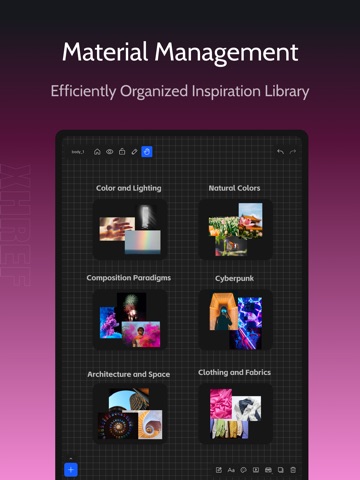
「App Store Editor's Choice」 「98% 5-Star Ratings」 「Cross-Platform for iPhone/iPad/MacOS」 Redefine your creative workflow - an all-in-one tool combining mood boards, reference images, smart asset management, precise color picking, and free-form collaging across devices. Designed for UI/brand/illustration/photography/architecture/video storyboard and other creative scenarios, this is your professional reference image and inspiration board on iPhone / iPad / macOS. Core Features: 1. Unlimited Canvas: Smart caching and image management for large long-term libraries and smooth browsing. 2. Multi-Select Batch Processing: Select multiple images for adaptive scaling, smart layout, uniform size, copy, and alignment. 3. Professional Workflow: Full keyboard shortcuts (Mac / iPad keyboard) for faster frequent actions. 4. Image Editing: Rotate, crop, desaturate, flip, adjust opacity, layers, scale, and more. 5. Dynamic Eyedropper: Pick any canvas color in real time and get common color codes. 6. Video Processing: MP4 playback and 4K still extraction for faster storyboards, covers, and video references. 7. Stylized Text: Built-in fonts and styles make notes, titles, and labels clearer on the canvas. 8. Magnetic Guides: Alignment hints and smart snapping for precise layouts. 9. GIF Decomposition: Break animations into frames for clearer detail references. 10. Import & Backup: Clipboard, photos, folders, drag & drop, export, full backup. 11. Web Drag & Drop: Drag images from Pinterest / ArtStation / Midjourney / Pixiv / Instagram and more. 12. Multiple Modes: View, lock, and edit modes keep browsing and editing separate. 13. Brush Tools: Annotate and highlight key areas for more intuitive communication. 14. File Management: Grid/list views with multiple sorting options. 15. Canvas Zoom: Smooth zoom and pan for comfortable detail viewing. Enhanced Features: 1. Image/GIF/Video Notes: Add notes to capture ideas and key points. 2. Preview Mode: Switch to a clean preview for focused viewing and presentations. 3. Advanced Crop: Fit different aspect ratios and compositions faster for cleaner output. 4. Image Blur: Blur images for privacy protection and richer visual layering. 5. High-Resolution Scene Export (PNG): Export full scenes as HD PNG for sharing and delivery. 6. File Favorites: Save frequent files for quick access to key references. 7. Category Tags: Tag files by use, project, or status for faster filtering. 8. Dotted Background: Toggle a dotted background for clearer edge contrast. 9. Canvas Grayscale: Focus on tone and composition with grayscale view. 10. Image Color Analysis: Extract dominant colors to understand palette relationships. 11. Layer Panel: Preview names, reorder, and quick select for efficient layer management. 12. Scheduled Playback: Timed switching, playback controls, and countdown. 13. Layer Search: Filter by type and keyword to quickly locate target content among many layers. 14. Brush Presets: Switch stroke width, color, and opacity for annotation, highlighting, and sketching. 15. Canvas RGB Single-Channel Preview: View R/G/B channels separately to analyze color distribution, tone, and detail. 16. Link Cards: Turn webpages into cover cards pinned on the canvas; one tap to open 17. Image OCR: One tap reads the text in an image and creates text beside it, so titles, copy, and labels can be lifted without retyping. 18. Classify/Find by Color: Basic, nearby, and fine families. Group canvas images by color family, or find from an image’s color family, for clearer palette comparison. You can subscribe to ImgRef Pro. Charged to your iTunes account on confirmation. Auto-renews unless canceled 24+ hours before period end. Manage in iTunes Store. Privacy Policy: https://xunhuaref.cn/index.php/privacypolicy/ Terms of Use: https://xunhuaref.cn/index.php/privacypolicy/eula-en/ Download now and experience the smoothest creative tool in the Apple ecosystem! Thank you for reading. Contact us: Email: imgref@163.com
More like this
- Top Graphics & Design on App Store by estimated revenue
- ImgRef alternatives
- ImgRef vs SketchArt: AR Draw & Trace
- ImgRef vs AI Art Generator : AI Image
- All top charts and categories
Similar apps
 SketchArt: AR Draw & TraceASIAN MOBILE SOFTWARE COMPANY LIMITED4.3 ★ (128)
 AI Art Generator : AI ImageRevoo Teknoloji Limited Sirketi3.9 ★ (128)
 Finger Manga - Comic MakerChun Ho Li3.7 ★ (128)
 Glow Art Drawing - Doodle AppBraly4.4 ★ (128)
 Gencraft AI Image GeneratorGencraft, LLC4.1 ★ (129)
 Blur Video·Le Giang Nam4.5 ★ (129)
 AI Design Creator & Font SpaceMuhammad Awais4.5 ★ (129)
 Business Card Maker·Le Giang Nam4.8 ★ (127)