Markdown Annotate
Akash AgarwalProductivityApp Store$4.99Markdown Annotate revenue and downloads, last 30 days
History
Daily readings as we observed them, last 30 days worldwide. Free shows the last 30 days.
One reading so far: history starts Nov 21, 2026, and a trend line appears after the next daily reading.
Monthly history: we have found no public-archive copy of this store page from the last 12 months, so monthly readings start with our own in Nov 2026.
Create a free account to save apps; Pro shows full history.
Chart positions
On 1 chart at the latest capture. Charts are swept every 6 hours.
| Country | Top paidProductivity |
|---|---|
| India | #335places down |
Change is against the previous capture of the same chart.
Top paid, Productivity, India
Observed since Nov 15 11:32 UTC.
Search terms
No search terms read for this app yet. Terms are read from its title and the searches it shows up in, and appear here once ranked.
In-app purchases
Prices
In-app purchase ladder, price changes and paywall terms
No in-app prices recorded yet. We read them from the store listing: either this app sells none, or its listing has not been read yet.
Ratings and reviews
Rating distribution
No rating distribution read yet.
Recent reviews
Marketing
Paid ads, organic videos and onboarding captured for this app.
Paid ads
No Meta, Google or TikTok ads tied to this app yet. We check the public ad libraries daily.
Organic videos
No YouTube, TikTok or Instagram videos tied to this app yet.
Change history
Versions, price changes, rank jumps and listing edits, as we observed them.
Details
- Developer
- Akash Agarwal, 1 app
- Bundle id
- xyz.a7builds.markdownannotate
- Category
- Productivity
- Price
- $4.99
- Released
- Nov 19, 2026
- Updated
- Nov 20, 2026
- Version
- 1.0
- Size
- 9.5 MB
- Content rating
- 4+
- Contact email
- Not available
- Privacy policy
- Not available
- Languages (1)
- English
- Charted in
- United States, United Kingdom, Japan, Brazil, India, Canada, Australia, South Korea, Norway, Switzerland, Turkey, Mexico, Indonesia, Thailand, Vietnam, Philippines, Taiwan, Saudi Arabia, United Arab Emirates
- First seen
- Nov 21, 2026
- Listing read
- Nov 21, 2026
Show store descriptionShow less
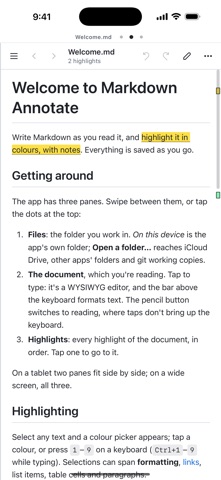
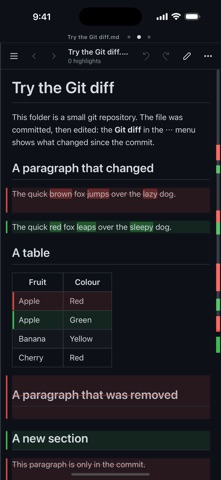
Read your Markdown notes formatted, highlight what matters in colour, add notes, and edit right on the page. Your files stay plain Markdown. Markdown Annotate opens the folders you already keep notes in, whether in the app, in iCloud Drive or another app's folder, and shows each file as a formatted page you can type into. Select any text and pick a colour to highlight it. Tap a highlight to change its colour, write a note, or delete it. HIGHLIGHT AND ANNOTATE • Highlight across formatting, links, list items, table cells and paragraphs • Six colours to start with, and you can edit the palette • Notes on any highlight, listed with the highlights in their own pane • Keep highlights beside the file, or write them into it as standard HTML mark tags that other Markdown apps show • Move a highlight between the two with one tap • Export your highlights as a Markdown summary, grouped by colour EDIT WHAT YOU SEE • Type into the formatted page, with a formatting bar above the keyboard • Markdown shortcuts as you type: # for headings, - for lists, > for quotes, ``` for code • Tables, lists, quotes, images and code with syntax colours • The Markdown source, on its own or side by side with the page on iPad • Reading mode: select and highlight without the keyboard popping up • Saves as you go, and leaves the parts you didn't change exactly as they were FIND YOUR WAY • Three panes: your files, the page, and its highlights. Swipe between them on iPhone; on iPad they sit side by side • Long-press a link to preview the section it points to, and highlight in the preview too • A table of contents, numbered headings, and back and forward through your jumps • A scrollbar that marks where the highlights are • Make the selected text a link to another file or a section, with completions SEE WHAT CHANGED • In a folder that's a git repository, see what changed since the last commit: changed paragraphs, removed ones struck through, edited table rows and words Highlights use the same format as the Markdown Annotate extension for VS Code, so highlights made on your computer show on your iPhone and iPad, and the other way round, when the files are shared through a synced folder or git. For students, researchers, writers and developers who keep their notes, papers and documentation in Markdown and want to read them closely.
More like this
- Top Productivity on App Store by estimated revenue
- Markdown Annotate alternatives
- Markdown Annotate vs Platen Writer
- Markdown Annotate vs Strimio: Movie & TV Diary
- All top charts and categories
Similar apps
 Platen WriterAswath Hasina Syed Mohamed0.0 ★ (0)
 Strimio: Movie & TV DiaryHa Phuc Trung0.0 ★ (0)
 CalendariaJorge Cohen0.0 ★ (0)
 FocusBookOsama Naeem0.0 ★ (0)
 The WardroomBLUEPITT14 LLC0.0 ★ (0)
 Hello DayishWilkes Venture Group0.0 ★ (0)
 Pomodoro - Pomo QuestTop Free Diabetes Apps0.0 ★ (0)
 Isopod Collector and SalesJax Beaudoin0.0 ★ (0)