NodeUI: ComfyUI Editor
Guhl Design Studio LLCGraphics & DesignApp Store$4.99NodeUI: ComfyUI Editor revenue and downloads, last 30 days
How we got this (11 inputs)
- signals
- ratings ÷ age
- ratings/day
- 0.03
- monetisation
- design ARPD 0.8; IAP not collected yet
- range
- 80% interval from out-of-fold residuals (×1.12 scale, 90 products)
- likelyLow
- 657.38
- likelyHigh
- 3096.43
- observed days (of 30)
- 6
- bound
- revenue per download ceiling at the downloads mid: at most $15 per download × 98 downloads (the 30-day downloads mid); the window's revenue read 1.17x more
- low confidence because
- the figure rests on the revenue-per-download ceiling (an assumption), not on a revenue signal
- confidence
- low
- rough
- order of magnitude
As of Nov 21, 2026.
How we got this (17 inputs)
- signals
- ratings ÷ age ÷ ratings per download; lifetime→current drift ×/÷4.12 (135278 measured Play counter deltas)
- spread
- measured on downloads ground truth (downloads ground truth: 48 App Store milestones, 33 platform splits, 13 drift points)
- ratings
- 0
- ratings/day
- 0.03
- ratings per download
- 0.015 (non-games, measured on 44 products)
- ratings velocity (recorded, not used yet)
- 0/day over 6d
- low confidence because
- the figure rests on 0 App Store ratings summed over the storefronts read (rating counts are per storefront; 5 or fewer say little about worldwide installs)
- tier
- modelled: the listing shows 0 ratings in the storefronts read, so the ratings relation has nothing of this listing's own to scale
- range scale
- ×0.88 (coverage scale on 9 ground-truth rows; publication is decided before it)
- note
- outer range 171x: only a lifetime signal; a rating-count change between days, dated reviews or a free-chart position would narrow it
- likelyLow
- 20
- likelyHigh
- 443
- confidence
- low
- rough
- order of magnitude
- observed days (of 30)
- 6
- measured days
- 0
- scaling
- observed days, scaled to 30
As of Nov 21, 2026.
Active users: not estimated for this app (too uncertain to show).
History
Daily readings as we observed them, last 30 days worldwide. Free shows the last 30 days.
Downloads per day
Observed by us since Nov 15, 2026.
Revenue per day
Observed by us since Nov 15, 2026.
Ratings (United States)
Observed by us since Nov 15, 2026.
Monthly history: we have found no public-archive copy of this store page from the last 12 months, so monthly readings start with our own in Nov 2026.
Create a free account to save apps; Pro shows full history.
Chart positions
On 6 charts at the latest capture. Charts are swept every 6 hours.
| Country | Top paidGraphics & Design |
|---|---|
| Australia | #41places down |
| Norway | #34= |
| United States | #532places down |
| Turkey | #59= |
| Japan | #71= |
| Mexico | #76= |
Change is against the previous capture of the same chart.
Top paid, Graphics & Design, Australia
Observed since Nov 15 11:36 UTC.
Top paid, Graphics & Design, Norway
Observed since Nov 16 01:38 UTC.
Show 4 more chartsShow less
Top paid, Graphics & Design, United States
Observed since Nov 15 11:28 UTC.
Top paid, Graphics & Design, Turkey
Observed since Nov 16 01:45 UTC.
Top paid, Graphics & Design, Japan
Observed since Nov 15 11:37 UTC.
Top paid, Graphics & Design, Mexico
Observed since Nov 16 01:52 UTC.
Search terms
No search terms read for this app yet. Terms are read from its title and the searches it shows up in, and appear here once ranked.
In-app purchases
Prices
In-app purchase ladder, price changes and paywall terms
No in-app prices recorded yet. We read them from the store listing: either this app sells none, or its listing has not been read yet.
Ratings and reviews
Rating distribution
No rating distribution read yet.
Recent reviews
Marketing
Paid ads, organic videos and onboarding captured for this app.
Paid ads
No Meta, Google or TikTok ads tied to this app yet. We check the public ad libraries daily.
Organic videos
No YouTube, TikTok or Instagram videos tied to this app yet.
Change history
Versions, price changes, rank jumps and listing edits, as we observed them.
- Nov 19, 2026New icon

 , US
- Nov 19, 2026New screenshots , US
- Nov 19, 2026New version 1.2 → 1.3, US
Details
- Developer
- Guhl Design Studio LLC, 1 app
- Bundle id
- com.gds.ComfyMobile
- Category
- Graphics & Design
- Price
- $4.99
- Released
- Nov 4, 2026
- Updated
- Nov 18, 2026
- Version
- 1.3
- Size
- 51.0 MB
- Content rating
- 4+
- Website
- nodeui.guhlstudio.com
- Contact email
- Not available
- Privacy policy
- Not available
- Languages
- Not available
- Charted in
- United Arab Emirates, Austria, Australia, Belgium, Brazil, Canada, Switzerland, Germany, Denmark, Spain, France, United Kingdom, Indonesia, Ireland, India, Italy, Japan, South Korea, Mexico, Netherlands, Norway, Philippines, Poland, Saudi Arabia, Sweden, Thailand, Turkey, Taiwan, United States, Vietnam
- First seen
- Nov 15, 2026
- Listing read
- Nov 23, 2026
Show store descriptionShow less
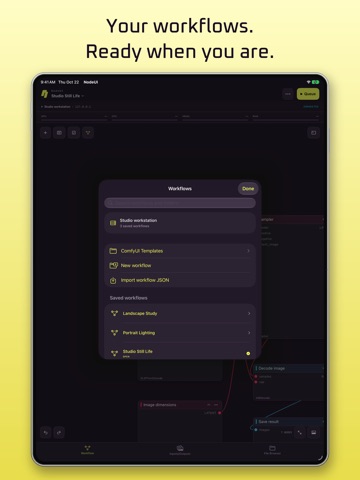
Your workflow. Within reach. NodeUI is a native ComfyUI workflow workspace for iPhone and iPad. Connect to your own ComfyUI computer or Comfy Cloud, shape your workflow with touch, and follow the generation from prompt to output. COMFY CLOUD REQUIREMENTS Running workflows on Comfy Cloud through NodeUI requires an active paid Comfy Cloud subscription, an API key, and generation credits. Credits alone or free access to the Comfy Cloud website do not include API access. The Cloud subscription and credits are purchased separately and are not included with NodeUI. EDIT YOUR WORKFLOW Pan and zoom a native canvas. Connect typed ports, search nodes, inspect settings, organize groups, and use undo/redo. Move and resize nodes with a positioning preview, then confirm or cancel. Open nested node groups to inspect and edit their contents. SHARE IMAGES TO A WORKFLOW Select one or more images in Photos, tap Share, and choose NodeUI. Pick a saved workflow on your self-hosted ComfyUI server, add an optional prompt, and tap Run workflow. To set this up, install the NodeUI companion on your server. In ComfyUI, connect the Shared Input node’s numbered image outputs where you want each image to go. The first image you select goes to Image 1, the second to Image 2, and so on. Connect the result to Return Image to NodeUI to get the finished image back on your device. WORK WITH YOUR OWN FILES Import and export workflow JSON. Save or Save As to your ComfyUI server with conflict detection, and keep local drafts. Browse workflows, inputs, outputs, and model folders with the NodeUI server companion. FOLLOW THE GENERATION Queue or stop a workflow, watch progress and live previews, browse execution history, and view your output media. Bring images in from Photos or Files, then save or share the results. FIND A STARTING POINT Browse the official ComfyUI template catalog and open a template as a local draft. Required models and custom nodes must be installed on your connected computer. Third-party premium templates may require separate credits. MAKE IT FEEL LIKE YOUR WORKSPACE Choose dark, light, or system appearance, OLED pure black, a highlight color, and alternate app icons. REQUIREMENTS • iPhone or iPad running iOS or iPadOS 26 or later. • For generation: a reachable ComfyUI installation on your own computer, or a Comfy Cloud account with an active paid subscription, API key, and credits. • Models and custom nodes required by your chosen workflows must be available on the selected connection. • The NodeUI companion is required for full self-hosted server folder browsing and file-transfer features. NodeUI does not run AI models on your mobile device or include a hosted GPU, models, or third-party service credits. It does not execute arbitrary browser frontend JavaScript extensions. Node groups, including nested groups, can be edited and run directly from NodeUI. NodeUI is independently developed by Guhl Design Studio and is not affiliated with or endorsed by ComfyUI. Support: https://nodeui.guhlstudio.com/support/ Privacy: https://nodeui.guhlstudio.com/privacy/ Terms: https://nodeui.guhlstudio.com/terms/
More like this
- Top Graphics & Design on App Store by estimated revenue
- NodeUI: ComfyUI Editor alternatives
- NodeUI: ComfyUI Editor vs Dunovi
- NodeUI: ComfyUI Editor vs Flux 2: Private AI Art
- All top charts and categories
Similar apps
 DunoviNguyen Xuan Mai0.0 ★ (0)
 Flux 2: Private AI Art昱旻 利0.0 ★ (0)
 SnowflakerFloyd Hayes0.0 ★ (0)
 Local AI Art Private Diffusion昱旻 利0.0 ★ (0)
 3DGS ViewerPETER GROSSERHODE0.0 ★ (0)
 RAYS - 3D Path TracerSketchbot Studios, Inc.0.0 ★ (0)
 SigridDrawXavier Daleau0.0 ★ (0)
 Inky - E-Ink NFC DesignerEluma labs ltd0.0 ★ (0)