Solar Eclipse Timer
Foxwood Astronomy, LLC.Photo & VideoApp StoreSolar Eclipse Timer revenue and downloads, last 30 days
How we got this (9 inputs)
- signals
- ratings ÷ age
- ratings/day
- 0.16
- monetisation
- photo ARPD 1; IAP not collected yet
- range
- 80% interval from out-of-fold residuals (×1.12 scale, 90 products)
- likelyLow
- 2263.26
- likelyHigh
- 11706.33
- confidence
- low
- rough
- order of magnitude
- observed days (of 30)
- 6
As of Nov 21, 2026.
How we got this (13 inputs)
- signals
- ratings ÷ age ÷ ratings per download; lifetime→current drift ×/÷4.12 (135278 measured Play counter deltas); measured Play twin × 2.06
- spread
- measured on downloads ground truth (downloads ground truth: 48 App Store milestones, 33 platform splits, 13 drift points)
- ratings
- 561
- ratings/day
- 0.16
- ratings per download
- 0.015 (non-games, measured on 44 products)
- range scale
- ×0.88 (coverage scale on 9 ground-truth rows; publication is decided before it)
- likelyLow
- 350
- likelyHigh
- 2742
- confidence
- low
- rough
- order of magnitude
- observed days (of 30)
- 6
- measured days
- 0
- scaling
- observed days, scaled to 30
As of Nov 21, 2026.
How we got this (13 inputs)
- method
- installs in the window (all active on install day) + earlier installers active in the month (published retention ÷ the category's DAU/MAU stickiness) + the retained base of installers older than two years
- downloads per day
- 31.4 (4.8 to 238.73, the published worldwide figure)
- retention
- day 1 / 7 / 30: 23.9% / 8.3% / 3.7% (iOS benchmark × 1 for the category; AppsFlyer Q3 2024 day-1/7/30 retention, via getstream.io/blog/app-retention-guide (read 2026-11-16); category: OneSignal 2024 day-30 retention by category, via getstream.io/blog/app-retention-guide (read 2026-11-16))
- active days per install
- 10.38 over 730 days (age 3568 days; the curve is used to 730)
- stickiness
- 15% DAU/MAU, Media & Entertainment median (MWM DAU/MAU medians, US iOS, May 2026 (mwm.ai/glossary/dau-mau, read 2026-11-16))
- parts
- window installs 942 (the published 30-day downloads), earlier installers 1638, retained base 917
- retained base
- 11923 installers older than 730 days (lifetime from 561 ratings ÷ 0.0161 ratings per download (non-games, measured on 44 App Store products)) × 7.69% active in a month (between 4.19%, the benchmark curve held flat, and 14.1%, median disclosed MAU ÷ lifetime installs of Duolingo, Snapchat and Grindr (company filings, data/ground-truth-active-users.csv; chosen on these rows, scored leave-one-product-out)); range ×/÷2 past each (widened after the leave-one-product-out check)
- spread
- downloads ×/÷7.05, retention ×/÷3, tail ×/÷1.69, stickiness ×/÷1.8, retained base ×/÷9.76 (assumptions; not fitted)
- ratings per download (recorded, not used)
- 0.00501
- chart persistence (recorded, not used)
- 0 day(s) on a chart in the window; fewer than 7 live days exist
- tier
- modelled: retention and stickiness are published benchmarks, not measured on this listing
- confidence
- low
- rough
- order of magnitude
As of Nov 21, 2026.
Daily active users
Modelled from this app's downloads and a published retention curve for its store and category, not measured. Read it as an order of magnitude.
History
Daily readings as we observed them, last 30 days worldwide. Free shows the last 30 days.
One reading so far: history starts Nov 15, 2026, and a trend line appears after the next daily reading.
Downloads per day
Observed by us since Nov 15, 2026.
Revenue per day
Observed by us since Nov 15, 2026.
Monthly history: we have found no public-archive copy of this store page from the last 12 months, so monthly readings start with our own in Nov 2026.
Create a free account to save apps; Pro shows full history.
Chart positions
Where this app ranks on the top free, paid and grossing charts we capture.
Search terms
No search terms read for this app yet. Terms are read from its title and the searches it shows up in, and appear here once ranked.
In-app purchases
Prices
In-app purchase ladder, price changes and paywall terms
No in-app prices recorded yet. We read them from the store listing: either this app sells none, or its listing has not been read yet.
Ratings and reviews
Rating distribution
No rating distribution read yet.
Recent reviews
Marketing
Paid ads, organic videos and onboarding captured for this app.
Paid ads
No Meta, Google or TikTok ads tied to this app yet. We check the public ad libraries daily.
Organic videos
No YouTube, TikTok or Instagram videos tied to this app yet.
Change history
Versions, price changes, rank jumps and listing edits, as we observed them.
Details
- Developer
- Foxwood Astronomy, LLC., 1 app
- Bundle id
- com.solareclipsetimer.foxwoodastronomy
- Category
- Photo & Video
- Price
- Free
- Released
- Feb 13, 2017
- Updated
- Aug 5, 2026
- Version
- 5.0.14
- Size
- 242 MB
- Content rating
- 17+
- Website
- www.solareclipsetimer.com
- Contact email
- Not available
- Privacy policy
- Not available
- Languages (2)
- English, Spanish
- Charted in
- United States, United Kingdom, Germany, France, Japan, Brazil, India, Canada, Australia, Italy, Spain, Netherlands, Switzerland, Austria, Belgium, Ireland, Turkey, Mexico, Thailand, Taiwan, Saudi Arabia, United Arab Emirates
- First seen
- Nov 15, 2026
- Listing read
- Nov 15, 2026
Show store descriptionShow less
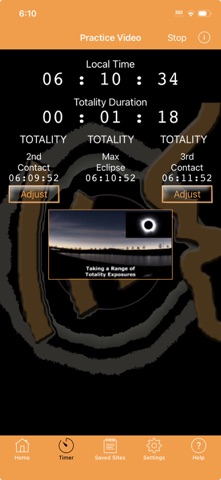
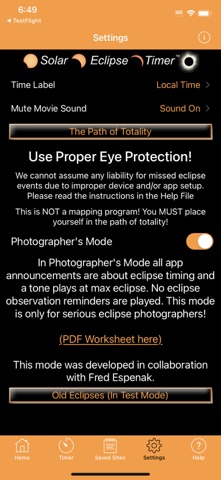
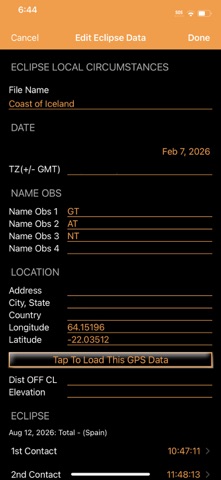
The Solar Eclipse Timer app is marking its 6th eclipse since 2017, which speaks volumes about its reliability and the trust it has built within the eclipse-chasing community. Helping tens of thousands of people enjoy the eclipse more by being reminded to observe all the fascinating eclipse phenomena. Photographers are aided by down-to-the-second precision and countdowns. Since the 2026 path covers some remote areas as well as high-traffic spots in Spain where cell service could be overwhelmed on eclipse day, the app works offline once unlocked. So, geolocation and contact time calculation are all done within the app. This makes it a true "field tool." The app is free to try, and for only a $1.99 in-app purchase to unlock the 2026 eclipse, it's an easy "yes" for anyone who has invested time and travel to be in the path of totality. In-App Video Tutorial: The first button on the Home Screen provides a comprehensive tutorial that explains all the app's functions and how to use them effectively. Audio and Notification Tests: The second button lets users run a "device sound check" to confirm that audio cues, spoken timings, and notifications are audible, which is critical since the app is designed to talk to you. Practice Session Video: The third button launches a 4-minute-45-second video of my actual eclipse-day observation site in 2024, synchronized with the app's real-time announcements. This allows both observers and photographers to practice their routines repeatedly, such as observing for shadow bands, adjusting shutter speeds, and knowing when to remove solar filters. Additionally, dialogue boxes appear as functions are selected, giving you more guidance. On eclipse day, after you get into the path, you can be timing the eclipse in 3 easy steps: 1. Tap to geolocate. 2. Tap to have the app calculate the precise contact times. 3. Tap to load the times into the timer. That's it! You are timing the eclipse. A major convenience feature of the app is the automatic calculation of the clock times needed to capture a perfect set of partial-phase images before and after totality. It is the only app in the world with this function. Collaborating with the late Fred Espenak (Mr. Eclipse) on Photographers Mode before the 2024 eclipse gives the app an incredible pedigree. For pros who need to stay "in the zone" and only care about timing and countdowns from C1 through C4, this mode is a game-changer. You can manually enter coordinates and save the site as a file. This helps compare multiple potential viewing locations. The app includes a hyperlink to the Solar Eclipse Timer website, which gives access to downloadable worksheets to record your partial-phase image times or the chores you want to do in Photographers mode, as well as my Master Stop Chart to count full and partial camera stops. I have observed and photographed six total solar eclipses and one annular eclipse. The concept of an eclipse “talking” timer was developed by me in 2002. I have been helping people time eclipses for almost 25 years. When you use the app, you will appreciate that it was designed by an eclipse chaser. There is also a link to learn more about my comprehensive eclipse observation and photography book, now in its second edition, titled “Eclipse Day.” The app also has a partial eclipse timing mode. This app is ad-free and does not track any user data. ALWAYS USE EYE PROTECTION DURING THE PARTIAL PHASES OF A SOLAR ECLIPSE! OR EVEN WHEN IT IS BRIGHT! NOT DOING SO CAN CAUSE EYE DAMAGE! We are NOT liable for misuse of the app, causing inaccurate timing, or the lack of eye safety precautions during the observation of a solar eclipse. The "glasses off" and "glasses on" statements are guides based on the calculated contact times. The timing can be affected by your phone's clock and the shape of the shadow due to the edge of the lunar limb. Use the Adjust buttons for Lunar Limb variation time adjustments. Glasses should be ON if it's bright!
More like this
- Top Photo & Video on App Store by estimated revenue
- Solar Eclipse Timer alternatives
- Solar Eclipse Timer vs Arsenal Remote
- Solar Eclipse Timer vs Magic mirror booth
- All top charts and categories
Similar apps
 Arsenal RemoteNorth of You, LLC4.3 ★ (561)
 Magic mirror boothGuillaume Fleury4.3 ★ (561)
 Teleprompter-Read scriptSolitude Colors4.6 ★ (560)
 WaterLili Lite- WaterColor FxesDot Studio Inc4.4 ★ (560)
 ArtStudio - Draw and PaintLucky Clan4.6 ★ (559)
 Cross Clip: Edit, Post, GrowStreamlabs4.6 ★ (564)
 Story Savers : InStoryApurva Hariyawala4.4 ★ (565)
 Katseye WallpaperAdam Majd4.7 ★ (557)