Timer: 인터벌 타이머
Francis BonninUtilitiesApp Store₩6,600Timer: 인터벌 타이머 revenue and downloads, last 30 days
How we got this (12 inputs)
- signals
- ratings ÷ age
- ratings/day
- 0
- monetisation
- utilities ARPD 0.8; IAP not collected yet
- bound
- revenue per download ceiling: $15/download × downloads high (modelled downloads)
- range
- 80% interval from out-of-fold residuals (×1.12 scale, 90 products)
- likelyLow
- 16.43
- likelyHigh
- 53.29
- observed days (of 30)
- 6
- bound
- revenue per download ceiling at the downloads mid: at most $15 per download × 2 downloads (the 30-day downloads mid); the window's revenue read 2.96x more
- low confidence because
- the figure rests on the revenue-per-download ceiling (an assumption), not on a revenue signal
- confidence
- low
- rough
- order of magnitude
As of Nov 21, 2026.
How we got this (17 inputs)
- signals
- ratings ÷ age ÷ ratings per download; lifetime→current drift ×/÷4.12 (135278 measured Play counter deltas)
- spread
- measured on downloads ground truth (downloads ground truth: 48 App Store milestones, 33 platform splits, 13 drift points)
- ratings
- 2
- ratings/day
- 0
- ratings per download
- 0.015 (non-games, measured on 44 products)
- ratings velocity (recorded, not used yet)
- 0/day over 1d
- low confidence because
- the figure rests on 2 App Store ratings summed over the storefronts read (rating counts are per storefront; 5 or fewer say little about worldwide installs)
- tier
- modelled: 2 storefront-local ratings are too few for the ratings relation to scale
- range scale
- ×0.88 (coverage scale on 9 ground-truth rows; publication is decided before it)
- note
- outer range 77x: only a lifetime signal; a rating-count change between days, dated reviews or a free-chart position would narrow it
- likelyLow
- 0
- likelyHigh
- 8
- confidence
- low
- rough
- order of magnitude
- observed days (of 30)
- 6
- measured days
- 0
- scaling
- observed days, scaled to 30
As of Nov 21, 2026.
Active users: not estimated for this app (too uncertain to show).
History
Daily readings as we observed them, last 30 days worldwide. Free shows the last 30 days.
Downloads per day
Observed by us since Nov 15, 2026.
Revenue per day
Observed by us since Nov 15, 2026.
Ratings (South Korea)
Observed by us since Nov 15, 2026.
Average rating
Observed by us since Nov 15, 2026.
Create a free account to save apps; Pro shows full history.
Chart positions
Where this app ranks on the top free, paid and grossing charts we capture.
Search terms
In-app purchases
Prices
In-app purchase ladder, price changes and paywall terms
No in-app prices recorded yet. We read them from the store listing: either this app sells none, or its listing has not been read yet.
Ratings and reviews
Rating distribution
No rating distribution read yet.
Recent reviews
Marketing
Paid ads, organic videos and onboarding captured for this app.
Paid ads
No Meta, Google or TikTok ads tied to this app yet. We check the public ad libraries daily.
Organic videos
No YouTube, TikTok or Instagram videos tied to this app yet.
Change history
Versions, price changes, rank jumps and listing edits, as we observed them.
Details
- Developer
- Francis Bonnin, 29 apps
- Bundle id
- com.yourcompany.Timer
- Category
- Utilities
- Price
- ₩6,600
- Released
- Feb 12, 2019
- Updated
- Oct 17, 2026
- Version
- 8.1
- Size
- 39.8 MB
- Content rating
- 4+
- Website
- pacolabs.com/iOS/Timer
- Contact email
- Not available
- Privacy policy
- Not available
- Languages (8)
- English, French, German, Italian, Japanese, Korean, Portuguese, Spanish
- Charted in
- Austria, Australia, Belgium, Brazil, Canada, Switzerland, Germany, Spain, France, United Kingdom, Ireland, Italy, Japan, South Korea, Mexico, Netherlands, Thailand, Taiwan, United States
- First seen
- Nov 15, 2026
- Listing read
- Nov 16, 2026
Show store descriptionShow less
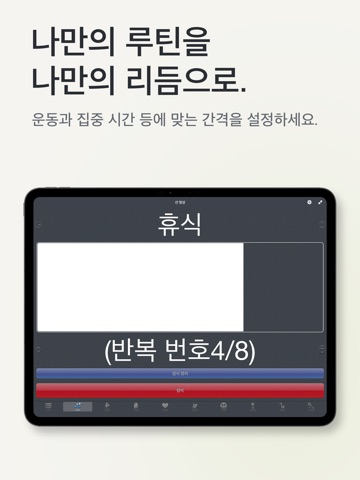
일상의 각 단계를 안내하는 타이머를 만들어 보세요. 다음 스트레칭 동작을 듣고, 요리 순서에 맞춰 신호를 받거나, 운동과 휴식을 번갈아 진행하세요. 음성 안내, 소리, 한눈에 보이는 진행 표시가 함께합니다. 준비된 프리셋으로 시작해 내 루틴에 맞게 바꿔 보세요. 간단한 카운트다운부터 여러 단계의 운동까지, 필요한 신호를 설정하고 시작 전에 미리보기로 흐름을 확인할 수 있습니다. 음성 안내가 포함된 ‘스트레칭’ 예제도 사용해 보세요. 다음 동작을 음성으로 안내 “자세를 유지하세요”, “총 5회 중 3회차”처럼 원하는 안내를 만드세요. 직접 입력한 문구에 타이머 이름, 이벤트 이름, 반복 횟수, 경과 시간, 남은 시간, 현재 시각을 조합할 수 있습니다. 음성을 선택하고 알람이 먼저 울리도록 안내를 지연시킬 수도 있습니다. 같은 문구와 변수를 화면 메시지와 알림에도 사용할 수 있습니다. 내 루틴에 맞는 인터벌 HIIT, 타바타, 스트레칭, 명상이나 공부 중 쉬는 시간에 맞춰 설정하세요. 보드게임에서 각 차례의 제한 시간을 정할 때도 사용할 수 있습니다. • 카운트다운 시간이나 종료 시각을 정하고, 필요하면 시작 전 준비 시간을 추가하세요. • 정해진 횟수만큼 또는 제한 없이 반복하세요. • 하루 중 원하는 시각, 시작이나 종료를 기준으로 한 시간 또는 비율, 일정한 간격에 맞춰 신호를 보내세요. 매일의 알림을 예약하거나 종료 30초 전에 징을 울리고 매초 똑딱 소리를 낼 수 있습니다. • 이벤트를 매번, 첫 번째나 마지막 반복에서만, 또는 3~5회처럼 선택한 범위에서 실행하세요. 종료 동작도 매 반복 후 또는 마지막 반복 후에만 실행할 수 있습니다. 한 번 설정하고 다시 사용 여러 타이머를 동시에 실행하세요. 이벤트로 타이머를 제어하고, 표시할 타이머를 선택하거나 URL을 열 수 있습니다. 타이머를 추가하고 순서를 바꾸거나 필요 없는 타이머를 숨길 수 있습니다. 설정을 프리셋으로 저장하고 정리하세요. 가져오기와 내보내기로 다시 사용하거나 공유할 수도 있습니다. 진행 상황을 한눈에 확인 두 개의 표시 영역에 남은 시간, 경과 시간, 현재 시각이나 그래픽 진행 표시를 설정하세요. 전체 화면으로 전환하면 세로와 가로 방향 모두에서 더 크게 볼 수 있습니다. 현재 회차를 확인하고, 화면을 어둡게 하거나 시간을 표시한 채 조작을 잠글 수도 있습니다. 종료 시 타이머를 멈출지, 종료 후 얼마나 지났는지 계속 표시할지도 선택하세요. 나만의 소리와 화면 종소리, 징 소리 등 다양한 알람을 선택하거나 원하는 소리를 가져오고 직접 녹음하세요. 음높이가 끝없이 올라가거나 내려가는 듯한 셰퍼드 톤도 사용해 보세요. 음악 보관함의 곡이나 재생목록에서 무작위로 고른 곡을 재생하고, 정해진 시점에 음악을 멈추도록 설정할 수도 있습니다. 소리 없이 사용하고 싶다면 화면 메시지, 진동, 화면 깜박임으로 신호를 받으세요. 색상과 배경을 바꾸고 1,800개 이상의 아이콘을 검색해 보세요. 지원되는 기기에서는 정해진 시간에 사진을 촬영하거나 손전등을 신호로 사용할 수도 있습니다. 백그라운드에서는 예약된 알림으로 메시지를 표시하고 알림음을 재생할 수 있습니다. 알림에서 바로 다시 알림을 설정하고, 반복 번호와 알림 번호를 표시할지 선택하세요. 알림을 탭하면 설정한 타이머 제어 동작을 실행하거나 URL을 열 수 있습니다. 음성 안내와 사진 촬영을 실행하려면 Timer를 열어 둬야 합니다.
More like this
- Top Utilities on App Store by estimated revenue
- Timer: 인터벌 타이머 alternatives
- Timer: 인터벌 타이머 vs AWTRIX NG
- Timer: 인터벌 타이머 vs Roomy for Duo: Full Width
- All top charts and categories
Similar apps
 AWTRIX NGStephan Muehl5.0 ★ (2)
 Roomy for Duo: Full WidthJulian Christopher Siebert5.0 ★ (2)
 DuctWise HVAC Duct CalculatorYaniv van der Stigchel5.0 ★ (2)
 Safety Light: Flashlight BlinkKatarina Kralovicova4.5 ★ (2)
 After Inc. Scenario CreatorNdemic Creations5.0 ★ (2)
 JulianatorBright Day Digital LLC5.0 ★ (2)
 OwnVPNS.T. MOSTRA MEZE LIMITED4.0 ★ (2)
 ZipApp Pro: The Unarchiver兰桂 吴3.0 ★ (2)