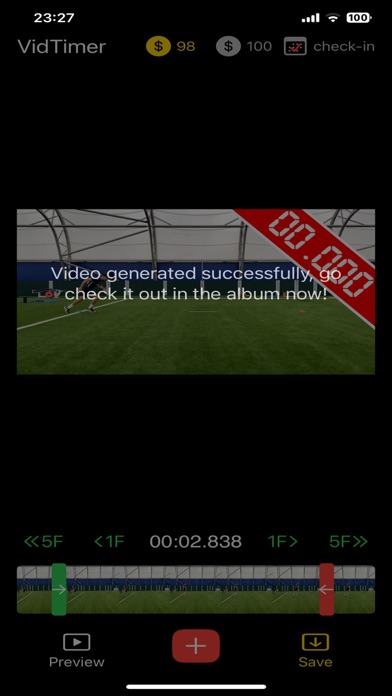
VidTimer - Video Timer
Shanghai Qingge Technology Co., Ltd.SportsApp StoreVidTimer - Video Timer revenue and downloads, last 30 days
How we got this (11 inputs)
- signals
- ratings ÷ age
- ratings/day
- 0.05
- monetisation
- sports ARPD 0.5; IAP not collected yet
- range
- 80% interval from out-of-fold residuals (×1.12 scale, 90 products)
- likelyLow
- 910.78
- likelyHigh
- 4046.95
- observed days (of 30)
- 6
- bound
- revenue per download ceiling at the downloads mid: at most $15 per download × 132 downloads (the 30-day downloads mid); the window's revenue read 1.07x more
- low confidence because
- the figure rests on the revenue-per-download ceiling (an assumption), not on a revenue signal
- confidence
- low
- rough
- order of magnitude
As of Nov 21, 2026.
How we got this (14 inputs)
- signals
- ratings ÷ age ÷ ratings per download; lifetime→current drift ×/÷4.12 (135278 measured Play counter deltas)
- spread
- measured on downloads ground truth (downloads ground truth: 48 App Store milestones, 33 platform splits, 13 drift points)
- ratings
- 49
- ratings/day
- 0.05
- ratings per download
- 0.015 (non-games, measured on 44 products)
- range scale
- ×0.88 (coverage scale on 9 ground-truth rows; publication is decided before it)
- note
- outer range 60x: only a lifetime signal; a rating-count change between days, dated reviews or a free-chart position would narrow it
- likelyLow
- 42
- likelyHigh
- 427
- confidence
- low
- rough
- order of magnitude
- observed days (of 30)
- 6
- measured days
- 0
- scaling
- observed days, scaled to 30
As of Nov 21, 2026.
Active users: not estimated for this app (too uncertain to show).
History
Daily readings as we observed them, last 30 days worldwide. Free shows the last 30 days.
One reading so far: history starts Nov 15, 2026, and a trend line appears after the next daily reading.
Downloads per day
Observed by us since Nov 15, 2026.
Revenue per day
Observed by us since Nov 15, 2026.
Monthly history: we have found no public-archive copy of this store page from the last 12 months, so monthly readings start with our own in Nov 2026.
Create a free account to save apps; Pro shows full history.
Chart positions
On 1 chart at the latest capture. Charts are swept every 6 hours.
| Country | Top grossingSports |
|---|---|
| South Korea | #92New |
Change is against the previous capture of the same chart.
Top grossing, Sports, South Korea
History starts Nov 15 11:30 UTC. Charts are captured every 6 hours.
Search terms
In-app purchases
Prices
In-app purchase ladder, price changes and paywall terms
No in-app prices recorded yet. We read them from the store listing: either this app sells none, or its listing has not been read yet.
Ratings and reviews
Rating distribution
No rating distribution read yet.
Recent reviews
Marketing
Paid ads, organic videos and onboarding captured for this app.
Paid ads
No Meta, Google or TikTok ads tied to this app yet. We check the public ad libraries daily.
Organic videos
No YouTube, TikTok or Instagram videos tied to this app yet.
Change history
Versions, price changes, rank jumps and listing edits, as we observed them.
Details
- Bundle id
- cn.qinggetech.VidTimer
- Category
- Sports
- Price
- Free
- Released
- Feb 21, 2024
- Updated
- Jul 20, 2025
- Version
- 1.1.7
- Size
- 1.8 MB
- Content rating
- 4+
- Website
- Not available
- Contact email
- Not available
- Privacy policy
- Not available
- Languages (9)
- English, French, German, Japanese, Korean, Portuguese, Russian, Chinese, Spanish
- Charted in
- United States, United Kingdom, Germany, France, Japan, Brazil, India, Canada, Australia, South Korea, Italy, Spain, Switzerland, Austria, Mexico, Thailand, Taiwan
- First seen
- Nov 15, 2026
- Listing read
- Nov 15, 2026
Show store descriptionShow less
V1.1.7 New Features: Add center reference line V1.1.4 New Features: Supports members to modify the timer title(watermark) V1.1.3 New Features: 1. Added support for professional members to remove the timer watermark and screen recording watermark. 2. Significantly improved the clarity of video preview images. VidTimer's Key Features: 1.Drag the timer on the main interface to freely adjust its position in the video frame. 2.Easily set the timer's start point by dragging the green slider on the main interface. 3.Effortlessly set the timer's end point by dragging the red slider on the main interface. 4.Click the "Forward 1 Frame"/"Back 1 Frame" buttons on the main interface to advance or retreat by one frame, respectively. 5.Click the "Forward 5 Frames"/"Back 5 Frames" buttons on the main interface to advance or retreat by five frames, respectively. 6.Click the preview button in the bottom left corner of the main interface to preview the video with the timer added. 7.Double-clicking the video frame without zooming can show or hide the timer, making it easier to view the video content. 8.The timer's display supports two styles: the default font and a digital tube font. 9.Users can save or delete timer styles according to personal preference. 10.The timer's font size, color, and transparency can be customized. 11.The background size, color, transparency, and corner radius can be adjusted as desired. 12.The border width, color, and transparency can also be modified according to needs. 13.Supports both countdown and count-up modes. 14.Allows setting the display digits for minutes, seconds, and milliseconds. 15.Enables precise timing results based on the current start and end points. 16.Offers a custom setting for the timer's rotation angle. 17.Supports pinching to zoom and dragging operations on the video frame for precise positioning of the start and end points. 18.Supports double-clicking to restore the zoomed video frame to its original size. We continuously update our app to deliver the best experience and more features. By using this app, you agree to the Apple Standard End User License Agreement, available at: https://www.apple.com/legal/internet-services/itunes/dev/stdeula/
More like this
- Top Sports on App Store by estimated revenue
- VidTimer - Video Timer alternatives
- VidTimer - Video Timer vs FANZO: Sports Bar Finder
- VidTimer - Video Timer vs Turnierplan Fußball Pro
- All top charts and categories
Similar apps
 FANZO: Sports Bar FinderMatchPint Ltd3.2 ★ (49)
 Turnierplan Fußball ProOliver Kuehne4.0 ★ (49)
 HOTDOG(Ai潮流)Shanghai Banding Internet Technology Company Limited2.2 ★ (49)
 Soccer AI: Predictions & PicksCagatay Koroglu3.9 ★ (49)
 Tigo Sports ParaguayTigo Paraguay1.7 ★ (49)
 Olé: deportes 24hsAGEA Sociedad anónima1.7 ★ (49)
 ABandBET株式会社レイトバスター3.7 ★ (49)
 Buddy: Social Dive AppDive with Buddy, Inc.4.3 ★ (49)