WorkHours: Work Timer
TradingPlus Inc.ProductivityApp StoreWorkHours: Work Timer revenue and downloads, last 30 days
How we got this (10 inputs)
- signals
- ratings ÷ age
- ratings/day
- 0
- monetisation
- productivity ARPD 1; IAP not collected yet
- low confidence because
- the figure rests on 0 App Store ratings summed over the storefronts read, through the ratings relation alone
- range
- 80% interval from out-of-fold residuals (×1.12 scale, 90 products)
- likelyLow
- 175.91
- likelyHigh
- 820.08
- confidence
- low
- rough
- order of magnitude
- observed days (of 30)
- 6
As of Nov 21, 2026.
How we got this (18 inputs)
- signals
- Play twin's installs × platform ratio; lifetime→current drift ×/÷4.12 (135278 measured Play counter deltas)
- spread
- measured on downloads ground truth (downloads ground truth: 48 App Store milestones, 33 platform splits, 13 drift points)
- ratings
- 0
- ratings/day
- 0
- ratings per download
- 0.015 (non-games, measured on 44 products)
- Play twin installs
- 2059
- iOS per Android (measured)
- 2.06
- note
- 0 App Store ratings across the 1 storefront read: rating counts are per storefront, so this says little about worldwide installs; the matched Play twin is used instead
- low confidence because
- App Store downloads read from the Play twin through the measured iOS per Android ratio (a prior), not from this listing's own ratings
- range scale
- ×0.88 (coverage scale on 9 ground-truth rows; publication is decided before it)
- note
- outer range 70x: only a lifetime signal; a rating-count change between days, dated reviews or a free-chart position would narrow it
- likelyLow
- 20
- likelyHigh
- 220
- confidence
- low
- rough
- order of magnitude
- observed days (of 30)
- 6
- measured days
- 0
- scaling
- observed days, scaled to 30
As of Nov 21, 2026.
Active users: not estimated for this app (too uncertain to show).
History
Daily readings as we observed them, last 30 days worldwide. Free shows the last 30 days.
One reading so far: history starts Nov 15, 2026, and a trend line appears after the next daily reading.
Downloads per day
Observed by us since Nov 15, 2026.
Revenue per day
Observed by us since Nov 15, 2026.
Monthly history: we have found no public-archive copy of this store page from the last 12 months, so monthly readings start with our own in Nov 2026.
Create a free account to save apps; Pro shows full history.
Chart positions
Where this app ranks on the top free, paid and grossing charts we capture.
Search terms
No search terms read for this app yet. Terms are read from its title and the searches it shows up in, and appear here once ranked.
In-app purchases
Prices
In-app purchase ladder, price changes and paywall terms
No in-app prices recorded yet. We read them from the store listing: either this app sells none, or its listing has not been read yet.
Ratings and reviews
Rating distribution
No rating distribution read yet.
Recent reviews
Marketing
Paid ads, organic videos and onboarding captured for this app.
Paid ads
No Meta, Google or TikTok ads tied to this app yet. We check the public ad libraries daily.
Organic videos
No YouTube, TikTok or Instagram videos tied to this app yet.
Change history
Versions, price changes, rank jumps and listing edits, as we observed them.
Details
- Developer
- TradingPlus Inc., 4 apps
- Bundle id
- app.workhours.ios.WORKHOURS
- Category
- Productivity
- Price
- Free
- Released
- Jun 26, 2026
- Updated
- Nov 6, 2026
- Version
- 1.4
- Size
- 10.5 MB
- Content rating
- 4+
- Website
- workhours.app
- Contact email
- Not available
- Privacy policy
- Not available
- Languages (9)
- English, French, German, Italian, Japanese, Portuguese, Chinese, Spanish, Turkish
- Charted in
- Brazil, Canada, Switzerland, Germany, Spain, France, Italy, Saudi Arabia, Turkey, United States
- First seen
- Nov 15, 2026
- Listing read
- Nov 15, 2026
Show store descriptionShow less
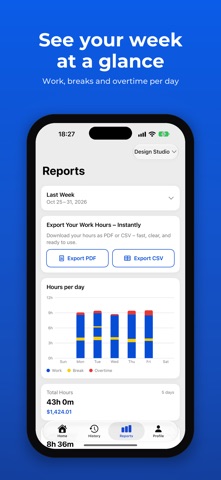
WorkHours makes it effortless to track your working time — and know exactly what it's worth. Tap once to start the timer, tag the task or client you're working on, and pause or stop whenever you like. Forgot to start it? Add a session manually in seconds. Your hours, and your earnings, update live as you work. WHY WORKHOURS • One-tap time tracking with a live timer • Tag your work by task or client • Pause, resume, and stop with a single tap • Add or edit past sessions manually • See today's and this month's hours and earnings at a glance • Set your own currency and hourly rate • Notification reminders help you remember when a work session is still running • Works offline — sessions sync automatically once you're back online • Sign in to keep your hours safe and access them from any device • Available in English, French, Spanish, German, Portuguese (Brazil), Italian, Turkish, Simplified Chinese, and Japanese MULTI-JOB TRACKING (PRO) • Create and manage multiple jobs separately • Track work sessions for different jobs, clients, or projects • Run multiple job timers at the same time POWERFUL REPORTS & CHARTS • Pick a range: this week, last week, this month, last month — or any custom dates • Total hours, daily average, and earnings for the period • Task breakdown that shows where your time really goes • Understand your work patterns with clear reports and a stacked bar chart showing daily working hours across your selected period. OVERTIME TRACKING • Automatically calculate overtime based on your daily or weekly working hours. • Set custom overtime thresholds and pay rates, track regular and overtime hours, and keep your estimated earnings accurate — even when adding or editing hours manually. EXPORT YOUR TIMESHEETS (PRO) • Export clean, professional timesheets as PDF or CSV • Ideal for invoicing clients, payroll, or your own records • Custom date-range reports WORKHOURS PRO Unlock multi-job tracking, exports (PDF & CSV), custom date-range reports, priority support, and early access to new features. • 7-day free trial for new subscribers • Then billed monthly — cancel anytime Whether you're a freelancer, contractor, or simply want an honest picture of where your hours go, WorkHours keeps your time — and your income — crystal clear.
More like this
- Top Productivity on App Store by estimated revenue
- WorkHours: Work Timer alternatives
- WorkHours: Work Timer vs Platen Writer
- WorkHours: Work Timer vs Strimio: Movie & TV Diary
- All top charts and categories
Similar apps
 Platen WriterAswath Hasina Syed Mohamed0.0 ★ (0)
 Strimio: Movie & TV DiaryHa Phuc Trung0.0 ★ (0)
 CalendariaJorge Cohen0.0 ★ (0)
 FocusBookOsama Naeem0.0 ★ (0)
 The WardroomBLUEPITT14 LLC0.0 ★ (0)
 Hello DayishWilkes Venture Group0.0 ★ (0)
 Pomodoro - Pomo QuestTop Free Diabetes Apps0.0 ★ (0)
 Isopod Collector and SalesJax Beaudoin0.0 ★ (0)