
screenrecorder
exdataToolsGoogle Play$0.99screenrecorder revenue and downloads, last 30 days
History
Daily readings as we observed them, last 30 days worldwide. Free shows the last 30 days.
One reading so far: history starts Nov 22, 2026, and a trend line appears after the next daily reading.
Monthly history: we have found no public-archive copy of this store page from the last 12 months, so monthly readings start with our own in Nov 2026.
Create a free account to save apps; Pro shows full history.
Chart positions
Where this app ranks on the top free, paid and grossing charts we capture.
Search terms
No search terms read for this app yet. Terms are read from its title and the searches it shows up in, and appear here once ranked.
In-app purchases
Prices
In-app purchase ladder, price changes and paywall terms
No in-app prices recorded yet. We read them from the store listing: either this app sells none, or its listing has not been read yet.
Ratings and reviews
Rating distribution
No rating distribution read yet.
Recent reviews
Marketing
Paid ads, organic videos and onboarding captured for this app.
Paid ads
No Meta, Google or TikTok ads tied to this app yet. We check the public ad libraries daily.
Organic videos
No YouTube, TikTok or Instagram videos tied to this app yet.
Onboarding
No store screenshots, web funnel or in-app recording captured for this app yet.
Change history
Versions, price changes, rank jumps and listing edits, as we observed them.
Details
- Developer
- exdata, 5 apps
- Package
- biz.exdata.screenrecorder
- Category
- Tools
- Price
- $0.99
- Released
- Feb 6, 2026
- Updated
- Feb 6, 2026
- Version
- 1.12
- Size
- -
- Content rating
- Everyone
- Website
- www.exdata.biz
- Contact email
- info@exdata.biz
- Privacy policy
- www.exdata.biz/policy
- Languages
- Not available
- Charted in
- United States
- First seen
- Nov 22, 2026
- Listing read
- Nov 22, 2026
Show store descriptionShow less
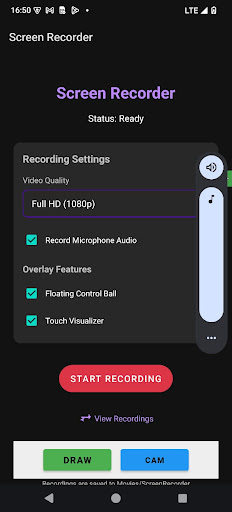
📱 Screen Recorder Pro - Capture Your Screen with Ease Record your Android screen in stunning quality with our powerful, easy-to-use screen recorder. Whether you're creating tutorials, capturing gameplay, recording video calls, or documenting app issues, Screen Recorder Pro has everything you need. 🎬 PROFESSIONAL RECORDING FEATURES • Multiple Quality Options - Choose from HD (720p), Full HD (1080p), or Ultra HD (4K) recording to match your needs • Audio Recording - Capture microphone audio alongside your screen recording for voiceovers and commentary • Flexible Controls - Start, pause, resume, and stop recordings with intuitive on-screen controls • No Time Limits - Record as long as you need without arbitrary restrictions • No Watermarks - Your recordings are clean and professional 🎨 POWERFUL OVERLAY FEATURES • Floating Control Ball - Access recording controls from anywhere on screen with our draggable floating button. Easily pause, resume, or stop recording without returning to the app • Touch Visualizer - Show touch interactions on screen, perfect for tutorials and demonstrations • Screen Drawing - Draw and annotate directly on your screen while recording to highlight important areas • Facecam Overlay - Add a front camera overlay to your recordings for reaction videos, commentary, or personal touch ✂️ BUILT-IN VIDEO EDITOR • Trim & Cut - Remove unwanted parts from the beginning or end of your recordings • Preview Changes - See your edits before saving • Quick Export - Save edited videos in seconds 📁 ORGANIZED GALLERY • Built-in Gallery - Browse all your recordings in one place without leaving the app • Video Playback - Watch your recordings with our integrated video player featuring seek controls • Easy Sharing - Share recordings directly to social media, messaging apps, or cloud storage • Quick Delete - Remove unwanted recordings with a single tap ⚡ OPTIMIZED PERFORMANCE • Minimal Battery Impact - Efficient recording engine designed to preserve battery life • Low Memory Usage - Optimized to run smoothly even on older devices • Background Recording - Continue recording while using other apps • Auto-Save - Recordings are automatically saved to your Movies folder 🔒 PRIVACY FOCUSED • No Account Required - Start recording immediately without sign-up • Offline Operation - Works completely offline, no internet connection needed • Local Storage Only - All recordings stay on your device • No Data Collection - We don't collect or share any personal data 📋 PERFECT FOR: ✓ Creating tutorials and how-to videos ✓ Recording mobile gameplay and walkthroughs ✓ Capturing video calls and meetings ✓ Documenting bugs and app issues ✓ Making product demos and presentations ✓ Creating content for social media ✓ Recording online classes and webinars ✓ Saving streaming content for offline viewing 🛠️ EASY TO USE Open the app and adjust your settings Tap "Start Recording" and grant screen capture permission Record your screen - use the floating controls for quick access Stop recording when finished View, edit, and share from the built-in gallery 📱 DEVICE COMPATIBILITY Works on Android 7.0 (Nougat) and above. Optimized for the latest Android versions including Android 14 and Android 15 with full edge-to-edge display support. 💡 TIPS FOR BEST RESULTS • Close unnecessary apps before recording to ensure smooth performance • Use headphones when recording audio to avoid echo • Enable Do Not Disturb mode to prevent notification interruptions • Choose lower resolution for longer recordings to save storage space Download Screen Recorder Pro today and start creating amazing screen recordings!

More like this
- Top Tools on Google Play by estimated revenue
- screenrecorder alternatives
- screenrecorder vs FF Sensi Max
- screenrecorder vs Tesor
- All top charts and categories


