The Split Second
DesiDevopToolsGoogle PlayThe Split Second revenue and downloads, last 30 days
History
Daily readings as we observed them, last 30 days worldwide. Free shows the last 30 days.
One reading so far: history starts Nov 22, 2026, and a trend line appears after the next daily reading.
Monthly history: we have found no public-archive copy of this store page from the last 12 months, so monthly readings start with our own in Nov 2026.
Create a free account to save apps; Pro shows full history.
Chart positions
Where this app ranks on the top free, paid and grossing charts we capture.
Search terms
No search terms read for this app yet. Terms are read from its title and the searches it shows up in, and appear here once ranked.
In-app purchases
Prices
In-app purchase ladder, price changes and paywall terms
No in-app prices recorded yet. We read them from the store listing: either this app sells none, or its listing has not been read yet.
Ratings and reviews
Rating distribution
No rating distribution read yet.
Recent reviews
Marketing
Paid ads, organic videos and onboarding captured for this app.
Paid ads
No Meta, Google or TikTok ads tied to this app yet. We check the public ad libraries daily.
Organic videos
No YouTube, TikTok or Instagram videos tied to this app yet.
Change history
Versions, price changes, rank jumps and listing edits, as we observed them.
Details
- Developer
- DesiDevop, 3 apps
- Package
- co.stillforge.splitsecond
- Category
- Tools
- Price
- Free
- Released
- Sep 4, 2026
- Updated
- Sep 4, 2026
- Version
- 1.1.5
- Size
- -
- Content rating
- Everyone
- Website
- Not available
- Contact email
- adamsjenni2024@gmail.com
- Languages
- Not available
- Charted in
- United States
- First seen
- Nov 22, 2026
- Listing read
- Nov 22, 2026
Show store descriptionShow less
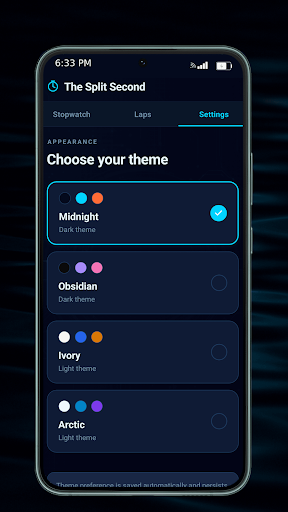
The Split Second is a straightforward stopwatch built for people who actually need one. Large, easy-to-read digits sit front and center so you can check elapsed time at a glance without squinting at your screen. Lap recording works exactly as expected: tap the lap button and the current split gets added to a scrollable list below the timer. Each entry stays visible while the stopwatch keeps running, so you never lose track of where you are in a session. The app ships with multiple color themes — two light and two dark — so you can match your preference or switch based on ambient light. Themes are selectable from settings, no restart required. Everything runs locally. No account, no sync, no network connection needed. Open the app, start the timer, record your laps, close it. That's the whole thing. First launch walks you through a short onboarding screen to orient you, and after that you go straight to the stopwatch every time.
More like this
- Top Tools on Google Play by estimated revenue
- The Split Second alternatives
- The Split Second vs FF Sensi Max
- The Split Second vs Tesor
- All top charts and categories