HTML Viewer: HTML Inspector
Code PlayToolsGoogle PlayIn-app purchasesContains adsHTML Viewer: HTML Inspector revenue and downloads, last 30 days
How we got this (9 inputs)
- signals
- ratings ÷ age
- ratings/day
- 0.09
- monetisation
- utilities ARPD 0.8; IAP max $6.49 ×0.81
- range
- 80% interval from out-of-fold residuals (×1.12 scale, 90 products)
- likelyLow
- 1526.91
- likelyHigh
- 8185.05
- confidence
- low
- rough
- order of magnitude
- observed days (of 30)
- 2
As of Nov 21, 2026.
How we got this (12 inputs)
- signals
- Play installs ÷ age; lifetime→current drift ×/÷4.12 (135278 measured Play counter deltas)
- spread
- measured on downloads ground truth (downloads ground truth: 48 App Store milestones, 33 platform splits, 13 drift points)
- installs
- 73525
- age days
- 2398
- bound
- at most the lifetime installs counter (73525) over 30 days: the listing is 2398 days old, so its last 30 days cannot hold more installs than it ever had
- range scale
- ×0.88 (coverage scale on 9 ground-truth rows; publication is decided before it)
- likelyLow
- 795
- likelyHigh
- 2858
- confidence
- medium
- observed days (of 30)
- 2
- measured days
- 0
- scaling
- observed days, scaled to 30
As of Nov 21, 2026.
How we got this (13 inputs)
- method
- installs in the window (all active on install day) + earlier installers active in the month (published retention ÷ the category's DAU/MAU stickiness) + the retained base of installers older than two years
- downloads per day
- 50.27 (14.9 to 169.2, the published worldwide figure)
- retention
- day 1 / 7 / 30: 23.7% / 6.54% / 2.45% (Android benchmark × 1.17 for the category; AppsFlyer Q3 2024 day-1/7/30 retention, via getstream.io/blog/app-retention-guide (read 2026-11-16); category: OneSignal 2024 day-30 retention by category, via getstream.io/blog/app-retention-guide (read 2026-11-16))
- active days per install
- 6.25 over 730 days (age 2398 days; the curve is used to 730)
- stickiness
- 17.5% DAU/MAU, Productivity & Tools median (MWM DAU/MAU medians, US iOS, May 2026 (mwm.ai/glossary/dau-mau, read 2026-11-16))
- parts
- window installs 1508 (the published 30-day downloads), earlier installers 1187, retained base 1766
- retained base
- 36830 installers older than 730 days (lifetime from the listing's Play installs counter) × 4.79% active in a month (between 1.63%, the benchmark curve held flat, and 14.1%, median disclosed MAU ÷ lifetime installs of Duolingo, Snapchat and Grindr (company filings, data/ground-truth-active-users.csv; chosen on these rows, scored leave-one-product-out)); range ×/÷2 past each (widened after the leave-one-product-out check)
- spread
- downloads ×/÷3.37, retention ×/÷3, tail ×/÷1.58, stickiness ×/÷1.8, retained base ×/÷5.89 (assumptions; not fitted)
- ratings per download (recorded, not used)
- 0.00175
- chart persistence (recorded, not used)
- 0 day(s) on a chart in the window; fewer than 7 live days exist
- tier
- modelled: retention and stickiness are published benchmarks, not measured on this listing
- confidence
- low
- rough
- order of magnitude
As of Nov 21, 2026.
Daily active users
Modelled from this app's downloads and a published retention curve for its store and category, not measured. Read it as an order of magnitude.
History
Daily readings as we observed them, last 30 days worldwide. Free shows the last 30 days.
One reading so far: history starts Nov 19, 2026, and a trend line appears after the next daily reading.
Downloads per day
Observed by us since Nov 19, 2026.
Revenue per day
Observed by us since Nov 19, 2026.
Monthly history: we have found no public-archive copy of this store page from the last 12 months, so monthly readings start with our own in Nov 2026.
Create a free account to save apps; Pro shows full history.
Chart positions
Where this app ranks on the top free, paid and grossing charts we capture.
Search terms
In-app purchases
Google Play shows one in-app price range per storefront, not each product's price. The range over time, as the store published it:
United States, USD
- $0.99 - $6.49 per itemNov 19, 2026 to now
Prices
In-app purchase ladder, price changes and paywall terms
No itemised in-app prices yet. Google Play publishes only the price range shown above, not each product; the individual products and their prices have not been read.
Ratings and reviews
Rating distribution
Store histogram
208 ratings
Recent reviews
Marketing
Paid ads, organic videos and onboarding captured for this app.
Paid ads
No Meta, Google or TikTok ads tied to this app yet. We check the public ad libraries daily.
Organic videos
No YouTube, TikTok or Instagram videos tied to this app yet.
Change history
Versions, price changes, rank jumps and listing edits, as we observed them.
Details
- Developer
- Code Play, 41 apps
- Package
- codeplay.html.viewer
- Category
- Tools
- Price
- Free
- Released
- Apr 28, 2020
- Updated
- Nov 17, 2026
- Version
- 3.9
- Size
- -
- Content rating
- Everyone
- Website
- htmlcodeplay.com
- Contact email
- merbin2010@gmail.com
- Languages
- Not available
- Charted in
- United States, South Korea, Japan, United Kingdom, Brazil
- First seen
- Nov 19, 2026
- Listing read
- Nov 19, 2026
Show store descriptionShow less
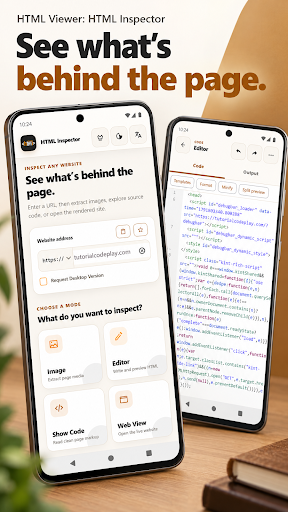
HTML Viewer helps web developers, students and site owners explore the markup behind a website and try changes on their device. Enter a URL to view source, edit HTML, inspect page resources or review common structural issues. Choose the tool that fits your question without starting a full development setup. READ, EDIT AND PREVIEW Open a page in the HTML editor and compare your code with its rendered output. Turn on split preview to see changes while you work. Syntax highlighting, tag suggestions, find and replace, go-to-line controls, undo and redo help you navigate longer documents. Format markup for easier reading or use the minify action to compact it. Start an experiment with an HTML starter, landing page, accessible form or reusable card template. The editor also flags common problems such as mismatched tags, duplicate IDs and missing image alt attributes. Open a local .html file, save your edited document or share the code through the available device actions. Edits affect your working copy, not the original website. REVIEW PAGE STRUCTURE Run a site report to check titles, meta descriptions, canonical URLs, document language, viewport metadata and social sharing metadata. Explore heading levels and counts for links, images, scripts, styles and forms. Findings draw attention to missing labels, unnamed links, duplicate IDs and insecure resource references. Copy or share the report when discussing a page with someone else. CHECK LINKS AND RESOURCES Scan the loaded page's links, images, external scripts and stylesheets. See working, redirected and failed responses, distinguish internal from external addresses, and filter results to focus on broken or insecure resources. Search the results, copy individual URLs or copy a text report for follow-up. Request failures can also reflect server restrictions or connectivity. TRY DIFFERENT VIEWPORTS Use responsive preview presets for phone, tablet and desktop sizes, or enter custom dimensions. Rotate the viewport, adjust zoom and choose a light, dark or system color scheme. Refresh with a different user agent when a website provides different server-rendered content. Share the current preview as a screenshot. A simulated viewport helps compare layouts; it does not reproduce every physical device. LOOK INTO PREVIEW BEHAVIOR The console viewer collects messages, warnings and errors from the app's instrumented page preview. The network inspector shows captured fetch, XMLHttpRequest and resource activity with available status and timing details. Clear entries, reload the preview and use filters to investigate a specific problem. These tools inspect that preview, rather than traffic from other apps. KEEP USEFUL REFERENCES Browse extracted page images, search by file name or format, and preview an image before saving it. Share a screenshot of the visible export viewport or create a PDF of the loaded page. PDF capture is limited to 16,000 pixels of page height. Save favorite URLs, use address suggestions and search recent inspection history to return to useful sites. Website loading, resource checks and remote content need an internet connection. Protected pages, blocked images and browser security rules can limit results or exports. Use the toolkit to study accessible web content and test your own ideas, with light, dark and system app themes available for comfortable reading.
More like this
- Top Tools on Google Play by estimated revenue
- HTML Viewer: HTML Inspector alternatives
- HTML Viewer: HTML Inspector vs Cloud Backup and Restore
- HTML Viewer: HTML Inspector vs Cheat Codes List for V City
- All top charts and categories
Similar apps
Cloud Backup and RestoreInfinite Soft4.4 ★ (211)
Cheat Codes List for V CityFluffy Cat
Wi-Fi WebcamCocoGame4.0 ★ (211)
Raidboi-1129: Rust CalculatorWantApps Studio4.2 ★ (211)
130 Point130 Point3.0 ★ (211)
Led-to-Bulb Convertermickbitsoftware3.0 ★ (211)
CE on the goCoast Electric Power3.3 ★ (211)
Nexora Device - System InfoHB MAX4.8 ★ (211)