h1801 Daily Manager Master
Happy Watch FacesPersonalizationGoogle Play₹390.00h1801 Daily Manager Master revenue and downloads, last 30 days
How we got this (7 inputs)
- signals
- paid price × downloads (paid sales only; in-app purchases not counted)
- method
- paid sales only; in-app purchases not counted
- range
- 80% interval from out-of-fold residuals (×1.12 scale, 90 products)
- likelyLow
- 477.14
- likelyHigh
- 1374.75
- confidence
- medium
- observed days (of 30)
- 6
As of Nov 21, 2026.
How we got this (10 inputs)
- method
- Play install counter: total accepted delta ÷ elapsed days
- measured days
- 5.21
- window
- 2026-11-15..2026-11-21
- step spread
- ×/÷1.35 (the counter moves in steps; narrows with more days)
- likelyLow
- 133
- likelyHigh
- 274
- confidence
- medium
- observed days (of 30)
- 6
- measured days
- 2
- scaling
- projected to 30 days from 5.2 measured days (2026-11-15..2026-11-21, counter 483 → 513) plus 24.8 modelled days
As of Nov 21, 2026.
How we got this (11 inputs)
- method
- installs in the window (all active on install day) + earlier installers active in the month (published retention ÷ the category's DAU/MAU stickiness) + the retained base of installers older than two years
- downloads per day
- 6.43 (3.2 to 12.5, the published worldwide figure)
- retention
- day 1 / 7 / 30: 20.3% / 5.6% / 2.1% (Android benchmark × 1 for the category; AppsFlyer Q3 2024 day-1/7/30 retention, via getstream.io/blog/app-retention-guide (read 2026-11-16); category: OneSignal 2024 day-30 retention by category, via getstream.io/blog/app-retention-guide (read 2026-11-16))
- active days per install
- 2.49 over 69 days
- stickiness
- 15% DAU/MAU, Media & Entertainment median (MWM DAU/MAU medians, US iOS, May 2026 (mwm.ai/glossary/dau-mau, read 2026-11-16))
- parts
- window installs 193 (the published 30-day downloads), earlier installers 26, retained base 0
- spread
- downloads ×/÷1.98, retention ×/÷3, tail ×/÷1.18, stickiness ×/÷1.8 (assumptions; not fitted)
- chart persistence (recorded, not used)
- 9 day(s) on a chart in the window; fewer than 7 live days exist
- tier
- modelled: retention and stickiness are published benchmarks, not measured on this listing
- confidence
- low
- rough
- order of magnitude
As of Nov 21, 2026.
Daily active users
Modelled from this app's downloads and a published retention curve for its store and category, not measured. Read it as an order of magnitude.
History
Daily readings as we observed them, last 30 days worldwide. Free shows the last 30 days.
Downloads per day
Observed by us since Nov 15, 2026.
Revenue per day
Observed by us since Nov 15, 2026.
Installs, Play counter
Observed by us since Nov 15, 2026.
Monthly history: we have found no public-archive copy of this store page from the last 12 months, so monthly readings start with our own in Nov 2026.
Create a free account to save apps; Pro shows full history.
Chart positions
On 17 charts at the latest capture. Charts are swept every 6 hours.
| Country | Top paidPersonalization |
|---|---|
| United Arab Emirates | #15712places up |
| Saudi Arabia | #15712places up |
| Switzerland | #1588places up |
| Thailand | #15811places up |
| Poland | #1599places up |
| Turkey | #1599places up |
| Vietnam | #1599places up |
| Indonesia | #1609places up |
| Mexico | #1609places up |
| Philippines | #1609places up |
| Austria | #1618places up |
| Belgium | #1618places up |
| Ireland | #1618places up |
| Norway | #1626places up |
| Denmark | #1636places up |
| Netherlands | #1635places up |
| India | #1653places up |
Change is against the previous capture of the same chart.
Top paid, Personalization, United Arab Emirates
Observed since Nov 16 06:52 UTC.
Top paid, Personalization, Saudi Arabia
Observed since Nov 16 06:51 UTC.
Show 15 more chartsShow less
Top paid, Personalization, Switzerland
Observed since Nov 16 01:44 UTC.
Top paid, Personalization, Thailand
Observed since Nov 16 06:44 UTC.
Top paid, Personalization, Poland
Observed since Nov 16 06:37 UTC.
Top paid, Personalization, Turkey
Observed since Nov 16 06:39 UTC.
Top paid, Personalization, Vietnam
Observed since Nov 16 06:46 UTC.
Top paid, Personalization, Indonesia
Observed since Nov 16 06:42 UTC.
Top paid, Personalization, Mexico
Observed since Nov 16 06:40 UTC.
Top paid, Personalization, Philippines
Observed since Nov 16 06:47 UTC.
Top paid, Personalization, Austria
Observed since Nov 16 02:12 UTC.
Top paid, Personalization, Belgium
Observed since Nov 16 06:33 UTC.
Search terms
No search terms read for this app yet. Terms are read from its title and the searches it shows up in, and appear here once ranked.
In-app purchases
Prices
In-app purchase ladder, price changes and paywall terms
No in-app prices recorded yet. We read them from the store listing: either this app sells none, or its listing has not been read yet.
Ratings and reviews
Rating distribution
No rating distribution read yet.
Recent reviews
Marketing
Paid ads, organic videos and onboarding captured for this app.
Paid ads
No Meta, Google or TikTok ads tied to this app yet. We check the public ad libraries daily.
Organic videos
No YouTube, TikTok or Instagram videos tied to this app yet.
Change history
Versions, price changes, rank jumps and listing edits, as we observed them.
Details
- Developer
- Happy Watch Faces, 18 apps
- Package
- com.AAA.h1801
- Category
- Personalization
- Price
- ₹390.00
- Released
- Sep 13, 2026
- Updated
- Sep 22, 2026
- Version
- Not available
- Size
- -
- Content rating
- Rated for 3+
- Website
- www.viennastudios.com
- Contact email
- luxury.watch.face@gmail.com
- Privacy policy
- www.viennastudios.com/privacy-policy/
- Languages
- Not available
- Charted in
- United Arab Emirates, Austria, Belgium, Switzerland, Denmark, Indonesia, Ireland, India, Mexico, Netherlands, Norway, Philippines, Poland, Saudi Arabia, Thailand, Turkey, Vietnam
- First seen
- Nov 15, 2026
- Listing read
- Nov 23, 2026
Show store descriptionShow less
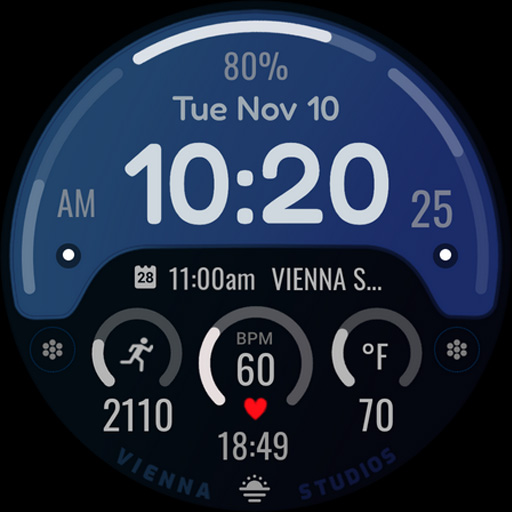
📋 h1801 Daily Manager Master Watch Face Your day, perfectly organized! h1801 is a clean digital watch face for Wear OS with a big, easy-to-read time and a stylish two-tone split-screen layout. See your heart rate, steps, battery and date at a glance – and add the extra info you need, like weather, sunrise / sunset or your next calendar event, with customizable complications. ⌚ Features - Big digital time with seconds and AM/PM indicator - 12h / 24h format (follows your phone settings) - Day of the week and date at the top - Heart rate (BPM) - Daily step counter - Watch battery level (%) - Two-tone split-screen layout with a dark data dashboard 🎨 Customization - Color themes for the top half, e.g. white, pink, blue and green - Customizable complications – e.g. weather / temperature, sunrise / sunset or upcoming calendar events - Touch and hold the watch face, then tap "Customize" 🌦️ Weather not showing or not updating? 1. Make sure location is enabled on your phone and watch. 2. Open the Weather app on your watch and refresh it (e.g. tap "Last updated" or pull down). 3. Switch to another watch face for a few seconds, then switch back – this often refreshes the weather data. 4. Wait a few minutes for the data to sync. ❤️ Heart rate not showing? Allow the "Sensors / Body sensors" permission when asked, and check that heart rate measuring is turned on in your health app (e.g. Samsung Health). 📲 How to install 1. Make sure your watch is connected to your phone (Galaxy Wearable or Pixel Watch app) and uses the same Google account. 2. On your phone, open the Play Store, tap the arrow next to "Install" and select your watch. 3. Or open the Play Store directly on your watch and search for "h1801". 4. After installation, touch and hold your current watch face, swipe to the end, tap "+" and select h1801. Tip: It can take a few minutes until the watch face appears on your watch. ⌚ Supported devices Compatible with all Wear OS 5+ smartwatches (API level 34+), including: - Samsung Galaxy Watch 4, 5, 6, 7, 8, Classic and Ultra series - Google Pixel Watch 1, 2, 3 and 4 - Other Wear OS 5+ watches Not compatible with Tizen (Galaxy Watch 3 or older) or Apple Watch. 💬 Support Questions or problems? Please write to us before leaving a review – we are happy to help! 📩 luxury.watch.face@gmail.com 🌐 www.viennastudios.com 💛 Thank you for choosing Happy Watch Faces by Vienna Studios! We hope this design brightens your day and your wrist 😊
More like this
- Top Personalization on Google Play by estimated revenue
- h1801 Daily Manager Master alternatives
- h1801 Daily Manager Master vs SamWatch Digital Themis 2024
- h1801 Daily Manager Master vs [69D] Virtue Analog Watch
- All top charts and categories
Similar apps
SamWatch Digital Themis 2024Samtree
[69D] Virtue Analog Watch69 Design
Breitling Premier Watch FacePrestige Watch Faces Studio
BLZ SEAVOR - Diver Watch FaceBALLOZI Watch Faces
Verge Watch Faceamoledwatchfaces™
Node N1 Analog Watch FaceFutorum
JJ Carbon GT Watch FaceJJ-Design
BREITLING AVENGER Watch FaceLIBERTY WATCH FACES™