NavEdge Smart Assistive Touch
AionyxeToolsGoogle PlayIn-app purchasesNavEdge Smart Assistive Touch revenue and downloads, last 30 days
How we got this (8 inputs)
- signals
- ratings ÷ age
- ratings/day
- 1.2
- monetisation
- utilities ARPD 0.8; IAP max $4.99 ×0.71
- range
- 80% interval from out-of-fold residuals (×1.12 scale, 90 products)
- likelyLow
- 3346.85
- likelyHigh
- 15312.54
- confidence
- medium
- observed days (of 30)
- 5
As of Nov 21, 2026.
How we got this (10 inputs)
- method
- Play install counter: total accepted delta ÷ elapsed days
- measured days
- 4.64
- window
- 2026-11-16..2026-11-21
- step spread
- ×/÷1.38 (the counter moves in steps; narrows with more days)
- likelyLow
- 1030
- likelyHigh
- 2395
- confidence
- medium
- observed days (of 30)
- 5
- measured days
- 1
- scaling
- projected to 30 days from 4.6 measured days (2026-11-16..2026-11-21, counter 5952 → 6186) plus 25.4 modelled days
As of Nov 21, 2026.
How we got this (12 inputs)
- method
- installs in the window (all active on install day) + earlier installers active in the month (published retention ÷ the category's DAU/MAU stickiness) + the retained base of installers older than two years
- downloads per day
- 52.8 (23.33 to 115.73, the published worldwide figure)
- retention
- day 1 / 7 / 30: 23.7% / 6.54% / 2.45% (Android benchmark × 1.17 for the category; AppsFlyer Q3 2024 day-1/7/30 retention, via getstream.io/blog/app-retention-guide (read 2026-11-16); category: OneSignal 2024 day-30 retention by category, via getstream.io/blog/app-retention-guide (read 2026-11-16))
- active days per install
- 3.46 over 125 days
- stickiness
- 17.5% DAU/MAU, Productivity & Tools median (MWM DAU/MAU medians, US iOS, May 2026 (mwm.ai/glossary/dau-mau, read 2026-11-16))
- parts
- window installs 1584 (the published 30-day downloads), earlier installers 403, retained base 0
- spread
- downloads ×/÷2.23, retention ×/÷3, tail ×/÷1.31, stickiness ×/÷1.8 (assumptions; not fitted)
- ratings per download (recorded, not used)
- 0.02258
- chart persistence (recorded, not used)
- 0 day(s) on a chart in the window; fewer than 7 live days exist
- tier
- modelled: retention and stickiness are published benchmarks, not measured on this listing
- confidence
- low
- rough
- order of magnitude
As of Nov 21, 2026.
Daily active users
Modelled from this app's downloads and a published retention curve for its store and category, not measured. Read it as an order of magnitude.
History
Daily readings as we observed them, last 30 days worldwide. Free shows the last 30 days.
Downloads per day
Observed by us since Nov 16, 2026.
Revenue per day
Observed by us since Nov 16, 2026.
Ratings (worldwide)
Observed by us since Nov 16, 2026.
Installs, Play counter
Observed by us since Nov 16, 2026.
Monthly history: we have found no public-archive copy of this store page from the last 12 months, so monthly readings start with our own in Nov 2026.
Create a free account to save apps; Pro shows full history.
Chart positions
Where this app ranks on the top free, paid and grossing charts we capture.
Search terms
No search terms read for this app yet. Terms are read from its title and the searches it shows up in, and appear here once ranked.
In-app purchases
Google Play shows one in-app price range per storefront, not each product's price. The range over time, as the store published it:
United States, USD
- $1.99 - $4.99 per itemNov 21, 2026 to now
Prices
In-app purchase ladder, price changes and paywall terms
No itemised in-app prices yet. Google Play publishes only the price range shown above, not each product; the individual products and their prices have not been read.
Ratings and reviews
Rating distribution
Store histogram
147 ratings
Recent reviews
Marketing
Paid ads, organic videos and onboarding captured for this app.
Paid ads
No Meta, Google or TikTok ads tied to this app yet. We check the public ad libraries daily.
Organic videos
No YouTube, TikTok or Instagram videos tied to this app yet.
Change history
Versions, price changes, rank jumps and listing edits, as we observed them.
Details
- Developer
- Aionyxe, 15 apps
- Package
- com.aionyxe.navedge
- Category
- Tools
- Price
- Free
- Released
- Jul 19, 2026
- Updated
- Nov 13, 2026
- Version
- v1.29
- Size
- -
- Content rating
- Everyone
- Website
- Not available
- Contact email
- aionyxe@gmail.com
- Privacy policy
- sites.google.com/view/navedge-privacy-policy/home
- Languages
- Not available
- Charted in
- United States
- First seen
- Nov 16, 2026
- Listing read
- Nov 21, 2026
Show store descriptionShow less
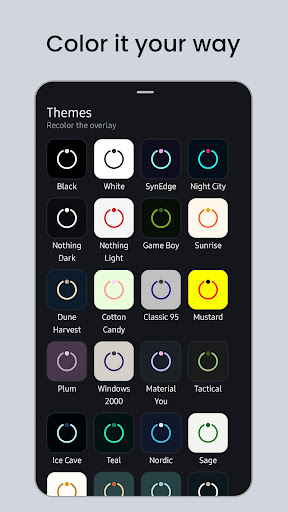
Assistive touch for one hand. Reach every button on a big phone. NavEdge puts a small floating button on your screen. Tap it and a ring of shortcuts opens right under your thumb. Back, home, recent apps, volume, flashlight, screenshot, or any app you like. Swipe the button in four directions for four more shortcuts, without opening the ring. It works on the lock screen too. Made for big phones, a weak grip, sore or shaky hands, and one handed use. HOW NAVEDGE USES THE ACCESSIBILITY SERVICE NavEdge uses the Android AccessibilityService API. The app cannot work without it. Here is all it is used for: * To run the floating button over other apps, and keep it in place when you switch apps or turn your phone. * To do the action when you tap a shortcut: back, home, recent apps, notifications, quick settings, screenshot, power menu and lock screen. * To scroll the page for you in Auto Scroll, by sending a swipe. * To see when the keyboard is open, so the button moves out of your way. * To see if the field you are typing in is a password field, so Cloak can cover the screen on its own. * To take one picture of your screen when you start the Fold effect. That picture is dropped when the effect ends. What NavEdge never does with it: * It does not read or save what you type. * It does not change your settings without you asking, and it never stops you from turning it off or uninstalling the app. * It does not get around Android privacy controls, permissions or notifications. * It does not collect your data. Nothing is sent off your phone. No ads, no account, no tracking. You can turn the service off at any time in Settings, Accessibility. WHAT YOU CAN PUT IN IT More than 40 actions: back, home, recent apps, notifications, quick settings, screenshot, screen record, lock screen, volume, brightness, flashlight, camera, rotation, Do Not Disturb, music controls, Wi-Fi, Bluetooth, airplane mode, answer or end a call, and any app on your phone. * Contact bubbles. Tap a face to call someone. * Folders. Group apps and actions behind one bubble. * Auto Scroll. Hands free reading at a speed you choose. * Cloak. Cover the screen while you type, so nobody can read over your shoulder. The keyboard stays visible. * Night Dim. Go darker and warmer than your phone allows. * Fold. Tilt your phone to fold the screen away. * Screen off animations, and a quick settings tile. EASY TO SEE, EASY TO PRESS * Make the button and the shortcuts as large as you need. * It stays where you put it. Hold it before you drag, so it cannot move by accident. * It lifts above the keyboard, and hides itself in screenshots. * It fades when you are not using it, and can tuck into the edge. * Works with TalkBack. MAKE IT YOUR OWN Many button styles and color themes, from plain and high contrast to bold. Change the size, the shape, how far the ring opens and how it moves. Ultra adds your own colors, icon packs, and a backup file for your next phone. FREE, PRO AND ULTRA The free version is a real app, not a trial. No ads. No countdown. Pay once for Pro or Ultra. There is no subscription, and every update is included. NEEDS Android 12 or newer, permission to draw over other apps, and the accessibility service. Some shortcuts need their own permission, such as calls for a contact bubble. Some system switches need Shizuku. NavEdge never asks for the camera or the microphone. Something not working, or a shortcut you want? Write to us. I read every message.
More like this
- Top Tools on Google Play by estimated revenue
- NavEdge Smart Assistive Touch alternatives
- NavEdge Smart Assistive Touch vs PDF Reader & Sign
- NavEdge Smart Assistive Touch vs Stitchcraft Premium
- All top charts and categories
Similar apps
PDF Reader & SignÇağlar Türker3.8 ★ (149)
Stitchcraft PremiumZheteng3.9 ★ (149)
xps viewer - xps converterSUFIAN TECH1.8 ★ (149)
Velvet ProxyYantai Xuyu Electronics Commerce And Trade Co.,Ltd
Find My Phone & Device FinderJingKang4.3 ★ (149)
Alpha Com ACom WikiMint Maker4.8 ★ (149)
SmartAIIdeaKard3.7 ★ (149)
MyOzarksNational Information Solutions Cooperative4.2 ★ (149)