BACKUPit: App Backup & Restore
AkashsoftToolsGoogle PlayContains adsBACKUPit: App Backup & Restore revenue and downloads, last 30 days
History
Daily readings as we observed them, last 30 days worldwide. Free shows the last 30 days.
One reading so far: history starts Nov 22, 2026, and a trend line appears after the next daily reading.
Monthly history: we have found no public-archive copy of this store page from the last 12 months, so monthly readings start with our own in Nov 2026.
Create a free account to save apps; Pro shows full history.
Chart positions
Where this app ranks on the top free, paid and grossing charts we capture.
Search terms
No search terms read for this app yet. Terms are read from its title and the searches it shows up in, and appear here once ranked.
In-app purchases
Prices
In-app purchase ladder, price changes and paywall terms
No in-app prices recorded yet. We read them from the store listing: either this app sells none, or its listing has not been read yet.
Ratings and reviews
Rating distribution
Store histogram
361 ratings
Recent reviews
Marketing
Paid ads, organic videos and onboarding captured for this app.
Paid ads
No Meta, Google or TikTok ads tied to this app yet. We check the public ad libraries daily.
Organic videos
No YouTube, TikTok or Instagram videos tied to this app yet.
Change history
Versions, price changes, rank jumps and listing edits, as we observed them.
Details
- Developer
- Akashsoft, 2 apps
- Package
- com.akashsoft.backupit
- Category
- Tools
- Price
- Free
- Released
- Sep 16, 2019
- Updated
- Aug 10, 2026
- Version
- 2.0
- Size
- -
- Content rating
- Everyone
- Website
- www.backupit.app
- Contact email
- support@backupit.app
- Privacy policy
- www.backupit.app/privacy-policy-app
- Languages
- Not available
- Charted in
- United States
- First seen
- Nov 22, 2026
- Listing read
- Nov 22, 2026
Show store descriptionShow less
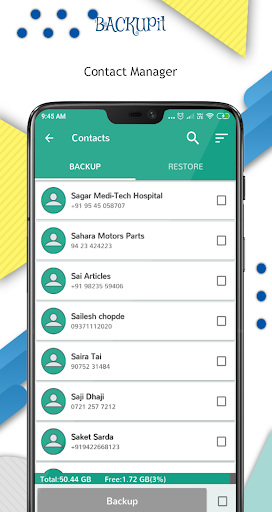
BACKUPit is a powerful backup and restore app that helps you securely backup apps, APKs, and contacts in just a few taps. Protect your important data before a factory reset, phone upgrade, or accidental deletion. Store your backups on your device or Google Drive and restore them anytime. Whether you're switching to a new phone, keeping copies of your favorite APKs, or protecting your contacts, BACKUPit makes backup and restore simple, fast, and reliable. ★ Why Choose BACKUPit? ✔ Backup installed apps and APK files ✔ Restore apps quickly from backups ✔ Backup and restore contacts ✔ Automatic and scheduled app backups ✔ Backup to Google Drive or local storage ✔ Share APKs with friends and family ✔ Batch uninstall unwanted apps ✔ Fast, lightweight and easy to use 📦 App & APK Backup Protect your installed applications by creating secure APK backups. • Backup apps and APKs to internal or external storage • Restore apps from saved backups anytime • Automatic backup for newly installed or updated apps • Schedule backups daily, weekly, or monthly • Upload and download app backups from Google Drive • Archive important APK versions before updates • View app version, size, install date and storage path • Search apps on Google Play for available updates • Sort apps by name, size, install date or backup date • Batch uninstall multiple apps • Launch installed apps directly from BACKUPit • Share APK files via Bluetooth, Wi-Fi Direct, email and other sharing apps 👥 Contacts Backup & Restore Never lose your important contacts again. • Backup contacts in seconds • Restore contacts whenever needed • Save contacts before changing or resetting your phone • Upload and download contact backups from Google Drive • Search and manage contacts easily • Sort contacts alphabetically • Share contacts with friends and family • Delete unwanted contacts quickly ☁ Google Drive Backup Keep your backups safe in the cloud. • Upload apps and contacts to Google Drive • Restore backups on another Android device • Secure cloud storage with your Google account • Access backups whenever you need them ⏰ Automatic & Scheduled Backups Stay protected without remembering to back up manually. • Automatic backup of newly installed apps • Schedule backups daily, weekly, or monthly • Backup reminders and notifications • Background backup support 📱 App Manager Manage all installed applications from one place. • View installed and archived apps • Check app version, size and installation date • Launch installed apps instantly • Organize apps using multiple sorting options • Search apps quickly ⚙ Settings Customize BACKUPit to suit your needs. • Enable or disable automatic backups • Configure scheduled backups • Manage your Google Drive account • Show or hide system apps • Show or hide storage usage information • Enable automatic app update checks • Customize notifications 🔒 Safe & Secure Your privacy matters. BACKUPit performs backup and restore operations directly on your device. Your personal data remains under your control, and backups are stored only in the locations you choose, including local storage and your own Google Drive account. 📌 Perfect For • Phone upgrades • Factory reset preparation • Keeping copies of APK files • Restoring favorite apps quickly • Contact protection • Device migration • Offline APK collection Required Permissions Storage Permission Used to save and restore app APKs and backup files from your device. Contacts Permission Required only to backup and restore your contacts. Notifications Used to notify you about automatic and scheduled backups. Google Account Required only if you choose to backup or restore using Google Drive. Download BACKUPit today and keep your apps, APKs, and contacts safe with fast, secure, and reliable backup and restore features.
More like this
- Top Tools on Google Play by estimated revenue
- BACKUPit: App Backup & Restore alternatives
- BACKUPit: App Backup & Restore vs Translate - Photo, Chat, PDF
- BACKUPit: App Backup & Restore vs Remote For Chromecast GoogleTV
- All top charts and categories
Similar apps
Translate - Photo, Chat, PDFNEWSTAR CORPORATION JOINT STOCK COMPANY4.7 ★ (363)
Remote For Chromecast GoogleTVמתן ימין3.7 ★ (363)
DataHive AIDataHive4.5 ★ (363)
Text delete and wordMohammed Samit3.0 ★ (363)
ConnectorShade Connector3.0 ★ (363)
Phone Cleaner-Junk RemoverPureTech Labs4.0 ★ (363)
Vercel On The Go — RevFarFetched4.0 ★ (363)
VYSIM: Receive SMS OnlineHCS CREATIVE4.9 ★ (363)