Forest road Trail Course
네버다이Maps & NavigationGoogle PlayContains adsForest road Trail Course revenue and downloads, last 30 days
How we got this (12 inputs)
- signals
- Play installs ÷ age; lifetime→current drift ×/÷4.12 (135278 measured Play counter deltas)
- spread
- measured on downloads ground truth (downloads ground truth: 48 App Store milestones, 33 platform splits, 13 drift points)
- installs
- 998
- age days
- 1467
- bound
- at most the lifetime installs counter (998) over 30 days: the listing is 1467 days old, so its last 30 days cannot hold more installs than it ever had
- range scale
- ×0.88 (coverage scale on 9 ground-truth rows; publication is decided before it)
- likelyLow
- 15
- likelyHigh
- 61
- confidence
- medium
- observed days (of 30)
- 1
- measured days
- 0
- scaling
- observed days, scaled to 30
As of Nov 21, 2026.
How we got this (12 inputs)
- method
- installs in the window (all active on install day) + earlier installers active in the month (published retention ÷ the category's DAU/MAU stickiness) + the retained base of installers older than two years
- downloads per day
- 1.03 (0.27 to 3.63, the published worldwide figure)
- retention
- day 1 / 7 / 30: 20.3% / 5.6% / 2.1% (Android benchmark × 1 for the category; AppsFlyer Q3 2024 day-1/7/30 retention, via getstream.io/blog/app-retention-guide (read 2026-11-16); category: OneSignal 2024 day-30 retention by category, via getstream.io/blog/app-retention-guide (read 2026-11-16))
- active days per install
- 5.43 over 730 days (age 1467 days; the curve is used to 730)
- stickiness
- 15.2% DAU/MAU, Lifestyle & Well-being median (MWM DAU/MAU medians, US iOS, May 2026 (mwm.ai/glossary/dau-mau, read 2026-11-16))
- parts
- window installs 31 (the published 30-day downloads), earlier installers 24, retained base 12
- retained base
- 244 installers older than 730 days (lifetime from the listing's Play installs counter) × 4.76% active in a month (between 1.61%, the benchmark curve held flat, and 14.1%, median disclosed MAU ÷ lifetime installs of Duolingo, Snapchat and Grindr (company filings, data/ground-truth-active-users.csv; chosen on these rows, scored leave-one-product-out)); range ×/÷2 past each (widened after the leave-one-product-out check)
- spread
- downloads ×/÷3.69, retention ×/÷3, tail ×/÷1.57, stickiness ×/÷1.8, retained base ×/÷5.93 (assumptions; not fitted)
- chart persistence (recorded, not used)
- 0 day(s) on a chart in the window; fewer than 7 live days exist
- tier
- modelled: retention and stickiness are published benchmarks, not measured on this listing
- confidence
- low
- rough
- order of magnitude
As of Nov 21, 2026.
Daily active users
Modelled from this app's downloads and a published retention curve for its store and category, not measured. Read it as an order of magnitude.
History
Daily readings as we observed them, last 30 days worldwide. Free shows the last 30 days.
One reading so far: history starts Nov 21, 2026, and a trend line appears after the next daily reading.
Monthly history: we have found no public-archive copy of this store page from the last 12 months, so monthly readings start with our own in Nov 2026.
Create a free account to save apps; Pro shows full history.
Chart positions
Where this app ranks on the top free, paid and grossing charts we capture.
Search terms
No search terms read for this app yet. Terms are read from its title and the searches it shows up in, and appear here once ranked.
In-app purchases
Prices
In-app purchase ladder, price changes and paywall terms
No in-app prices recorded yet. We read them from the store listing: either this app sells none, or its listing has not been read yet.
Ratings and reviews
Rating distribution
No rating distribution read yet.
Recent reviews
Marketing
Paid ads, organic videos and onboarding captured for this app.
Paid ads
No Meta, Google or TikTok ads tied to this app yet. We check the public ad libraries daily.
Organic videos
No YouTube, TikTok or Instagram videos tied to this app yet.
Change history
Versions, price changes, rank jumps and listing edits, as we observed them.
Details
- Developer
- 네버다이, 7 apps
- Package
- com.appffl.trek.forest
- Category
- Maps & Navigation
- Price
- Free
- Released
- Nov 15, 2022
- Updated
- Aug 13, 2026
- Version
- 1.0 r21
- Size
- -
- Content rating
- Everyone
- Website
- appffl.com
- Contact email
- appffl.com@gmail.com
- Privacy policy
- appffls.blogspot.com/2026/08/blog-post_659.html
- Languages
- Not available
- Charted in
- United States
- First seen
- Nov 21, 2026
- Listing read
- Nov 21, 2026
Show store descriptionShow less
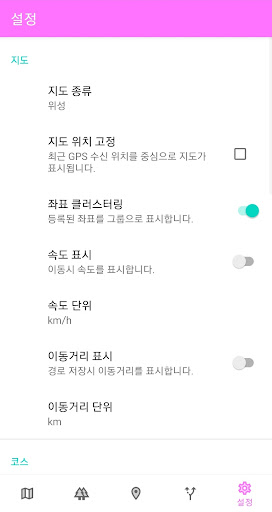
The Forest road Trail course information service is based on the information provided by the public data portal (https://www.data.go.kr). Information collected using GPS is latitude and longitude coordinates information. By using location information, it provides latitude and longitude coordinates, address, speed, and movement distance of the current location. It is available without membership registration and does not require or collect any personal information. AAID and cookie information may be used and collected for Google's advertising service and is subject to Google's advertising policy. * How to manage coordinates 1. Click the flag icon on the map menu while moving to register your current location. 2. Long-click the location you want to save on the map of the map menu. 3. Click the Add icon in the Coordinates menu to register. 4. When registering the coordinates, the address for the current coordinates is also registered. However, if there is no internet connection, address registration is not possible. 5. Long-click the list coordinate item registered in the coordinate menu. The management menu is activated. * How to manage routes 1. In the Map menu, click the More button. Click the Save Path menu. 2. When saving the route, the address for the current coordinate is registered together. However, if there is no internet connection, address registration is not possible. 3. While saving the route, click the More button. Click the Exit Save Path menu. 4. When saving the path, click the round red icon to finish saving the path. 5. Long-click the registered route item in the route menu. The management menu is activated. * Coordinate, path backup/restore 1. Managed in GPX file format. 2. Manage using the GPX Import and Export menus in the Coordinates and Paths menu. 3. Coordinates and paths GPX files are saved separately. 4. It is recommended to back up the app in advance when upgrading, deleting, or reinstalling the app. * map 1. When GPS location is received, the current location icon is activated. It is not displayed when not received. 2. Click the current location icon to move to the most recently received GPS location. 3. Click the screen capture icon to capture and save the current screen. 4. Click the flag icon to display the flag at the current location and save the coordinates. 5. Click the Save Path menu to start saving the path. Click again to end saving the path. 6. Click the Share menu to share the current coordinates. 7. Latitude and longitude are displayed on the map. Click to copy the current coordinates. 8. Click the full screen icon to hide the top and bottom menus and add a flag icon for coordinate registration. Click again to return to the original screen. 9. GPS location reception When moving, an icon is provided to determine whether the map location is fixed or not. 10. When saving the path, it is displayed on the saving path icon. Click to end saving path. 11. When GPS location information is not received, the route is not saved for the same location. * course 1. You can download it through an update on first run. 2. You can download and update from Course-Update in the Settings menu. * Point 1. Click the Add icon to register new coordinates. 2. If there is an address for new or modified coordinates, the address is registered together. However, if there is no internet connection, address registration is not possible. 3. Click the search icon to search for coordinates. 4. Import GPX file or export registered coordinates as GPX file. 5. After long-clicking an item in the coordinate list, select the selected item and click the Share menu to share it. 6. Long-click an item in the coordinate list and sort, edit, or delete the selected item. 7. You can hide the coordinate icon or change the color by using the sort menu. 8. Click the coordinate item in the coordinate list to move to the registered coordinate. 9. Coordinates, coordinate storage time, and address are displayed.
More like this
- Top Maps & Navigation on Google Play by estimated revenue
- Forest road Trail Course alternatives
- Forest road Trail Course vs Navigation Companion - G Maps
- Forest road Trail Course vs VAG DPF
- All top charts and categories