
Chicane Dashboard Watch Face
BasilBasePersonalizationGoogle Play$1.49Chicane Dashboard Watch Face revenue and downloads, last 30 days
History
Daily readings as we observed them, last 30 days worldwide. Free shows the last 30 days.
Installs, Play counter
Observed by us since Nov 21, 2026.
Monthly history: we have found no public-archive copy of this store page from the last 12 months, so monthly readings start with our own in Nov 2026.
Create a free account to save apps; Pro shows full history.
Chart positions
Where this app ranks on the top free, paid and grossing charts we capture.
Search terms
No search terms read for this app yet. Terms are read from its title and the searches it shows up in, and appear here once ranked.
In-app purchases
Prices
In-app purchase ladder, price changes and paywall terms
No in-app prices recorded yet. We read them from the store listing: either this app sells none, or its listing has not been read yet.
Ratings and reviews
Rating distribution
No rating distribution read yet.
Recent reviews
Marketing
Paid ads, organic videos and onboarding captured for this app.
Paid ads
No Meta, Google or TikTok ads tied to this app yet. We check the public ad libraries daily.
Organic videos
No YouTube, TikTok or Instagram videos tied to this app yet.
Onboarding
No store screenshots, web funnel or in-app recording captured for this app yet.
Change history
Versions, price changes, rank jumps and listing edits, as we observed them.
Details
- Developer
- BasilBase, 52 apps
- Package
- com.basilbase.chicane
- Category
- Personalization
- Price
- $1.49
- Released
- Aug 29, 2026
- Updated
- Aug 30, 2026
- Version
- 1.0
- Size
- -
- Content rating
- Everyone
- Website
- basilbase.com
- Contact email
- contact@basilbase.com
- Privacy policy
- basilbase.com/privacy-policy/
- Languages
- Not available
- Charted in
- United States
- First seen
- Nov 21, 2026
- Listing read
- Nov 22, 2026
Show store descriptionShow less
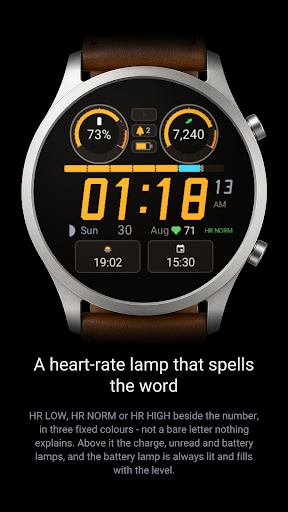
Chicane is an instrument binnacle for the wrist. Two round gauges, a bank of lamps between them, and a bar that fills across the week. BOTH BIG GAUGES ARE YOURS On most dashboard faces the two gauges are welded shut: one is always the battery, the other a step goal, and tapping either does nothing. Three reviews of the face this one was built against ask for the same thing, the most upvoted with seventeen helpful votes: let me choose what the gauge shows, and let me tap it. Here both gauges are complication slots. Out of the box the left one is the watch battery and the right one is your step count, each drawn as an arc filling against its own scale. Change either to whatever you want, and tap it to open the app behind it. SIX COMPLICATION SLOTS, AND WHAT EACH ONE TAKES Two round gauges across the top, 120 pixels wide. Each takes a ranged value, short text, long text, a monochromatic image or a small image. Watch battery left, step count right, until you say otherwise. Two rectangular complications along the foot, 134 pixels wide, taking the same five kinds. Sunrise and sunset left, your next calendar event right. Two small slots take an image and nothing else - no text, no gauge - one on the left flank, one under the lower complications. Set one to an app shortcut in Customize, save the change, then tap it. All six are yours to change and any may be left empty. An empty gauge or complication says SET and TAP + HOLD instead of sitting there blank. An empty image slot draws nothing at all - no ring, no placeholder. THE WEEK BAR One continuous rail under the lamps, seven days wide, dashed at every day boundary. It fills with the time of day rather than jumping at midnight, so on Tuesday afternoon the bar is Tuesday afternoon along. Saturday and Sunday carry their own colours, and the leading edge breathes. The week always starts on Monday, so the weekend never splits across the two ends of the bar. THE LAMP BANK Between the gauges: charging, unread notifications with the count, and battery. The battery lamp is always lit and fills with the level - a gauge rather than a warning light, so it is never a dead bulb on your dial. Under them the heart-rate lamp reads HR LOW, HR NORM or HR HIGH beside the number, in three fixed colours. Not a bare letter that nothing on the watch explains. With no reading it shows HR -- rather than a zero. ALWAYS-ON: THREE MODES AND FIVE BRIGHTNESS STEPS Full keeps the clock, date, week bar and gauge arcs as outlines. Reduced keeps the clock and date. Clock only draws hours and minutes in one colour. Five brightness steps sit on top, from a faint grey to a warm amber. Clock only at the dimmest step is for anyone who does not want a beacon on their wrist at night. NO LOCATION PERMISSION, EVER This face reads no weather source of its own, so it never asks for your location and never shows --° while it waits for one. Want weather? Put it in a complication and the provider you already trust supplies it. CUSTOMIZE, ON THE WATCH Eight themes. Six clock colours, six date colours and six gauge colours, on three independent axes. Five always-on brightness steps, three content modes. Hour format: follow the watch, 12-hour or 24-hour. Leading zero on or off. Eight settings, 39 options, 155,520 combinations - and every one is a dial in Customize on the watch itself. No phone app, no account, no sign-in. WHAT IT DOES NOT DO There is no wake-up animation: the bar is drawn at its value, not run up to it. Calories, distance and floors are not readings Watch Face Format publishes; put them in a complication. The face's own wording - SET, TAP + HOLD, HR NORM - is English; the weekday and month follow your watch's language. Wear OS 5 and 6, API 34 and above. It runs on the watch alone: no companion phone app, nothing to buy twice. One-time purchase, no ads, no subscription, no account, no tracking. If you have a question, or something is not working right, please write to us at contact@basilbase.com.




More like this
- Top Personalization on Google Play by estimated revenue
- Chicane Dashboard Watch Face alternatives
- Chicane Dashboard Watch Face vs SamWatch Digital Themis 2024
- Chicane Dashboard Watch Face vs [69D] Virtue Analog Watch
- All top charts and categories
Similar apps
SamWatch Digital Themis 2024Samtree
[69D] Virtue Analog Watch69 Design
Breitling Premier Watch FacePrestige Watch Faces Studio
BLZ SEAVOR - Diver Watch FaceBALLOZI Watch Faces
Verge Watch Faceamoledwatchfaces™
Node N1 Analog Watch FaceFutorum
JJ Carbon GT Watch FaceJJ-Design
BREITLING AVENGER Watch FaceLIBERTY WATCH FACES™