Offline Notepad
Gino BasilettiToolsGoogle PlayIn-app purchasesOffline Notepad revenue and downloads, last 30 days
History
Daily readings as we observed them, last 30 days worldwide. Free shows the last 30 days.
One reading so far: history starts Nov 22, 2026, and a trend line appears after the next daily reading.
Monthly history: we have found no public-archive copy of this store page from the last 12 months, so monthly readings start with our own in Nov 2026.
Create a free account to save apps; Pro shows full history.
Chart positions
Where this app ranks on the top free, paid and grossing charts we capture.
Search terms
In-app purchases
Google Play shows one in-app price range per storefront, not each product's price. The range over time, as the store published it:
South Korea, KRW
- ₩500 - ₩430,000 per itemNov 22, 2026 to now
Prices
In-app purchase ladder, price changes and paywall terms
No itemised in-app prices yet. Google Play publishes only the price range shown above, not each product; the individual products and their prices have not been read.
Ratings and reviews
Rating distribution
No rating distribution read yet.
Recent reviews
Marketing
Paid ads, organic videos and onboarding captured for this app.
Paid ads
No Meta, Google or TikTok ads tied to this app yet. We check the public ad libraries daily.
Organic videos
No YouTube, TikTok or Instagram videos tied to this app yet.
Change history
Versions, price changes, rank jumps and listing edits, as we observed them.
Details
- Developer
- Gino Basiletti, 1 app
- Package
- com.basiletti.gino.offlinenotepad
- Category
- Tools
- Price
- Free
- Released
- Jan 22, 2019
- Updated
- Oct 20, 2026
- Version
- 6.1.9
- Size
- -
- Content rating
- Rated for 3+
- Website
- basiletti.github.io
- Contact email
- ginobasiletti@gmail.com
- Languages
- Not available
- Charted in
- South Korea, Japan
- First seen
- Nov 22, 2026
- Listing read
- Nov 22, 2026
Show store descriptionShow less
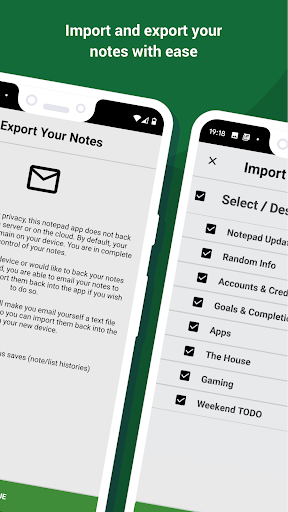
Offline Notepad is exactly what it says on the tin: A notepad which operates completely offline. No server syncs or data loss if you forget the login credentials to your account! Main features include: Creating Content: - Create as many notes as you like, and search for them by title or anything in the note body to find them again at ease. - Create & write your weekly shopping list or anything else with the dedicated list creation feature. Add as many items as you like! Check off items, filter by complete/incomplete items & see your progress at ease with a progress percentage bar! - Organise your notes & lists into folders and sub-folders, create as many folders as you like - as many layers deep as you like also! - Revisit old revisions/edits of a note/list to see the history of that item. You may also replace the current version of that note or list with an older version of it. - Flag and highlight your favoured notes to make them stand out from the rest. Organise & sort them all by either dragging & dropping or by alphabetical order. Security & Backup: - Protect your notes by setting up an app PIN & fingerprint unlocking within the app. - Import & export your items to yourself across devices via the app. As this is an offline notepad, the import/export process is done by emailing (or via any other means) your data to yourself. Your exported items are encrypted by default. - Have peace of mind knowing that your notes are automatically backed up on-device from day one. Backups will persist in your 'documents' folder on-device even if you accidentally uninstall the app! Customise: - Reskin the entire look of your app from a variety of themes! Choose from ‘panda white’, ‘dark mode’ & ‘rich red’ just to name a few! - Go further and take total control over your theme with custom themes; a premium feature which enables you to use a colour picker to set backgrounds, buttons, icons and home screen widgets (to name a few!) to whatever colour you like! - Resize the text throughout the entire app to better suit your visual needs. Your notes, lists and folders are only stored within the app itself and automatic backups are saved in your 'documents' folder on your device. There are no limitations on how many items you can create or how many times you can edit your notes/lists. This app is updated regularly with brand new features, fixes & improvements; and all of these changes are documented frequently in the ‘News & Updates’ section found from the home screen in the app! This app has been built and maintained by one developer since its creation in 2018. It is built with passion and integrity; and not with corporate business ambitions. That's all there is to it - happy note taking! -- FAQ 1. Why does this app have paid options available? The free experience of this app offers a plethora of features to do all of the things mentioned above. Offline Notepad Premium is a monthly membership which gives you complete access to everything the app has to offer. That being said, the free experience really does offer a lot! Premium is simply for those that want everything the app has to offer. 2. Why does an 'Offline' Notepad app make use of the internet permission and/or send data? To help monitor and respond to crashes and bug reports, Google's Firebase is embedded in the app. This is purely to help me analyse and resolve bugs and crashes which may unintentionally occur in the app. The internet permission is also required to enable users to donate and/or subscribe to Offline Notepad Premium within the app. Please be assured that your notes DO NOT leave your device. They are NEVER backed up to an external server! 3. Why is the app not translated into my spoken language? Translations are a work in progress. The app is currently translated into French, German, Italian and Japanese. Future languages are planned, but you can contribute to the translations in the app by emailing me at ginobasiletti@gmail.com - thanks!
More like this
- Top Tools on Google Play by estimated revenue
- Offline Notepad alternatives
- Offline Notepad vs Multi Language keyboard
- Offline Notepad vs PDFMaster - PDF Reader
- All top charts and categories
Similar apps
Multi Language keyboardNenoSoft Technologies4.5 ★ (1.7K)
PDFMaster - PDF ReaderVOYAGER SKY3.3 ★ (1.7K)
APRSdroid - APRS ClientGeorg Lukas4.4 ★ (1.7K)
Egg King Read & ListenEggyolk.Inc4.3 ★ (1.7K)
DjVU to PDF converterOnlineConverting3.1 ★ (1.7K)
iCenter OS 17: Control-NotifyApps-Commercial-Lab3.9 ★ (1.8K)
Good morning & night stickersWAStickerApps Stickers Memes GIFs4.8 ★ (1.7K)
CardoOCardoO3.2 ★ (1.7K)