Clock Punch – Work Log Tracker
Ido YToolsGoogle PlayIn-app purchasesContains adsClock Punch – Work Log Tracker revenue and downloads, last 30 days
How we got this (8 inputs)
- signals
- ratings ÷ age
- ratings/day
- 0.19
- monetisation
- utilities ARPD 0.8; IAP max $19.99 ×1.41
- range
- 80% interval from out-of-fold residuals (×1.12 scale, 90 products)
- likelyLow
- 1959.16
- likelyHigh
- 9729.81
- confidence
- medium
- observed days (of 30)
- 3
As of Nov 21, 2026.
How we got this (13 inputs)
- signals
- Play installs ÷ age; lifetime→current drift ×/÷4.12 (135278 measured Play counter deltas)
- spread
- measured on downloads ground truth (downloads ground truth: 48 App Store milestones, 33 platform splits, 13 drift points)
- installs
- 71013
- age days
- 3997
- note
- install counter moved once in 2.6 day(s); one step can hold several days of installs, so it is not read as a daily rate yet
- bound
- at most the lifetime installs counter (71013) over 30 days: the listing is 3997 days old, so its last 30 days cannot hold more installs than it ever had
- range scale
- ×0.88 (coverage scale on 9 ground-truth rows; publication is decided before it)
- likelyLow
- 365
- likelyHigh
- 1475
- confidence
- medium
- observed days (of 30)
- 3
- measured days
- 0
- scaling
- observed days, scaled to 30
As of Nov 21, 2026.
How we got this (13 inputs)
- method
- installs in the window (all active on install day) + earlier installers active in the month (published retention ÷ the category's DAU/MAU stickiness) + the retained base of installers older than two years
- downloads per day
- 24.17 (6.57 to 93.03, the published worldwide figure)
- retention
- day 1 / 7 / 30: 23.7% / 6.54% / 2.45% (Android benchmark × 1.17 for the category; AppsFlyer Q3 2024 day-1/7/30 retention, via getstream.io/blog/app-retention-guide (read 2026-11-16); category: OneSignal 2024 day-30 retention by category, via getstream.io/blog/app-retention-guide (read 2026-11-16))
- active days per install
- 6.25 over 730 days (age 3997 days; the curve is used to 730)
- stickiness
- 17.5% DAU/MAU, Productivity & Tools median (MWM DAU/MAU medians, US iOS, May 2026 (mwm.ai/glossary/dau-mau, read 2026-11-16))
- parts
- window installs 725 (the published 30-day downloads), earlier installers 570, retained base 2559
- retained base
- 53371 installers older than 730 days (lifetime from the listing's Play installs counter) × 4.79% active in a month (between 1.63%, the benchmark curve held flat, and 14.1%, median disclosed MAU ÷ lifetime installs of Duolingo, Snapchat and Grindr (company filings, data/ground-truth-active-users.csv; chosen on these rows, scored leave-one-product-out)); range ×/÷2 past each (widened after the leave-one-product-out check)
- spread
- downloads ×/÷3.76, retention ×/÷3, tail ×/÷1.58, stickiness ×/÷1.8, retained base ×/÷5.89 (assumptions; not fitted)
- ratings per download (recorded, not used)
- 0.0086
- chart persistence (recorded, not used)
- 0 day(s) on a chart in the window; fewer than 7 live days exist
- tier
- modelled: retention and stickiness are published benchmarks, not measured on this listing
- confidence
- low
- rough
- order of magnitude
As of Nov 21, 2026.
Daily active users
Modelled from this app's downloads and a published retention curve for its store and category, not measured. Read it as an order of magnitude.
History
Daily readings as we observed them, last 30 days worldwide. Free shows the last 30 days.
Downloads per day
Observed by us since Nov 18, 2026.
Revenue per day
Observed by us since Nov 18, 2026.
Ratings (worldwide)
Observed by us since Nov 18, 2026.
Installs, Play counter
Observed by us since Nov 18, 2026.
Monthly history: we have found no public-archive copy of this store page from the last 12 months, so monthly readings start with our own in Nov 2026.
Create a free account to save apps; Pro shows full history.
Chart positions
Where this app ranks on the top free, paid and grossing charts we capture.
Search terms
In-app purchases
Google Play shows one in-app price range per storefront, not each product's price. The range over time, as the store published it:
United States, USD
- $0.99 - $19.99 per itemNov 21, 2026 to now
Prices
In-app purchase ladder, price changes and paywall terms
No itemised in-app prices yet. Google Play publishes only the price range shown above, not each product; the individual products and their prices have not been read.
Ratings and reviews
Rating distribution
Store histogram
754 ratings
Recent reviews
Marketing
Paid ads, organic videos and onboarding captured for this app.
Paid ads
No Meta, Google or TikTok ads tied to this app yet. We check the public ad libraries daily.
Organic videos
No YouTube, TikTok or Instagram videos tied to this app yet.
Change history
Versions, price changes, rank jumps and listing edits, as we observed them.
Details
- Developer
- Ido Y, 1 app
- Package
- com.client.clockpunch
- Category
- Tools
- Price
- Free
- Released
- Dec 12, 2015
- Updated
- Apr 11, 2023
- Version
- 3.1.2
- Size
- -
- Content rating
- Everyone
- Contact email
- clockpunch.app@gmail.com
- Privacy policy
- sites.google.com/view/clock-punch-privacy-policy/home
- Languages
- Not available
- Charted in
- United States
- First seen
- Nov 18, 2026
- Listing read
- Nov 21, 2026
Show store descriptionShow less
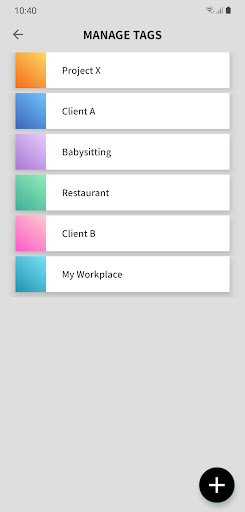
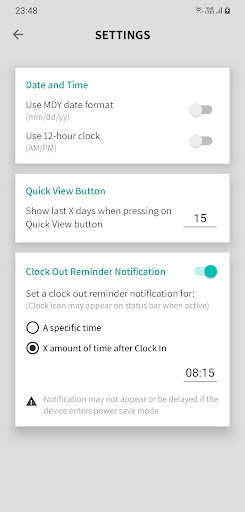
Are you in search of a free time clock & job hours tracker? Want this work clock to keep hours worked time log and allow you to export the working hours in Excel? Meet, Clock Punch, a simple hours tracker for work app which helps you easily and effectively keep track of your work hours. ⌚️TRACK WORK HOURS WITH EASE Ideal for freelancers, contractors, or anyone who wants to have a job time tracker, our hours calculator & time tracker allows you to easily clock in and punch out easily in one tap to enter and another to exit. 📅VIEW AND SHARE Our precise and minimalist job time tracker allows quick access to the hours punched and lets you share all the workhour timesheet information to your email or other services as an excel file in a quick and easy manner. 📁ADD PROJECT/JOB TAGS The log work tracker app also allows you to have different Tag for each clock punch to manage multiple Projects or Jobs. This is helpful when you work on a bigger project in milestones, work two jobs, or regularly work on different projects as freelancers/contractors. 📲NO NEED TO REGISTER When you use our punch time clock hours tracker you don’t need to sign up. That’s why it is important to remember that all the information you enter is currently only saved to your phone, as such, it is important to BACKUP your information by sending yourself an email or saving the excel document on your phone. Enjoy one of the most intuitive and practical clocking in and out for work apps. Try Clock Punch as overtime tracker, work hours tracker, job time tracker and more now for FREE! ✅GET PRO FOR JUST $1 MONTHLY (15 days free trial) & ENJOY: - NO Ads! - Get support for breaks Automatic/Manual - When you create a Tag you choose if you want Manual Breaks (press on a button to start and end a break whenever you want) OR Automatic Break Deduction - which you configure an amount of time to automatically deduct from each clock punch (you will also have an option to change it for a specific clock punch when editing the clock punch itself). - Set up Clock Out Reminder notification for X hours after clocking in or in a specific hour of the day. - Home Screen Widget that allows you to clock in/out or start/end a break. - Adding absence day/s such as Sick/Vacation/Other. - Configurable Quick View Button that you can configure how many days back you want to see when pressing on it (make it easier to view your punches) - Import punches from a previously exported excel file ===== Use of this app is the user's responsibility UX & Graphic Design by Liran Viler Contact: clockpunch.app@gmail.com
More like this
- Top Tools on Google Play by estimated revenue
- Clock Punch – Work Log Tracker alternatives
- Clock Punch – Work Log Tracker vs CleanBox
- Clock Punch – Work Log Tracker vs TV Remote | AC,Fan,Settopbox
- All top charts and categories
Similar apps
CleanBoxSPN Poppy3.7 ★ (759)
TV Remote | AC,Fan,SettopboxAbTech Mobile Solution1.9 ★ (759)
File Date FixerMOSHIMORE3.4 ★ (759)
QR Code & Barcode ScannerBinghuo Studio4.5 ★ (759)
EZ PDF - Image&text&PDFKaka Zz4.2 ★ (759)
Rewatch LIVE: Save Live StreamReactish, LLC3.6 ★ (760)
UnoVPN: Fast and Private VPNDollarUp3.7 ★ (760)
Aviation Weather with DecoderSteve Dexter4.1 ★ (760)