
LevelMatePRO
ETN Capital LLCTravel & LocalGoogle PlayLevelMatePRO revenue and downloads, last 30 days
History
Daily readings as we observed them, last 30 days worldwide. Free shows the last 30 days.
One reading so far: history starts Nov 23, 2026, and a trend line appears after the next daily reading.
Monthly history: we have found no public-archive copy of this store page from the last 12 months, so monthly readings start with our own in Nov 2026.
Create a free account to save apps; Pro shows full history.
Chart positions
Where this app ranks on the top free, paid and grossing charts we capture.
Search terms
No search terms read for this app yet. Terms are read from its title and the searches it shows up in, and appear here once ranked.
In-app purchases
Prices
In-app purchase ladder, price changes and paywall terms
No in-app prices recorded yet. We read them from the store listing: either this app sells none, or its listing has not been read yet.
Ratings and reviews
Rating distribution
Store histogram
225 ratings
Recent reviews
Marketing
Paid ads, organic videos and onboarding captured for this app.
Paid ads
No Meta, Google or TikTok ads tied to this app yet. We check the public ad libraries daily.
Organic videos
No YouTube, TikTok or Instagram videos tied to this app yet.
Onboarding
No store screenshots, web funnel or in-app recording captured for this app yet.
Change history
Versions, price changes, rank jumps and listing edits, as we observed them.
Details
- Developer
- ETN Capital LLC, 3 apps
- Package
- com.command.Levelmatepro
- Category
- Travel & Local
- Price
- Free
- Released
- Apr 16, 2016
- Updated
- Feb 3, 2026
- Version
- 2.3.5
- Size
- -
- Content rating
- Everyone
- Website
- www.command-electronics.com
- Contact email
- engineering@command-electronics.com
- Privacy policy
- levelmate.com/pages/ccpa-opt-out
- Languages
- Not available
- Charted in
- United States
- First seen
- Nov 23, 2026
- Listing read
- Nov 23, 2026
Show store descriptionShow less
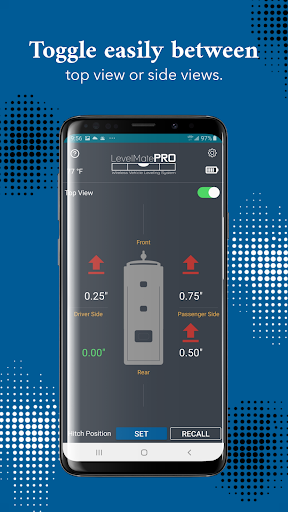
For use with Command Electronics' LevelMatePRO Wireless Vehicle Leveling System, this app allows the user to easily level their towable trailer with speed and accuracy. Great for travel trailers, 5th wheel trailers, motor homes, horse trailers, racing trailers, mobile medical units and food vending vehicles. The LevelMatePRO app interfaces with the LevelMatePRO module installed inside the trailer using Bluetooth and provides the user with side to side and front to rear level adjustment information. It automatically calculates the required location and height necessary to bring the vehicle into a leveled state. Once installed and configured, simply pull the vehicle to the desired setup location and open the app. The LevelMatePRO app will show where height adjustment is needed side to side and front to rear. For side to side adjustment, use spacers or a ramp under the indicated wheel by the specified amount. When the side to side indicator turns green, your level side to side. Use the trailer's front jack to adjust the front to rear level. When the front to rear indicator turns green, your level front to rear. LevelMatePRO also can be used to record the front height required to clear the hitch when disconnecting from a tow vehicle. Simply disengage the hitch, jack up the trailer to a point that clears the hitch and click the Save Hitch Position button. When you are ready to reconnect, start the LevelMatePRO app and click the Recall Hitch Position button. Raise or lower the front jack until the screen shows 0 distance and the indicator turns green. Your trailer is now at a position where it is ready to be connected to your tow vehicle. Note: You must possess a LevelMatePRO module for this app to operate completely. Go to www.command-electronics.com for information on how to purchase your LevelMatePRO module.


More like this
- Top Travel & Local on Google Play by estimated revenue
- LevelMatePRO alternatives
- LevelMatePRO vs Ferinesia
- LevelMatePRO vs ecbo cloak
- All top charts and categories
Similar apps
FerinesiaPT. Sinovasi Idea Karya3.1 ★ (226)
ecbo cloakecbo Inc.4.6 ★ (226)
花蓮搭公車 - 市區公車與公路客運即時動態時刻表查詢JIE AI STUDIO3.6 ★ (226)
Golden Tours – City GuideGolden Tours Ltd4.2 ★ (226)
PayTixModaxo Traffic Management USA Inc.2.5 ★ (226)
27 Trans Online TicketingRongRit Tech3.5 ★ (227)
Rotterdam The Hague AirportRotterdam The Hague Airport5.0 ★ (227)
Modo CarshareModo4.8 ★ (227)