Recovery Today
DailyReflectionsBooks & ReferenceGoogle PlayRecovery Today revenue and downloads, last 30 days
History
Daily readings as we observed them, last 30 days worldwide. Free shows the last 30 days.
One reading so far: history starts Nov 22, 2026, and a trend line appears after the next daily reading.
Monthly history: we have found no public-archive copy of this store page from the last 12 months, so monthly readings start with our own in Nov 2026.
Create a free account to save apps; Pro shows full history.
Chart positions
Where this app ranks on the top free, paid and grossing charts we capture.
Search terms
No search terms read for this app yet. Terms are read from its title and the searches it shows up in, and appear here once ranked.
In-app purchases
Prices
In-app purchase ladder, price changes and paywall terms
No in-app prices recorded yet. We read them from the store listing: either this app sells none, or its listing has not been read yet.
Ratings and reviews
Rating distribution
Store histogram
325 ratings
Recent reviews
Marketing
Paid ads, organic videos and onboarding captured for this app.
Paid ads
No Meta, Google or TikTok ads tied to this app yet. We check the public ad libraries daily.
Organic videos
No YouTube, TikTok or Instagram videos tied to this app yet.
Change history
Versions, price changes, rank jumps and listing edits, as we observed them.
Details
- Developer
- DailyReflections, 1 app
- Package
- com.companyname.Today
- Category
- Books & Reference
- Price
- Free
- Released
- Feb 24, 2018
- Updated
- Dec 16, 2023
- Version
- 5.3
- Size
- -
- Content rating
- Everyone 10+
- Website
- Not available
- Contact email
- recoverytodayapp@gmail.com
- Languages
- Not available
- Charted in
- United States
- First seen
- Nov 22, 2026
- Listing read
- Nov 22, 2026
Show store descriptionShow less
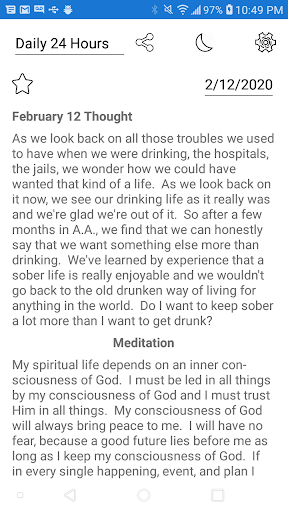
Collection of daily readings that are recovery themed. Click on the name of the reading to be able to select any of the other readings - Daily 24 Hours, Daily Reflections, Daily Inspiration, Keep it Simple, A Day at a Time, One More Day, As Bill Sees It, and Quotes. The reading for the current day will be loaded. Click on the date to open a calendar and select any other date. Select the share icon next to the name of the reading for sending the currently loaded reading to other applications on the device for sharing. Select the moon-shaped icon in the top reading menu to toggle dark mode. Select the empty star icon above a reading to enter a name and save it as a favorite. If you have saved any favorites, the reading selection list includes "Saved Favorites" - select this item to display a list of your favorites, sorted alphabetically by the names entered. Select an item from the list to load that reading. Select the filled star icon above a favorite reading to remove it from your saved favorites. Select the gear icon in the upper right corner of the main page to open the settings page. You can select a preferred text size and you can enter your anniversary date to have your recovery time displayed. To enter your anniversary date, select the Set button and click on the date to open the calendar. To remove your anniversary date, select the Reset button. Select the Save button on the settings page to keep any changes you have made and have them saved; select the Cancel button or page back to exit the settings page without keeping any changes you have made. The preferred text size will be applied to all readings. - Please let me know if you guys have ideas for features you'd like to have added. I'm just a guy in recovery, trying to make this app as helpful as I can for everyone. Thank you, Michael
More like this
- Top Books & Reference on Google Play by estimated revenue
- Recovery Today alternatives
- Recovery Today vs NovelsReader
- Recovery Today vs The 1 Book E-Library
- All top charts and categories
Similar apps
NovelsReaderHK IReader Technology Limited2.7 ★ (329)
The 1 Book E-LibraryMeb Corporation PCL4.0 ★ (329)
שמות הצדיקיםלזכות עם ישראל5.0 ★ (329)
Spirits' Book - TextsJúlio Conceição3.9 ★ (329)
BOOK WALKER ThailandKADOKAWA CORPORATION3.1 ★ (330)
Surah Hashr123Muslim
سبل السلام شرح بلوغ المرامSo Smart Apps4.4 ★ (330)
Herbal RemediesRadu Savutiu4.4 ★ (330)