Network Tools Pro
Farrukh Naveed AnjumCommunicationGoogle PlayIn-app purchasesNetwork Tools Pro revenue and downloads, last 30 days
How we got this (13 inputs)
- signals
- Play installs ÷ age; lifetime→current drift ×/÷4.12 (135278 measured Play counter deltas)
- spread
- measured on downloads ground truth (downloads ground truth: 48 App Store milestones, 33 platform splits, 13 drift points)
- installs
- 1548
- age days
- 2320
- note
- install counter moved once in 2.6 day(s); one step can hold several days of installs, so it is not read as a daily rate yet
- bound
- at most the lifetime installs counter (1548) over 30 days: the listing is 2320 days old, so its last 30 days cannot hold more installs than it ever had
- range scale
- ×0.88 (coverage scale on 9 ground-truth rows; publication is decided before it)
- likelyLow
- 13
- likelyHigh
- 56
- confidence
- medium
- observed days (of 30)
- 3
- measured days
- 0
- scaling
- observed days, scaled to 30
As of Nov 21, 2026.
How we got this (12 inputs)
- method
- installs in the window (all active on install day) + earlier installers active in the month (published retention ÷ the category's DAU/MAU stickiness) + the retained base of installers older than two years
- downloads per day
- 0.9 (0.23 to 3.5, the published worldwide figure)
- retention
- day 1 / 7 / 30: 20.3% / 5.6% / 2.1% (Android benchmark × 1 for the category; AppsFlyer Q3 2024 day-1/7/30 retention, via getstream.io/blog/app-retention-guide (read 2026-11-16); category: OneSignal 2024 day-30 retention by category, via getstream.io/blog/app-retention-guide (read 2026-11-16))
- active days per install
- 5.43 over 730 days (age 2320 days; the curve is used to 730)
- stickiness
- 21.2% DAU/MAU, Social & Communication median (MWM DAU/MAU medians, US iOS, May 2026 (mwm.ai/glossary/dau-mau, read 2026-11-16))
- parts
- window installs 27 (the published 30-day downloads), earlier installers 15, retained base 36
- retained base
- 891 installers older than 730 days (lifetime from the listing's Play installs counter) × 4.03% active in a month (between 1.15%, the benchmark curve held flat, and 14.1%, median disclosed MAU ÷ lifetime installs of Duolingo, Snapchat and Grindr (company filings, data/ground-truth-active-users.csv; chosen on these rows, scored leave-one-product-out)); range ×/÷2 past each (widened after the leave-one-product-out check)
- spread
- downloads ×/÷3.87, retention ×/÷3, tail ×/÷1.57, stickiness ×/÷1.8, retained base ×/÷7 (assumptions; not fitted)
- chart persistence (recorded, not used)
- 0 day(s) on a chart in the window; fewer than 7 live days exist
- tier
- modelled: retention and stickiness are published benchmarks, not measured on this listing
- confidence
- low
- rough
- order of magnitude
As of Nov 21, 2026.
Daily active users
Modelled from this app's downloads and a published retention curve for its store and category, not measured. Read it as an order of magnitude.
History
Daily readings as we observed them, last 30 days worldwide. Free shows the last 30 days.
Downloads per day
Observed by us since Nov 18, 2026.
Installs, Play counter
Observed by us since Nov 18, 2026.
Monthly history: we have found no public-archive copy of this store page from the last 12 months, so monthly readings start with our own in Nov 2026.
Create a free account to save apps; Pro shows full history.
Chart positions
Where this app ranks on the top free, paid and grossing charts we capture.
Search terms
In-app purchases
Google Play shows one in-app price range per storefront, not each product's price. The range over time, as the store published it:
United States, USD
- $0.19 - $0.39 per itemNov 21, 2026 to now
Prices
In-app purchase ladder, price changes and paywall terms
No itemised in-app prices yet. Google Play publishes only the price range shown above, not each product; the individual products and their prices have not been read.
Ratings and reviews
Rating distribution
No rating distribution read yet.
Recent reviews
Marketing
Paid ads, organic videos and onboarding captured for this app.
Paid ads
No Meta, Google or TikTok ads tied to this app yet. We check the public ad libraries daily.
Organic videos
No YouTube, TikTok or Instagram videos tied to this app yet.
Change history
Versions, price changes, rank jumps and listing edits, as we observed them.
Details
- Developer
- Farrukh Naveed Anjum, 3 apps
- Package
- com.deluxewebapps.networktools
- Category
- Communication
- Price
- Free
- Released
- Jul 15, 2020
- Updated
- Aug 19, 2026
- Version
- 3.0.0
- Size
- -
- Content rating
- Everyone
- Website
- www.deluxewebapps.com
- Contact email
- anjum.farrukh@gmail.com
- Privacy policy
- deluxewebapps.com/privacy-policy.php
- Languages
- Not available
- Charted in
- United States
- First seen
- Nov 18, 2026
- Listing read
- Nov 21, 2026
Show store descriptionShow less
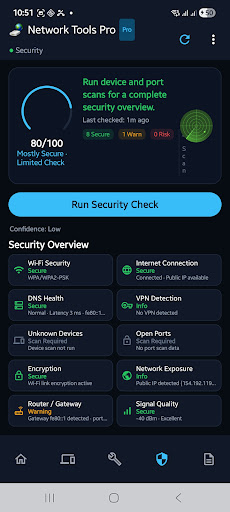
Network Tools Pro is a professional network diagnostics and analysis toolkit designed for IT professionals, network engineers, cybersecurity enthusiasts, system administrators, CCTV installers, and advanced users. Take complete control of your network with powerful tools that help you discover devices, analyze WiFi performance, test connectivity, identify open services, monitor security, and generate detailed reports. Whether you're troubleshooting a slow network, optimizing WiFi coverage, auditing connected devices, or investigating connectivity issues, Network Tools Pro provides the information you need in one modern and easy-to-use application. Key Features Device Discovery • Discover devices connected to your network • Identify routers, computers, cameras, printers, TVs, and IoT devices • View device information and network status • Detect unknown devices • Monitor online and offline devices WiFi Analyzer • Analyze nearby WiFi networks • View signal strength in real-time • Detect channel congestion • Get channel recommendations • Monitor WiFi quality and stability • Support for 2.4 GHz, 5 GHz, and compatible 6 GHz networks Ping & Connectivity Testing • Test connectivity to any IP address or hostname • Measure latency and packet loss • View response statistics • Monitor connection stability • Real-time performance charts Port Scanner • Scan common TCP ports • Identify active services • Discover open ports on network devices • Service recognition for popular protocols • Fast and detailed scanning modes Network Security Overview • Check WiFi encryption status • Detect unknown devices • Review exposed services • Monitor DNS health • VPN detection • Security score and recommendations Network Information • Local IPv4 and IPv6 addresses • Public IP detection • Gateway information • DNS servers • ISP information • Network quality metrics Reports & Export • Generate professional network reports • Export results in PDF, CSV, and JSON formats • Share reports with colleagues or clients • Maintain diagnostic history Designed For • Network Engineers • System Administrators • IT Support Professionals • Cybersecurity Learners • Home Network Users • CCTV and Surveillance Installers • Small Business Owners • Technology Enthusiasts Why Network Tools Pro? ✔ Professional-grade diagnostics ✔ Modern and intuitive interface ✔ Real-time network insights ✔ Comprehensive WiFi analysis ✔ Device discovery and monitoring ✔ Security-focused diagnostics ✔ Detailed reporting capabilities ✔ Fast, accurate, and reliable tools Network Tools Pro combines powerful diagnostics, network visibility, WiFi analysis, security monitoring, and reporting into a single application, helping you understand, troubleshoot, and optimize your network with confidence. Download Network Tools Pro today and take complete control of your network.
More like this
- Top Communication on Google Play by estimated revenue
- Network Tools Pro alternatives
- Network Tools Pro vs Brrro - Secure Messenger
- Network Tools Pro vs Messages Home: Text SMS
- All top charts and categories