Ethicq Vibration Meter
EthicqToolsGoogle PlayEthicq Vibration Meter revenue and downloads, last 30 days
History
Daily readings as we observed them, last 30 days worldwide. Free shows the last 30 days.
One reading so far: history starts Nov 18, 2026, and a trend line appears after the next daily reading.
Monthly history: we have found no public-archive copy of this store page from the last 12 months, so monthly readings start with our own in Nov 2026.
Create a free account to save apps; Pro shows full history.
Chart positions
Where this app ranks on the top free, paid and grossing charts we capture.
Search terms
No search terms read for this app yet. Terms are read from its title and the searches it shows up in, and appear here once ranked.
In-app purchases
Prices
In-app purchase ladder, price changes and paywall terms
No in-app prices recorded yet. We read them from the store listing: either this app sells none, or its listing has not been read yet.
Ratings and reviews
Rating distribution
No rating distribution read yet.
Recent reviews
Marketing
Paid ads, organic videos and onboarding captured for this app.
Paid ads
No Meta, Google or TikTok ads tied to this app yet. We check the public ad libraries daily.
Organic videos
No YouTube, TikTok or Instagram videos tied to this app yet.
Change history
Versions, price changes, rank jumps and listing edits, as we observed them.
Details
- Developer
- Ethicq, 5 apps
- Package
- com.ethicq.vibration
- Category
- Tools
- Price
- Free
- Released
- Oct 30, 2026
- Updated
- Oct 30, 2026
- Version
- 0.1.0
- Size
- -
- Content rating
- Everyone
- Website
- ethicq.ai
- Contact email
- hello@ethicq.ai
- Privacy policy
- ethicq.ai/apps/privacy
- Languages
- Not available
- Charted in
- United States
- First seen
- Nov 18, 2026
- Listing read
- Nov 18, 2026
Show store descriptionShow less
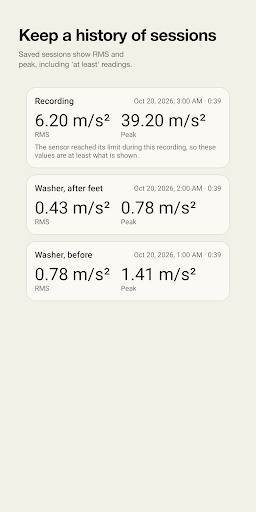
No ads, no trackers, no analytics and no account. All measurement and analysis happens on your phone. The app sends nothing anywhere. Free, with nothing to buy. Ethicq Vibration Meter shows movement of the surface beneath your phone, relative to stillness measured on that phone and surface. These readings are not calibrated measurements. Rest the phone flat on the surface: a loose phone can measure its own bouncing. If the phone moves while the app measures the noise floor, it refuses that calibration. MEASURE See RMS acceleration over the last few seconds in m/s² or g, with the peak beside it. A one-minute strip shows each second's RMS on a fixed, stated scale. Seconds that reach the sensor's limit are marked, and readings at that limit are shown as 'at least' the reported value. Hold freezes the display while measurement and recording continue. When movement rises above the noise floor and is clear enough to resolve, see its dominant frequency. The app shows rpm conversions for one, two and four events per turn without choosing which event produced the frequency. Appliance, engine, floor and fan presets place the frequency alongside common, overlapping ranges as context, not a conclusion. The app shows the delivered sample rate and the highest frequency it can resolve; it does not name frequencies beyond that limit. LONG RECORD Follow a longer trace of the same one-second readings, with gaps shown as breaks. Mark a moment you felt movement. See what happened on a floor or over a machine's long run, without treating the phone as a seismometer. RECORD AND HISTORY Start and stop a session yourself, or set a movement level to start a separate session for each event above it. Recording stops when the app leaves the screen, and the recorded portion is kept. Saved sessions show RMS, peak, date and length. Rename them, delete with undo, or export CSV with one row per second: RMS, peak, sensor-limit flag, dominant frequency, sample rate and gaps. History can be turned off. Recordings remain on the phone until you delete them or the app. CSV leaves the phone only when you choose to share it through the system share sheet. COMPARE Compare Before and After recordings from the same phone. See the change in RMS in m/s² and percent and whether it exceeds what the two noise floors allow. If it does not, the result says 'No clear difference'. The app refuses comparisons across phones, with sensor-limit readings, without a noise floor, or with recordings that are too short. Comparisons are only as fair as placement: use the same phone in the same spot, resting the same way. SETTINGS AND LIMITS Choose m/s² or g, the recording level, History on or off, and light or dark appearance. The More menu includes Settings, Limits, Privacy, Support and About. Available in English, German, Spanish, French, Portuguese and Japanese. A phone on a floor is not a seismometer. It cannot distinguish an earthquake from a passing lorry, detect earthquakes, give a magnitude, or issue an alert or warning before shaking starts. It records movement while it happens. It cannot tell you what is wrong with a machine.
More like this
- Top Tools on Google Play by estimated revenue
- Ethicq Vibration Meter alternatives
- Ethicq Vibration Meter vs FF Sensi Max
- Ethicq Vibration Meter vs Tesor
- All top charts and categories