Floatly: Assistive Touch Ball
David SagerToolsGoogle PlayContains adsFloatly: Assistive Touch Ball revenue and downloads, last 30 days
History
Daily readings as we observed them, last 30 days worldwide. Free shows the last 30 days.
One reading so far: history starts Nov 22, 2026, and a trend line appears after the next daily reading.
Monthly history: we have found no public-archive copy of this store page from the last 12 months, so monthly readings start with our own in Nov 2026.
Create a free account to save apps; Pro shows full history.
Chart positions
Where this app ranks on the top free, paid and grossing charts we capture.
Search terms
No search terms read for this app yet. Terms are read from its title and the searches it shows up in, and appear here once ranked.
In-app purchases
Prices
In-app purchase ladder, price changes and paywall terms
No in-app prices recorded yet. We read them from the store listing: either this app sells none, or its listing has not been read yet.
Ratings and reviews
Rating distribution
No rating distribution read yet.
Recent reviews
Marketing
Paid ads, organic videos and onboarding captured for this app.
Paid ads
No Meta, Google or TikTok ads tied to this app yet. We check the public ad libraries daily.
Organic videos
No YouTube, TikTok or Instagram videos tied to this app yet.
Change history
Versions, price changes, rank jumps and listing edits, as we observed them.
Details
- Developer
- David Sager, 7 apps
- Package
- com.floatly.assistive.touch.floating.ball.button
- Category
- Tools
- Price
- Free
- Released
- Oct 2, 2026
- Updated
- Oct 16, 2026
- Version
- 1.0.0
- Size
- -
- Content rating
- Everyone
- Contact email
- davidsager7530@gmail.com
- Privacy policy
- davidsager-050cc1.netlify.app/policy
- Languages
- Not available
- Charted in
- United States
- First seen
- Nov 22, 2026
- Listing read
- Nov 22, 2026
Show store descriptionShow less
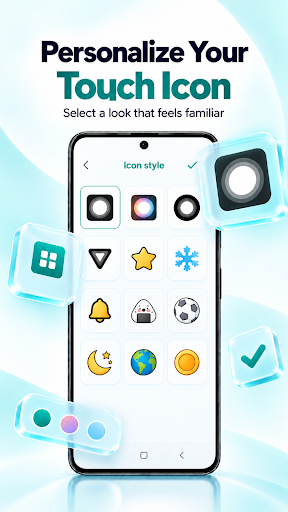
Floatly is an assistive touch app for Android that gathers your everyday controls inside one quick ball. Place the floating button anywhere on the screen and reach Home, Back, Recent apps, screenshot, the screen recorder and a volume panel without pressing a physical key. It helps protect worn hardware buttons, makes one-handed use of a large phone easier and gives you an easy touch shortcut to the settings you open most. ⚪ QUICK BALL OVER EVERY APP The Floatly ball floats above apps and games, so this floating panel of controls stays one tap away and gives you smart control of your phone. Drag it to the spot that suits your thumb and keep using your phone normally around it. 👆 TAP, DOUBLE TAP AND LONG PRESS GESTURES Give each gesture its own job. A single tap can open the menu, a double tap can go Back and a long press can lock the screen. You pick the action for each one. 🧩 CUSTOM MENU WITH MORE THAN 20 ACTIONS Fill the menu slots with the shortcuts you need: virtual home button, Back, Recent apps, Notifications, Screenshot, Lock screen, Screen recorder, Flashlight, Camera, Rotation lock, Screen timeout, Brightness, Volume up and Volume down. Wi-Fi, Bluetooth, Airplane mode, Location, Power, device settings, favorite apps and All apps shortcuts are available too. 🔊 FLOATING VOLUME BUTTON Add a separate volume button to the screen when your hardware volume keys are loose or worn. Tap it to open sliders for media, ringtone, notification, alarm and call volume, and choose which sliders appear in the panel. ☀️ BRIGHTNESS AND SCREEN DARKNESS The same panel adjusts screen brightness, switches auto brightness on or off, and adds a darkness overlay that dims the screen further for comfortable reading at night. 🎬 SCREEN RECORDER Launch the screen recorder from the menu to capture a tutorial, a game session or a bug report. Android asks for screen capture permission before recording begins, and the video is saved as an MP4 file on your device. 📸 SCREENSHOT AND LOCK SCREEN Take a screenshot or lock your phone with one tap instead of a button combination. Both actions work on Android 9 or newer. 🎨 ICON, SIZE AND STYLE Change the icon of the floating button, set its size and transparency, and adjust the button colors and shape so the assistive touch ball matches your wallpaper. 📱 ALL APPS AND FAVORITES Open a list of every installed app or pin favorite apps inside the menu, turning Floatly into a small launcher that works over any screen. 🔒 PRIVACY No account and no sign-in are needed. Your menu layout, gestures and button settings are stored on your device, and screen recordings stay in your device storage. ♿ ACCESSIBILITY SERVICE USE Floatly uses the Android Accessibility Service API to perform the actions you choose: Back, Home, Recent apps, Notifications, Screenshot and Lock screen. These actions run only when you tap them in the menu or trigger them with a gesture. WHAT FLOATLY INCLUDES ✓ Assistive touch quick ball that stays above other apps ✓ Floating button gestures for tap, double tap and long press ✓ Virtual home button, Back and Recent apps in an easy touch menu ✓ Screen recorder that saves MP4 video on your device ✓ Volume button with media, ring, alarm and call sliders ✓ Brightness control and a screen darkness overlay ✓ Assistive touch icon, size, transparency and button style options IMPORTANT NOTE Some manufacturers stop overlay apps in the background to save battery. If the floating button disappears after the screen turns off, allow Floatly to run in the background and exclude it from battery optimization in your device settings. Screenshot and lock screen actions need the Accessibility Service enabled and Android 9 or newer.
More like this
- Top Tools on Google Play by estimated revenue
- Floatly: Assistive Touch Ball alternatives
- Floatly: Assistive Touch Ball vs FF Sensi Max
- Floatly: Assistive Touch Ball vs Tesor
- All top charts and categories