
Post Maker - Fancy Text Art
FreeSharpAppsArt & DesignGoogle PlayContains adsPost Maker - Fancy Text Art revenue and downloads, last 30 days
History
Daily readings as we observed them, last 30 days worldwide. Free shows the last 30 days.
One reading so far: history starts Nov 23, 2026, and a trend line appears after the next daily reading.
Monthly history: we have found no public-archive copy of this store page from the last 12 months, so monthly readings start with our own in Nov 2026.
Create a free account to save apps; Pro shows full history.
Chart positions
Where this app ranks on the top free, paid and grossing charts we capture.
Search terms
No search terms read for this app yet. Terms are read from its title and the searches it shows up in, and appear here once ranked.
In-app purchases
Prices
In-app purchase ladder, price changes and paywall terms
No in-app prices recorded yet. We read them from the store listing: either this app sells none, or its listing has not been read yet.
Ratings and reviews
Rating distribution
Store histogram
2,274 ratings
Recent reviews
Marketing
Paid ads, organic videos and onboarding captured for this app.
Paid ads
No Meta, Google or TikTok ads tied to this app yet. We check the public ad libraries daily.
Organic videos
No YouTube, TikTok or Instagram videos tied to this app yet.
Onboarding
No store screenshots, web funnel or in-app recording captured for this app yet.
Change history
Versions, price changes, rank jumps and listing edits, as we observed them.
Details
- Developer
- FreeSharpApps, 8 apps
- Package
- com.fsapps.post.maker.fancy.textart
- Category
- Art & Design
- Price
- Free
- Released
- Jul 17, 2017
- Updated
- Oct 29, 2026
- Version
- 1.20
- Size
- -
- Content rating
- Everyone
- Website
- picxarts.com
- Contact email
- sharpshineapps@gmail.com
- Privacy policy
- picxarts.com/privacy.php
- Languages
- Not available
- Charted in
- United States
- First seen
- Nov 23, 2026
- Listing read
- Nov 23, 2026
Show store descriptionShow less
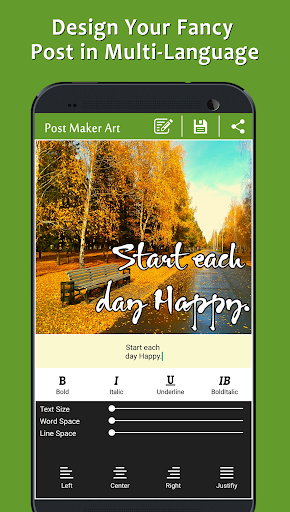
Post Maker makes your Post, message, and Photo stylish and impressive on Photo. Poster Maker App uses awesome backgrounds and lets you put your thoughts on them. Add text to your photos or select one of the many available colored, backgrounds, color photo backgrounds. The app allows you to add incredible text effects quickly and easily and share your work on your favorite social app. Post Maker's amazing poster creator makes your photographs look very different and attractive by not just adding text but also allowing you to customize the text. Poster Maker and Post Maker Features: 👉 Multi-languages supported. 👉 Multi-color for text and backgrounds. 👉 Design Posters with/without a background photo. 👉 Over a huge collection of backgrounds and templates. 👉 Custom art: You can use any Image from your gallery. 👉 Different text fonts,s including calligraphic fonts. 👉 Image Cropping facility, Easily Adjust Text on Photos. 👉 Shade and Stroke of text and their color. 👉 Modify Line space and Letter space. 👉 Outline the color for text according to your choice. 👉 Adjust Text Size and color from the color library. 👉 Rotate text over the x-axis, y-axis, and 360-degree z-axis. 👉 Allow text arrangement to be possible left, right, and center. 👉 No watermarks on images and no logo during creation. 👉 Your Designed Post Art can be saved or shared. 👉 Designed posts saved in SD-Card as "PosterArt" folder. 👉 Smart Gallery Includes Your Designed Posts. 👉 Create square images to fit the profile photo for Facebook, WhatsApp, or post. Post Maker Art Design your photo and cover major Area: ✔ In the University, College, School, or the unemployment line on Photo. ✔ Any place to recommend these memes to friends in funny situations is good. ✔ Use the app Post for social media, advertising, Photo editing, and designing. ✔ Allows to create memes with a photo gallery or camera and laugh for fun. ✔ Quranic verses posts, Al-hadith posts, quotes ✔ Eid greeting cards, Invitation cards, Valentine's Day cards ✔ Wallpapers, Signature maker, Ad campaign, and advertisement. ✔ Poetry posts, Funny posts, creating memes and jokes, and love letters. How to use: 1. Use the Edit Text box. Enter the text for send or poster. 2. Select the Built-in Design that you like for the background. 3: Change the color of the new design (text. text background, or background). 4. Change the text style of the design by changing the font from those available. 5. Set a cool background (built-in textures, solid color, or a custom image). 6. Change other layout settings: margins, aspect ratio, alignment, and save. Done Note: Fonts used: All the fonts used in the app comply with the following open license: If the owner of any fonts included in the app wants to remove them, send us an email, and we will do it as soon as possible. The app is in the development phase; new features are added in new versions. Share Your Art and Post Maker app with your friends and enjoy designing it.




More like this
- Top Art & Design on Google Play by estimated revenue
- Post Maker - Fancy Text Art alternatives
- Post Maker - Fancy Text Art vs PFP Maker: Cat Emoji
- Post Maker - Fancy Text Art vs CDR File Viewer
- All top charts and categories
Similar apps
PFP Maker: Cat EmojiAthenaHotC4.5 ★ (2.3K)
CDR File ViewerV Vorld2.4 ★ (2.3K)
Ai viewerVaibhav singhal2.1 ★ (2.3K)
Anime AI - Photo CreatorRaoulDEV3.3 ★ (2.3K)
MockLab 3Dsmallstack ApS4.7 ★ (2.3K)
Drawing Projector AR - DrawTooArt Hub Studio4.0 ★ (2.3K)
Adult Coloring Book - BloomKoi Apps4.4 ★ (2.3K)
MandelBrowserTomasz Śmigielski4.7 ★ (2.3K)