Auto+
GarminToolsGoogle PlayAuto+ revenue and downloads, last 30 days
How we got this (8 inputs)
- signals
- free, no IAP, on no grossing chart; ratings ÷ age
- method
- free, no IAP, on no grossing chart
- note
- the store lists no in-app purchases: likely monetises outside the store; range runs from $0 to what a comparable app with in-app purchases makes at its median
- likelyLow
- 0
- likelyHigh
- 1863.18
- confidence
- low
- rough
- order of magnitude
- observed days (of 30)
- 5
As of Nov 21, 2026.
How we got this (10 inputs)
- method
- Play install counter: total accepted delta ÷ elapsed days
- measured days
- 2.28
- window
- 2026-11-16..2026-11-19
- step spread
- ×/÷1.58 (the counter moves in steps; narrows with more days)
- likelyLow
- 1092
- likelyHigh
- 2715
- confidence
- medium
- observed days (of 30)
- 5
- measured days
- 2
- scaling
- projected to 30 days from 2.3 measured days (2026-11-16..2026-11-19, counter 164496 → 164644) plus 27.7 modelled days
As of Nov 21, 2026.
How we got this (13 inputs)
- method
- installs in the window (all active on install day) + earlier installers active in the month (published retention ÷ the category's DAU/MAU stickiness) + the retained base of installers older than two years
- downloads per day
- 54.4 (25.37 to 143.03, the published worldwide figure)
- retention
- day 1 / 7 / 30: 23.7% / 6.54% / 2.45% (Android benchmark × 1.17 for the category; AppsFlyer Q3 2024 day-1/7/30 retention, via getstream.io/blog/app-retention-guide (read 2026-11-16); category: OneSignal 2024 day-30 retention by category, via getstream.io/blog/app-retention-guide (read 2026-11-16))
- active days per install
- 6.25 over 730 days (age 4121 days; the curve is used to 730)
- stickiness
- 17.5% DAU/MAU, Productivity & Tools median (MWM DAU/MAU medians, US iOS, May 2026 (mwm.ai/glossary/dau-mau, read 2026-11-16))
- parts
- window installs 1632 (the published 30-day downloads), earlier installers 1284, retained base 5989
- retained base
- 124932 installers older than 730 days (lifetime from the listing's Play installs counter) × 4.79% active in a month (between 1.63%, the benchmark curve held flat, and 14.1%, median disclosed MAU ÷ lifetime installs of Duolingo, Snapchat and Grindr (company filings, data/ground-truth-active-users.csv; chosen on these rows, scored leave-one-product-out)); range ×/÷2 past each (widened after the leave-one-product-out check)
- spread
- downloads ×/÷2.37, retention ×/÷3, tail ×/÷1.58, stickiness ×/÷1.8, retained base ×/÷5.89 (assumptions; not fitted)
- ratings per download (recorded, not used)
- 0.00165
- chart persistence (recorded, not used)
- 0 day(s) on a chart in the window; fewer than 7 live days exist
- tier
- modelled: retention and stickiness are published benchmarks, not measured on this listing
- confidence
- low
- rough
- order of magnitude
As of Nov 21, 2026.
Daily active users
Modelled from this app's downloads and a published retention curve for its store and category, not measured. Read it as an order of magnitude.
History
Daily readings as we observed them, last 30 days worldwide. Free shows the last 30 days.
Downloads per day
Observed by us since Nov 16, 2026.
Revenue per day
Observed by us since Nov 16, 2026.
Ratings (worldwide)
Observed by us since Nov 16, 2026.
Installs, Play counter
Observed by us since Nov 16, 2026.
Monthly history: we have found no public-archive copy of this store page from the last 12 months, so monthly readings start with our own in Nov 2026.
Create a free account to save apps; Pro shows full history.
Chart positions
Where this app ranks on the top free, paid and grossing charts we capture.
Search terms
No search terms read for this app yet. Terms are read from its title and the searches it shows up in, and appear here once ranked.
In-app purchases
Prices
In-app purchase ladder, price changes and paywall terms
No in-app prices recorded yet. We read them from the store listing: either this app sells none, or its listing has not been read yet.
Ratings and reviews
Rating distribution
Store histogram
300 ratings
Recent reviews
Marketing
Paid ads, organic videos and onboarding captured for this app.
Paid ads
No Meta, Google or TikTok ads tied to this app yet. We check the public ad libraries daily.
Organic videos
No YouTube, TikTok or Instagram videos tied to this app yet.
Change history
Versions, price changes, rank jumps and listing edits, as we observed them.
Details
- Developer
- Garmin, 42 apps
- Package
- com.garmin.android.apps.autoplus
- Category
- Tools
- Price
- Free
- Released
- Aug 10, 2015
- Updated
- Dec 16, 2025
- Version
- 1.5.8
- Size
- -
- Content rating
- Everyone
- Website
- www.garmin.com.tw
- Contact email
- AOEM.Service@garmin.com
- Privacy policy
- www.garmin.com/en-US/legal/privacy-statement
- Languages
- Not available
- Charted in
- United States, France
- First seen
- Nov 16, 2026
- Listing read
- Nov 19, 2026
Show store descriptionShow less
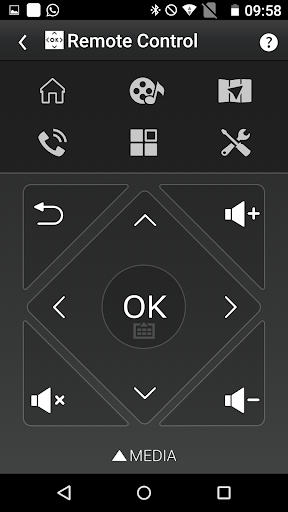
Auto+ is designed to be used with the particular model infotainment system, there are five modes to enhance the connectivity between the infotainment and your smartphone. You can control the infotainment anywhere from your car once the Bluetooth is connected, watch online video streaming, sync your personal calendar, share current locations, last mile destination and project your google map for navigation. Auto+ Remote control mode: Control navigation and media playback with single tap. Switch the Car Launcher with flick of your finger or quickly tap out the POI name instead of clicking the letter on the infotainment system screen. Auto+ Car App mode(*Require MHL cable): Use MHL cable connect infotainment to watch online video streaming, and also to sync your personal calendar via smartphone. Auto+ Share Location mode: Share locations from cell phone and start navigation by infotainment. Auto+ Last mile mode: Use last mile navigation guiding you from your car to destination and back. Auto+ Google map projection: Connect HDMI and then you can able to project your smartphone’s Google map screens on the Infotainment system. You can use Auto+ to: - Control the infotainment system - Control media playback - Control car launcher - Enter text with Keyboard - Watch online video streaming (*Require MHL cable) - Sync up your personal calendar (*Require MHL cable) - Share locations from cell phone - Use last mile navigation guiding you to the destination - Project Google map screens on the Infotainment system. (*Require MHL cable) Auto+ Requirement: - Requires a device with Android 4.2 or later to use Auto+. - Requires a Bluetooth LE connection to the infotainment to use Auto+. Auto+ Quick guide: 1. Install Auto+ 2. Click "Auto+ Connect" on the infotainment, and select Android mode. 3. Launch Auto+ and it will automatically connect. Enjoy our Auto+.
More like this
- Top Tools on Google Play by estimated revenue
- Auto+ alternatives
- Auto+ vs Robot Game Transformation Game
- Auto+ vs CyberHimoya (SamCyber102)
- All top charts and categories
Similar apps
Robot Game Transformation GameBriks Gamez3.2 ★ (327)
CyberHimoya (SamCyber102)Jasur Jiyanbaev
Voice Chat & AI AssistantMagiscan Inc.3.2 ★ (327)
File Recovery & Video RecoveryInse4.2 ★ (327)
Set Contact Photo Set PictureADR Developer4.6 ★ (327)
Onida Smart TV RemoteSmart TV Remote Pro
RepeatCraft: Text RepeaterVikrant Kunwar4.2 ★ (327)
Torque WrenchMIPET Studio2.9 ★ (328)