AnyCopy - Copy Text On Screen
xiaofeidevToolsGoogle PlayIn-app purchasesContains adsAnyCopy - Copy Text On Screen revenue and downloads, last 30 days
How we got this (9 inputs)
- signals
- ratings ÷ age
- ratings/day
- 0.09
- monetisation
- utilities ARPD 0.8; has IAP
- range
- 80% interval from out-of-fold residuals (×1.12 scale, 90 products)
- likelyLow
- 1156.84
- likelyHigh
- 5922.9
- confidence
- low
- rough
- order of magnitude
- observed days (of 30)
- 1
As of Nov 21, 2026.
How we got this (12 inputs)
- signals
- Play installs ÷ age; lifetime→current drift ×/÷4.12 (135278 measured Play counter deltas)
- spread
- measured on downloads ground truth (downloads ground truth: 48 App Store milestones, 33 platform splits, 13 drift points)
- installs
- 16622
- age days
- 510
- bound
- at most the lifetime installs counter (16622) over 30 days: the listing is 510 days old, so its last 30 days cannot hold more installs than it ever had
- range scale
- ×0.88 (coverage scale on 9 ground-truth rows; publication is decided before it)
- likelyLow
- 772
- likelyHigh
- 2842
- confidence
- medium
- observed days (of 30)
- 1
- measured days
- 0
- scaling
- observed days, scaled to 30
As of Nov 21, 2026.
How we got this (12 inputs)
- method
- installs in the window (all active on install day) + earlier installers active in the month (published retention ÷ the category's DAU/MAU stickiness) + the retained base of installers older than two years
- downloads per day
- 49.5 (14.27 to 167.87, the published worldwide figure)
- retention
- day 1 / 7 / 30: 23.7% / 6.54% / 2.45% (Android benchmark × 1.17 for the category; AppsFlyer Q3 2024 day-1/7/30 retention, via getstream.io/blog/app-retention-guide (read 2026-11-16); category: OneSignal 2024 day-30 retention by category, via getstream.io/blog/app-retention-guide (read 2026-11-16))
- active days per install
- 5.55 over 510 days
- stickiness
- 17.5% DAU/MAU, Productivity & Tools median (MWM DAU/MAU medians, US iOS, May 2026 (mwm.ai/glossary/dau-mau, read 2026-11-16))
- parts
- window installs 1485 (the published 30-day downloads), earlier installers 969, retained base 0
- spread
- downloads ×/÷3.43, retention ×/÷3, tail ×/÷1.53, stickiness ×/÷1.8 (assumptions; not fitted)
- ratings per download (recorded, not used)
- 0.0017
- chart persistence (recorded, not used)
- 0 day(s) on a chart in the window; fewer than 7 live days exist
- tier
- modelled: retention and stickiness are published benchmarks, not measured on this listing
- confidence
- low
- rough
- order of magnitude
As of Nov 21, 2026.
Daily active users
Modelled from this app's downloads and a published retention curve for its store and category, not measured. Read it as an order of magnitude.
History
Daily readings as we observed them, last 30 days worldwide. Free shows the last 30 days.
One reading so far: history starts Nov 21, 2026, and a trend line appears after the next daily reading.
Monthly history: we have found no public-archive copy of this store page from the last 12 months, so monthly readings start with our own in Nov 2026.
Create a free account to save apps; Pro shows full history.
Chart positions
Where this app ranks on the top free, paid and grossing charts we capture.
Search terms
No search terms read for this app yet. Terms are read from its title and the searches it shows up in, and appear here once ranked.
In-app purchases
Google Play shows one in-app price range per storefront, not each product's price. The range over time, as the store published it:
United States, USD
- $2.99 per itemNov 21, 2026 to now
Prices
In-app purchase ladder, price changes and paywall terms
No itemised in-app prices yet. Google Play publishes only the price range shown above, not each product; the individual products and their prices have not been read.
Ratings and reviews
Rating distribution
Store histogram
42 ratings
Recent reviews
Marketing
Paid ads, organic videos and onboarding captured for this app.
Paid ads
No Meta, Google or TikTok ads tied to this app yet. We check the public ad libraries daily.
Organic videos
No YouTube, TikTok or Instagram videos tied to this app yet.
Change history
Versions, price changes, rank jumps and listing edits, as we observed them.
Details
- Developer
- xiaofeidev, 6 apps
- Package
- com.github.xiaofeidev.omnicopy
- Category
- Tools
- Price
- Free
- Released
- Jun 29, 2025
- Updated
- Aug 29, 2026
- Version
- 2.3.0
- Size
- -
- Content rating
- Everyone
- Website
- flash-c1566.web.app
- Contact email
- xiaofei.dev@gmail.com
- Privacy policy
- anycopy-47c97.web.app/
- Languages
- Not available
- Charted in
- United States
- First seen
- Nov 21, 2026
- Listing read
- Nov 21, 2026
Show store descriptionShow less
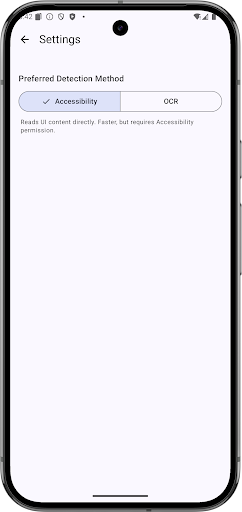
AnyCopy is the simple and powerful copy text on screen app that lets you copy any text on screen from any app, even when selection is blocked. Use universal copy (global copy) for instant selection, or switch to on-device OCR to copy text on image offline. Everything runs on your device for privacy, speed, and reliability. Why AnyCopy - Copy text on any app: social media, chat, shopping, news, maps, video, email, and more. - Two modes, zero friction: 1) Accessibility (Universal Copy): fast, battery-friendly, ideal for well-structured apps. 2) OCR (On‑device, Offline): extract text from images, photos, screenshots, and video frames. - Privacy by design: processing stays offline on your phone. No cloud upload. - Works anywhere: copy anything on screen and copy anywhere with a clean, intuitive overlay. - Clipboard first: copy to clipboard, then share, search, or save in one tap. Detect and copy link with ease. What you can do - Instantly copy any text on screen offline when an app blocks selection. - Copy product specs from shopping apps, comments from social feeds, or messages from chat apps. - Copy text on image offline: posters, scanned documents, receipts, slides, whiteboards, and photos. - Grab addresses, emails, codes, and copy link items from mixed content. - Multilingual OCR on device (no internet needed). You can copy text on screen bangla along with many other languages. How it works 1) Install and open AnyCopy. 2) Enable Accessibility Service (for universal copy) and grant Screen Capture permission (for OCR). 3) Tap the floating overlay to activate universal copy or switch to OCR when needed. 4) Select the text area: quick-select with Accessibility or box-select with OCR. 5) Copy to clipboard, then share or search instantly. Two modes in detail - Accessibility (Universal Copy / Global Copy) - Best for structured apps and standard UI text. - Fast, reliable, and battery-efficient. - Ideal when you want to copy text on app screens without taking screenshots. - OCR (On‑device, Offline) - Best for images, pictures, photos, scanned PDFs, and dynamic or canvas-based text. - Works fully offline on your device to protect privacy. - Great for copy any text on screen that Accessibility cannot reach. Designed for productivity - Minimal taps from detection to copy to clipboard. - Clean overlay with clear actions: copy, share, select‑again. - Smart handling of long text; preserves line breaks when possible. - Works seamlessly whether you need to copy any text or copy anything on screen just once or all day. Tips to get the best results - Start with Accessibility mode for speed. If the app blocks selection, switch to OCR. - For OCR, zoom the target area and keep it within the selection box for best accuracy. - Use OCR for posters, images, or when text looks like part of a picture. - If a link is present, AnyCopy helps you copy link for quick sharing or opening. Permissions and privacy - Accessibility Service: used to read on‑screen text for universal copy and to help you select it quickly. We do not collect or share your personal data. - Screen Capture (for OCR): used to analyze the selected area of the screen and extract text entirely on device. No screenshots are uploaded; text recognition is processed offline. Who it’s for - Students capturing quotes and notes from e‑books, slides, or learning apps. - Professionals collecting snippets from emails, docs, or project tools. - Shoppers copying product details, specs, coupons, and tracking information. - Social media users copying comments, bios, descriptions, and captions. - Anyone who needs a practical, reliable copy text on screen offline tool. Search-friendly capabilities (naturally described) - Need a copy text on screen offline solution? AnyCopy runs on‑device with no cloud. - Want to copy text on any app that blocks selection? Try the universal copy mode. - Prefer a copy text on app utility that is simple to use? Tap the overlay and select.
More like this
- Top Tools on Google Play by estimated revenue
- AnyCopy - Copy Text On Screen alternatives
- AnyCopy - Copy Text On Screen vs Rail Locator
- AnyCopy - Copy Text On Screen vs MakeApp for Blebricks
- All top charts and categories
Similar apps
Rail LocatorTracket Ltd3.1 ★ (43)
MakeApp for BlebricksBleb Technology3.9 ★ (43)
Remote for Onkyo / IntegraLuca Ziegler3.8 ★ (43)
PLAYBULB XPLAYBULB2.0 ★ (43)
Password Manager AuthenticatorStarnest JSC3.2 ★ (43)
PhotoCleaner - Storage CleanerAnyAi3.4 ★ (43)
Sport Digital Edge WatchFacejigu watchface4.7 ★ (43)
Sojourner Memoakai_t3.0 ★ (43)