
Screenshot Capture & Editor
UtilitySoft LabsToolsGoogle PlayIn-app purchasesScreenshot Capture & Editor revenue and downloads, last 30 days
History
Daily readings as we observed them, last 30 days worldwide. Free shows the last 30 days.
One reading so far: history starts Nov 23, 2026, and a trend line appears after the next daily reading.
Monthly history: we have found no public-archive copy of this store page from the last 12 months, so monthly readings start with our own in Nov 2026.
Create a free account to save apps; Pro shows full history.
Chart positions
Where this app ranks on the top free, paid and grossing charts we capture.
Search terms
No search terms read for this app yet. Terms are read from its title and the searches it shows up in, and appear here once ranked.
In-app purchases
Google Play shows one in-app price range per storefront, not each product's price. The range over time, as the store published it:
United States, USD
- $0.99 - $39.99 per itemNov 23, 2026 to now
Prices
In-app purchase ladder, price changes and paywall terms
No itemised in-app prices yet. Google Play publishes only the price range shown above, not each product; the individual products and their prices have not been read.
Ratings and reviews
Rating distribution
Store histogram
916 ratings
Recent reviews
Marketing
Paid ads, organic videos and onboarding captured for this app.
Paid ads
No Meta, Google or TikTok ads tied to this app yet. We check the public ad libraries daily.
Organic videos
No YouTube, TikTok or Instagram videos tied to this app yet.
Onboarding
No store screenshots, web funnel or in-app recording captured for this app yet.
Change history
Versions, price changes, rank jumps and listing edits, as we observed them.
Details
- Developer
- UtilitySoft Labs, 2 apps
- Package
- com.golemapps.screenshotLite
- Category
- Tools
- Price
- Free
- Released
- Nov 13, 2024
- Updated
- Nov 13, 2026
- Version
- 3.8.1
- Size
- -
- Content rating
- Everyone
- Website
- utilitysoftlabs.com
- Contact email
- support@utilitysoftlabs.com
- Languages
- Not available
- Charted in
- United States
- First seen
- Nov 23, 2026
- Listing read
- Nov 23, 2026
Show store descriptionShow less
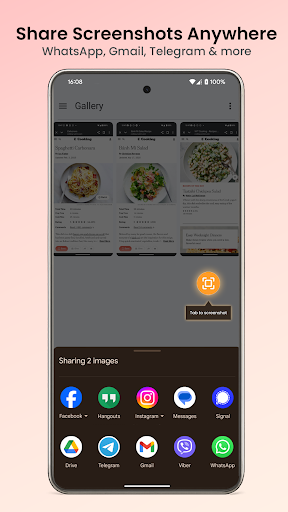
Screenshot Capture & Editor — the screenshot app that does it all! Need a fast screenshot editor to capture your screen and edit it right away? Screenshot Capture & Editor is a lightweight screen capture tool — take screenshots, capture full web pages, snap Google Maps, stitch images and edit them in one tap. 🔥 Why choose Screenshot Capture & Editor? ✔ One-tap capture — floating button, notification panel, or shake to capture ✔ Web page capture — save full or partial web pages as images ✔ Google Maps screenshot — capture map areas with high detail ✔ Image stitching — combine multiple photos into one long screenshot ✔ Powerful photo editor — crop, text, emoji, filters, shapes, draw ✔ Instant sharing — WhatsApp, Telegram, Drive, Email ✔ Smart gallery — auto-save and organize by date ✔ Dark mode — system, light, or dark theme ✔ Lightweight & fast — small size, saves battery 📷 Capture your screen Web pages, articles, maps, documents — just tap the floating button or shake your phone. Works on all Android devices (8.0+), no root required. 🔘 Multiple capture triggers Choose the way that works best for you: 🔹 Floating button — always-on overlay, tap to capture 🔹 Notification panel — quick toggle from the status bar 🔹 Shake to capture — just shake your phone, no tapping needed 🌐 Web page capture — scrolling screenshot Save any web page as a high-quality scrolling screenshot — full page or just the part you need: 🔹 Full page capture — entire web page from top to bottom 🔹 Partial capture — select and save only the section you want 🔹 No browser extensions needed — just paste the URL Perfect for saving articles, receipts, product pages, and online documents. 🗺️ Google Maps screenshot Capture detailed map screenshots with ease: 🔹 Save routes, directions, and locations 🔹 High-resolution map images 🔹 Share map screenshots with friends, colleagues, or clients Ideal for travel planning, delivery routes, and location sharing. 🖼️ Image stitching — long screenshot Pick multiple screenshots or photos and combine them into one long screenshot: 🔹 Stitch images vertically or horizontally 🔹 Great for step-by-step guides or before/after comparisons ✏️ Photo editor — edit like a pro Make your screenshot photos clear and informative: 🔹 Crop & resize — focus on what matters 🔹 Text & annotations — add notes directly 🔹 Emoji stickers — mark up with visual cues 🔹 Filters — apply effects to enhance your screenshot 🔹 Shapes & drawing — arrows, circles, lines, rectangles 🔹 Undo & redo — fix mistakes instantly 📤 Share in seconds Send screenshots instantly via: ✔ WhatsApp, Telegram, Messenger ✔ Instagram, Facebook, X (Twitter) ✔ Google Drive, Dropbox ✔ Email or save locally 📁 Organized screenshot gallery Every screenshot is saved automatically and sorted by date for quick access. No clutter, no searching through your photo gallery. ⚡ Performance first – App size under 5 MB – No background processes – Runs smoothly on any device – No root required – No account required 👥 Perfect for: 🎓 Students — save lecture slides, notes, study materials 💼 Professionals — document tasks, annotate reports, capture receipts 🗺️ Travelers — save maps, routes, hotel confirmations 🛒 Online shoppers — keep order confirmations and price comparisons 📲 Download Screenshot Capture & Editor now! The fastest way to capture, edit, and share your screen. Take screenshots like a pro — lightweight, powerful, and free!




More like this
- Top Tools on Google Play by estimated revenue
- Screenshot Capture & Editor alternatives
- Screenshot Capture & Editor vs Video Enhancer Pro: Brightness
- Screenshot Capture & Editor vs Digital Compass: Map & GPS
- All top charts and categories
Similar apps
Video Enhancer Pro: BrightnessCloudEx Inc.3.9 ★ (919)
Digital Compass: Map & GPSRV AppStudios4.6 ★ (919)
MindSootheMO YOUNG LIMITED4.5 ★ (920)
Spreadsheet app for Android深圳市前海乐游原网络技术有限公司4.4 ★ (920)
Truth Search People FinderAI PEOPLE SEARCH5.0 ★ (918)
Every Proxy Network BridgeGorilla Software LLP3.6 ★ (918)
E-Invoice QR Reader KSAPOSBANK TECHNOLOGY3.7 ★ (918)
EasyBBQCOWACO2.3 ★ (917)