
FocusFace Productivity App
GPhoenix StudioProductivityGoogle PlayIn-app purchasesContains adsFocusFace Productivity App revenue and downloads, last 30 days
How we got this (10 inputs)
- method
- Play install counter: total accepted delta ÷ elapsed days
- measured days
- 5.02
- window
- 2026-11-16..2026-11-21
- step spread
- ×/÷1.36 (the counter moves in steps; narrows with more days)
- likelyLow
- 33
- likelyHigh
- 102
- confidence
- medium
- observed days (of 30)
- 5
- measured days
- 1
- scaling
- projected to 30 days from 5.0 measured days (2026-11-16..2026-11-21, counter 482 → 487) plus 25.0 modelled days
As of Nov 21, 2026.
How we got this (11 inputs)
- method
- installs in the window (all active on install day) + earlier installers active in the month (published retention ÷ the category's DAU/MAU stickiness) + the retained base of installers older than two years
- downloads per day
- 1.93 (0.7 to 5.6, the published worldwide figure)
- retention
- day 1 / 7 / 30: 24.81% / 6.84% / 2.57% (Android benchmark × 1.22 for the category; AppsFlyer Q3 2024 day-1/7/30 retention, via getstream.io/blog/app-retention-guide (read 2026-11-16); category: OneSignal 2024 day-30 retention by category, via getstream.io/blog/app-retention-guide (read 2026-11-16))
- active days per install
- 4.57 over 253 days
- stickiness
- 17.5% DAU/MAU, Productivity & Tools median (MWM DAU/MAU medians, US iOS, May 2026 (mwm.ai/glossary/dau-mau, read 2026-11-16))
- parts
- window installs 58 (the published 30-day downloads), earlier installers 26, retained base 0
- spread
- downloads ×/÷2.83, retention ×/÷3, tail ×/÷1.43, stickiness ×/÷1.8 (assumptions; not fitted)
- chart persistence (recorded, not used)
- 0 day(s) on a chart in the window; fewer than 7 live days exist
- tier
- modelled: retention and stickiness are published benchmarks, not measured on this listing
- confidence
- low
- rough
- order of magnitude
As of Nov 21, 2026.
Daily active users
Modelled from this app's downloads and a published retention curve for its store and category, not measured. Read it as an order of magnitude.
History
Daily readings as we observed them, last 30 days worldwide. Free shows the last 30 days.
Downloads per day
Observed by us since Nov 16, 2026.
Installs, Play counter
Observed by us since Nov 16, 2026.
Monthly history: we have found no public-archive copy of this store page from the last 12 months, so monthly readings start with our own in Nov 2026.
Create a free account to save apps; Pro shows full history.
Chart positions
Where this app ranks on the top free, paid and grossing charts we capture.
Search terms
No search terms read for this app yet. Terms are read from its title and the searches it shows up in, and appear here once ranked.
In-app purchases
Google Play shows one in-app price range per storefront, not each product's price. The range over time, as the store published it:
United States, USD
- $2.49 per itemNov 22, 2026 to now
Prices
In-app purchase ladder, price changes and paywall terms
No itemised in-app prices yet. Google Play publishes only the price range shown above, not each product; the individual products and their prices have not been read.
Ratings and reviews
Rating distribution
No rating distribution read yet.
Recent reviews
Marketing
Paid ads, organic videos and onboarding captured for this app.
Paid ads
No Meta, Google or TikTok ads tied to this app yet. We check the public ad libraries daily.
Organic videos
No YouTube, TikTok or Instagram videos tied to this app yet.
Onboarding
No store screenshots, web funnel or in-app recording captured for this app yet.
Change history
Versions, price changes, rank jumps and listing edits, as we observed them.
Details
- Developer
- GPhoenix Studio, 18 apps
- Package
- com.gphoenix.productivity
- Category
- Productivity
- Price
- Free
- Released
- Mar 13, 2026
- Updated
- May 25, 2026
- Version
- Not available
- Size
- -
- Content rating
- Everyone
- Contact email
- hobbyistcommunity@gmail.com
- Privacy policy
- gphoenixapps.online/privacy-policy-page
- Languages
- Not available
- Charted in
- United States
- First seen
- Nov 16, 2026
- Listing read
- Nov 22, 2026
Show store descriptionShow less
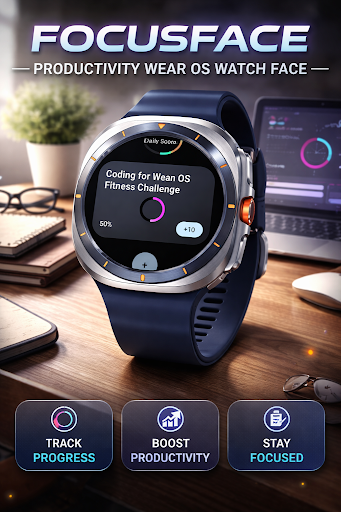
FocusFace: Productivity Watch Face/Wear App & Tracker Supercharge your workflow and master your time directly from your wrist. Are you looking to eliminate distractions and get more done? FocusFace is not just a stylish Wear OS app—it’s a powerful productivity ecosystem paired with a comprehensive mobile companion app. Designed for professionals, students, developers, and goal-setters, FocusFace helps you track tasks, monitor your daily efficiency, and stay locked in on what matters most. Transform your smartwatch into your personal accountability partner. With a quick glance at your wrist, you can check your "Daily Score," track specific activities, and ensure you are making progress throughout the day. 🔥 Key Features: ⌚ Smart Wear OS Watch Face /Wear App Daily Productivity Score: See your real-time productivity percentage at a glance right on your home screen. Active Task Tracking: Log time for specific activities directly from your watch (e.g., "Coding," "Reading," "Deep Work"). Quick Add Buttons: Easily add intervals of time or points (+10) to ongoing tasks without breaking your workflow. Clean & Modern Design: A sleek, professional aesthetic that looks great in the office, at the coffee shop, or at home. 📱 Comprehensive Mobile Dashboard ☀️/🌙 Dark & Light Mode Toggle: Customize your viewing experience with a single tap! Easily switch between a sleek dark mode for late-night focus sessions or a crisp light mode for daytime visibility. Seamless Syncing: Your watch data instantly syncs with the FocusFace mobile app. Detailed Activity Breakdown: View progress bars for individual tasks to see exactly where your time is going. Overall Productivity Metrics: Get a bird's-eye view of your daily efficiency with easy-to-read circular graphs. Built-in Stopwatch & Timers: Track precise focus sessions from your phone. In-Depth Stats & Manager: Review historical data, manage your task categories, and optimize your routine over time. 🚀 Why Choose FocusFace? Track Progress: Move away from guessing and start measuring exactly how productive you are. Stay Focused: Keep your goals visible on your wrist to prevent doom-scrolling and procrastination. Boost Efficiency: Identify time-wasting habits and allocate your energy to high-value tasks. Compatibility: Requires a smartwatch running Wear OS and a paired Android smartphone to unlock the full potential of the mobile dashboard. Stop wondering where your day went. Download FocusFace today and take control of your time!




More like this
- Top Productivity on Google Play by estimated revenue
- FocusFace Productivity App alternatives
- FocusFace Productivity App vs PDF Reader: View Documents
- FocusFace Productivity App vs Smart Transfer: Copy My Data
- All top charts and categories
Similar apps
PDF Reader: View DocumentsCrow Drama Studio
Smart Transfer: Copy My DataDigiGen Apps
Smart Switch App File TransferCoddeX Studio
AI Voice Changer: TTSMatechmobile Global
AI Translate: Voice & CameraSING HUI PTE. LTD.
PDF Reader: Converter & EditorStyle Of Me - VTN Global
Clean TurboFreeTree Studio
PDF Reader & Document ViewerOSIAS CAPITAL