
FinMate
MovaMeToolsGoogle PlayFinMate revenue and downloads, last 30 days
History
Daily readings as we observed them, last 30 days worldwide. Free shows the last 30 days.
One reading so far: history starts Nov 23, 2026, and a trend line appears after the next daily reading.
Monthly history: we have found no public-archive copy of this store page from the last 12 months, so monthly readings start with our own in Nov 2026.
Create a free account to save apps; Pro shows full history.
Chart positions
Where this app ranks on the top free, paid and grossing charts we capture.
Search terms
No search terms read for this app yet. Terms are read from its title and the searches it shows up in, and appear here once ranked.
In-app purchases
Prices
In-app purchase ladder, price changes and paywall terms
No in-app prices recorded yet. We read them from the store listing: either this app sells none, or its listing has not been read yet.
Ratings and reviews
Rating distribution
No rating distribution read yet.
Recent reviews
Marketing
Paid ads, organic videos and onboarding captured for this app.
Paid ads
No Meta, Google or TikTok ads tied to this app yet. We check the public ad libraries daily.
Organic videos
No YouTube, TikTok or Instagram videos tied to this app yet.
Onboarding
No store screenshots, web funnel or in-app recording captured for this app yet.
Change history
Versions, price changes, rank jumps and listing edits, as we observed them.
Details
- Developer
- MovaMe, 5 apps
- Package
- com.heliostech.finmate
- Category
- Tools
- Price
- Free
- Released
- Nov 12, 2026
- Updated
- Nov 12, 2026
- Version
- 1.0.3
- Size
- -
- Content rating
- Everyone
- Website
- Not available
- Contact email
- movameee@gmail.com
- Privacy policy
- keraladrawresults.xyz/finmate-privacy-policy.html
- Languages
- Not available
- Charted in
- United States
- First seen
- Nov 23, 2026
- Listing read
- Nov 23, 2026
Show store descriptionShow less
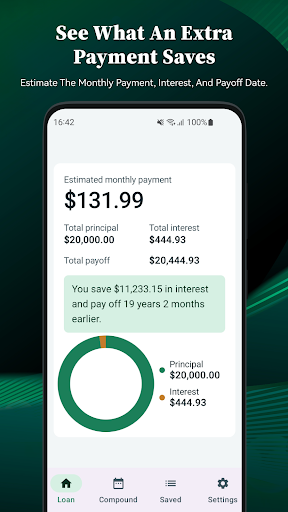
Plan loan payments and explore compound growth with a simple, offline calculator. Whether you are estimating a monthly payment, checking the impact of extra repayments, or projecting a savings balance, you can review the numbers clearly and keep your plans on your own device. **LOAN & MORTGAGE CALCULATOR** Estimate your monthly principal and interest payment by entering a loan amount, annual interest rate, and repayment term. Adjust the inputs to explore different borrowing scenarios and see how the rate or loan length affects your payment and total interest. For mortgage planning, you can include annual property tax and home insurance in your estimated monthly cost. Review these costs alongside principal and interest for a clearer breakdown of your estimate. **EXPLORE EXTRA PAYMENTS** See how paying extra toward your principal each month could change your repayment plan. Compare the estimated total interest and payoff time with and without extra payments to understand the potential effect of a larger monthly payment. **DETAILED AMORTIZATION SCHEDULE** Look beyond the monthly payment with a repayment schedule available by month or by year. Review how each payment is split between principal and interest, and follow the remaining loan balance as it decreases over time. **COMPOUND INTEREST & SAVINGS PROJECTIONS** Explore how a starting balance and regular monthly contributions could grow over time. Enter your initial amount, monthly contribution, nominal annual interest rate, and projection period, then choose monthly, annual, or daily compounding. View the projected future balance, total contributions, and calculated interest. A year-by-year breakdown helps you follow the progression and distinguish the money you contribute from the growth generated by compounding. Projections use your chosen assumptions. A constant rate is a calculation scenario, not a prediction or a guarantee of future investment returns. **SAVE AND COMPARE YOUR PLANS** Save estimates locally on your device so you can return to them later and load their inputs back into the calculator. Compare two saved plans of the same type side by side. Explore different loan terms, extra payment amounts, contribution levels, or interest rates without relying on memory or switching between separate notes. **SIMPLE DISPLAY OPTIONS** Choose the display settings that suit you: • Show $, €, £, ¥, or no currency symbol. • Display amounts with 0 or 2 decimal places. • Use light mode, dark mode, or your device’s system theme. Currency symbols are for display only. The app does not convert currencies or provide exchange rates. **OFFLINE AND PRIVATE** All calculations run locally on your device. No account or internet connection is required, and your inputs and saved estimates are not sent to a server. Your saved plans stay on your device, giving you a straightforward way to explore financial scenarios without creating an online profile. **IMPORTANT INFORMATION** This app is a financial calculation tool for educational and planning purposes only. It does not provide loans, credit, or financial advice, and it does not connect users with lenders. Results are estimates based on the values you enter and the calculator’s assumptions. Actual payments, interest charges, and payoff dates may differ because of lender rules, payment timing, rounding, fees, or other costs. Property tax and insurance estimates may not include every expense associated with homeownership. Savings and investment projections are hypothetical and do not guarantee future results. Unless explicitly included, estimates do not account for taxes, fees, inflation, or changes in interest rates or investment returns.



More like this
- Top Tools on Google Play by estimated revenue
- FinMate alternatives
- FinMate vs FF Sensi Max
- FinMate vs Tesor
- All top charts and categories


