
AutoBarcodeLite
joaomgcdPersonalizationGoogle PlayContains adsAutoBarcodeLite revenue and downloads, last 30 days
History
Daily readings as we observed them, last 30 days worldwide. Free shows the last 30 days.
One reading so far: history starts Nov 23, 2026, and a trend line appears after the next daily reading.
Monthly history: we have found no public-archive copy of this store page from the last 12 months, so monthly readings start with our own in Nov 2026.
Create a free account to save apps; Pro shows full history.
Chart positions
Where this app ranks on the top free, paid and grossing charts we capture.
Search terms
No search terms read for this app yet. Terms are read from its title and the searches it shows up in, and appear here once ranked.
In-app purchases
Prices
In-app purchase ladder, price changes and paywall terms
No in-app prices recorded yet. We read them from the store listing: either this app sells none, or its listing has not been read yet.
Ratings and reviews
Rating distribution
Store histogram
103 ratings
Recent reviews
Marketing
Paid ads, organic videos and onboarding captured for this app.
Paid ads
No Meta, Google or TikTok ads tied to this app yet. We check the public ad libraries daily.
Organic videos
No YouTube, TikTok or Instagram videos tied to this app yet.
Onboarding
No store screenshots, web funnel or in-app recording captured for this app yet.
Change history
Versions, price changes, rank jumps and listing edits, as we observed them.
Details
- Developer
- joaomgcd, 19 apps
- Package
- com.joaomgcd.barcode.lite
- Category
- Personalization
- Price
- Free
- Released
- Feb 7, 2012
- Updated
- Apr 19, 2023
- Version
- 1.3.5
- Size
- -
- Content rating
- Everyone
- Website
- joaoapps.com
- Contact email
- support@joaoapps.com
- Privacy policy
- joaoapps.com/privacy-policy-google-play-games/
- Languages
- Not available
- Charted in
- United States
- First seen
- Nov 23, 2026
- Listing read
- Nov 23, 2026
Show store descriptionShow less
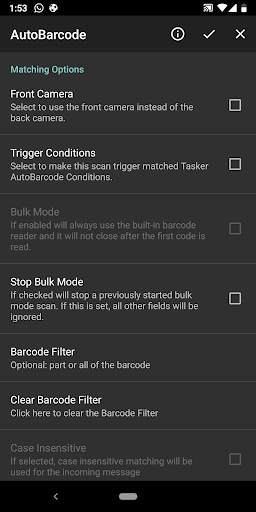
Automate your phone with QR codes! AutoBarcode is a Tasker plugin that allows you to completely automate your phone with QR Codes. Simply scan a code (generate one here http://goo.gl/JBLg7 ) and react to it in Tasker any way you like! (WARNING: TASKER IS AN ANDROID APP THAT AUTOMATES TASKS ON YOUR PHONE. THIS FEATURE ONLY WORKS WITH TASKER INSTALLED) Note: AutoBarcode uses a Barcode Scanner installed on your phone. If no compatible scanner is found, it will open Android Market so you can download "Barcode Scanner" ( https://market.android.com/details?id=com.google.zxing.client.android ) for free. Very simple example: open Tasker and create a new profile with an AutoBarcode condition (State->plugin->AutoBarcode). To start out, check the Event checkbox and leave everything else blank. Then associate it with a task that simply flashes "Hello World!". After this run the AutoBarcode app and scan any QR Code with it. This should make "Hello World!" flash on your screen! With AutoBarcode you have advanced matching options and even a flexible command system (see how it works here: http://goo.gl/PRQas) that allows you to truly personalize your experience. Here are some examples on how you can use AutoBarcode: - AutoBarcode is the Quickest way to let Tasker know you're at a specific place if there's no wifi or you don't want or can't use wifi (work, car, specific bedroom in your home). For example, have a QR code ready on your car's dashboard. When you get there, just scan the code, and Tasker can start playing your favorite songs with the volume turned way up, while opening google maps to show you the way. - Create QR codes that enable or disable specific settings on your phone: turn off sound, enable blutooth, enable wifi when you get to work, etc.. - Use with AutoShortcut ( https://market.android.com/details?id=com.joaomgcd.autoshortcut ) and Winamp ( https://market.android.com/details?id=com.nullsoft.winamp ) to have fast access to your favorite playlists: have specific playlists at work, in your living room, in your bedroom, in your kid's bedrooms, in your car, etc - Suprise your friends with your talking phone: generate QR codes and follow the instructions here: http://goo.gl/JBLg7 - Create a Scavenger hunt for your kids by spreading out QR codes with hints and clues on how to find the next one, by playing songs, videos, opening popups or webpages in tasker (or anything else you want!) - Propose marriage in a cool and geeky way By combining the power of QR Codes and Tasker you can do this and much, much more. Follow our Community page to always get the latest updates on AutoBarcode: https://joaoapps.com/communities/redirect.html?p=autoapps If anything goes wrong or if you have any suggestions, please remember that Developers can't respond to Market comments. If you have problems using AutoBarcode, just drop me an email. Lite version limited to 3 character scans.


More like this
- Top Personalization on Google Play by estimated revenue
- AutoBarcodeLite alternatives
- AutoBarcodeLite vs Flowers Frame - Seasonal
- AutoBarcodeLite vs Fonts Keyboard
- All top charts and categories
Similar apps
Flowers Frame - SeasonalRECREATIVE Watch Faces4.0 ★ (115)
Fonts KeyboardFindMe Tracker Team4.3 ★ (115)
Music Wallpaper 2025Swidr inc3.8 ★ (115)
Slanted! Watch FaceMuLambda4.2 ★ (115)
Circuit Board Live Wallpaperlivephoto3.9 ★ (115)
Glance AI LockscreenGlance InMobi Pte. Ltd.2.6 ★ (115)
Iride UI is Dark - Icon PackFraom Design4.5 ★ (115)
Easter Eggs Keyboard ThemeStylish Emoji keyboard Theme4.8 ★ (115)