
Quick Control Center: OS Style
KEE STDPersonalizationGoogle PlayContains adsQuick Control Center: OS Style revenue and downloads, last 30 days
How we got this (13 inputs)
- signals
- Play installs ÷ age; lifetime→current drift ×/÷4.12 (135278 measured Play counter deltas)
- spread
- measured on downloads ground truth (downloads ground truth: 48 App Store milestones, 33 platform splits, 13 drift points)
- installs
- 640
- age days
- 185
- note
- install counter moved once in 1.82 day(s); one step can hold several days of installs, so it is not read as a daily rate yet
- bound
- at most the lifetime installs counter (640) over 30 days: the listing is 185 days old, so its last 30 days cannot hold more installs than it ever had
- range scale
- ×0.88 (coverage scale on 9 ground-truth rows; publication is decided before it)
- likelyLow
- 84
- likelyHigh
- 270
- confidence
- medium
- observed days (of 30)
- 2
- measured days
- 0
- scaling
- observed days, scaled to 30
As of Nov 21, 2026.
How we got this (11 inputs)
- method
- installs in the window (all active on install day) + earlier installers active in the month (published retention ÷ the category's DAU/MAU stickiness) + the retained base of installers older than two years
- downloads per day
- 5.13 (1.6 to 13.7, the published worldwide figure)
- retention
- day 1 / 7 / 30: 20.3% / 5.6% / 2.1% (Android benchmark × 1 for the category; AppsFlyer Q3 2024 day-1/7/30 retention, via getstream.io/blog/app-retention-guide (read 2026-11-16); category: OneSignal 2024 day-30 retention by category, via getstream.io/blog/app-retention-guide (read 2026-11-16))
- active days per install
- 3.45 over 185 days
- stickiness
- 15% DAU/MAU, Media & Entertainment median (MWM DAU/MAU medians, US iOS, May 2026 (mwm.ai/glossary/dau-mau, read 2026-11-16))
- parts
- window installs 154 (the published 30-day downloads), earlier installers 54, retained base 0
- spread
- downloads ×/÷2.93, retention ×/÷3, tail ×/÷1.37, stickiness ×/÷1.8 (assumptions; not fitted)
- chart persistence (recorded, not used)
- 0 day(s) on a chart in the window; fewer than 7 live days exist
- tier
- modelled: retention and stickiness are published benchmarks, not measured on this listing
- confidence
- low
- rough
- order of magnitude
As of Nov 21, 2026.
Daily active users
Modelled from this app's downloads and a published retention curve for its store and category, not measured. Read it as an order of magnitude.
History
Daily readings as we observed them, last 30 days worldwide. Free shows the last 30 days.
Downloads per day
Observed by us since Nov 19, 2026.
Installs, Play counter
Observed by us since Nov 19, 2026.
Monthly history: we have found no public-archive copy of this store page from the last 12 months, so monthly readings start with our own in Nov 2026.
Create a free account to save apps; Pro shows full history.
Chart positions
Where this app ranks on the top free, paid and grossing charts we capture.
Search terms
No search terms read for this app yet. Terms are read from its title and the searches it shows up in, and appear here once ranked.
In-app purchases
Prices
In-app purchase ladder, price changes and paywall terms
No in-app prices recorded yet. We read them from the store listing: either this app sells none, or its listing has not been read yet.
Ratings and reviews
Rating distribution
No rating distribution read yet.
Recent reviews
Marketing
Paid ads, organic videos and onboarding captured for this app.
Paid ads
No Meta, Google or TikTok ads tied to this app yet. We check the public ad libraries daily.
Organic videos
No YouTube, TikTok or Instagram videos tied to this app yet.
Onboarding
No store screenshots, web funnel or in-app recording captured for this app yet.
Change history
Versions, price changes, rank jumps and listing edits, as we observed them.
Details
- Developer
- KEE STD, 10 apps
- Package
- com.kee.controlpanel
- Category
- Personalization
- Price
- Free
- Released
- May 20, 2026
- Updated
- May 20, 2026
- Version
- 1.0.0
- Size
- -
- Content rating
- Everyone
- Website
- control-panel.k33v1pr0.space
- Contact email
- vohuyhoang112@gmail.com
- Privacy policy
- control-panel.k33v1pr0.space/privacy.html
- Languages
- Not available
- Charted in
- United States
- First seen
- Nov 19, 2026
- Listing read
- Nov 23, 2026
Show store descriptionShow less
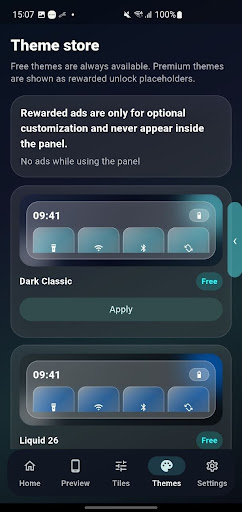
Quick Control Center: OS Style gives your Android phone a fast, stylish and easy-to-use quick control panel. Swipe from the screen edge to open a modern control center style panel with everyday tools such as flashlight, volume control, brightness control, camera shortcut, calculator shortcut and your favorite app shortcuts. Designed for users who want a cleaner and more personal quick settings experience, Quick Control Center helps you access common tools faster without searching through menus. KEY FEATURES • Quick control panel from the screen edge • Flashlight shortcut • Volume control • Brightness control or quick brightness settings • Camera shortcut • Calculator shortcut • Favorite app shortcuts • Custom quick tiles • Glass, dark and light panel themes • Simple setup guide • No account required FAST QUICK PANEL Open your favorite tools with one swipe. Use the floating edge handle to access your quick panel anytime while using your phone. DAILY TOOLS AND SHORTCUTS Quick Control Center helps you access useful tools and settings more conveniently: • Turn on flashlight on supported devices • Adjust media volume • Adjust brightness or open brightness settings • Open camera quickly • Open calculator quickly • Add your favorite apps as shortcuts • Open Wi-Fi or Bluetooth settings when direct control is not available CUSTOM THEMES Personalize your quick panel with clean control center style themes. Choose from glass, dark, light and colorful styles to match your phone setup. PRIVACY-FRIENDLY The app uses overlay permission only to show the quick panel over other apps. Quick Control Center does not read your messages, contacts, calls, location or screen content. NO ADS WHILE USING THE PANEL The quick panel is designed for fast access. Ads are not shown inside the panel or while you are using control buttons. You may watch rewarded ads to unlock optional themes and extra customization. IMPORTANT NOTE Some Android settings may not allow direct control by third-party apps on all devices or Android versions. In those cases, the app opens the related Android settings screen instead. Quick Control Center: OS Style is a utility app for quick access, shortcuts and personalization. It is not affiliated with any phone manufacturer or operating system brand.




More like this
- Top Personalization on Google Play by estimated revenue
- Quick Control Center: OS Style alternatives
- Quick Control Center: OS Style vs SamWatch Digital Themis 2024
- Quick Control Center: OS Style vs [69D] Virtue Analog Watch
- All top charts and categories
Similar apps
SamWatch Digital Themis 2024Samtree
[69D] Virtue Analog Watch69 Design
Breitling Premier Watch FacePrestige Watch Faces Studio
BLZ SEAVOR - Diver Watch FaceBALLOZI Watch Faces
Verge Watch Faceamoledwatchfaces™
Node N1 Analog Watch FaceFutorum
JJ Carbon GT Watch FaceJJ-Design
BREITLING AVENGER Watch FaceLIBERTY WATCH FACES™