Vault clock : Photo Video Lock
Gallery Vault - Video Hide Pictures And VideosVideo PlayersGoogle PlayIn-app purchasesContains adsVault clock : Photo Video Lock revenue and downloads, last 30 days
How we got this (8 inputs)
- signals
- ratings ÷ age
- ratings/day
- 2.12
- monetisation
- photo ARPD 1; IAP max $3.49 ×0.59
- range
- 80% interval from out-of-fold residuals (×1.12 scale, 90 products)
- likelyLow
- 4095.3
- likelyHigh
- 20066.22
- confidence
- medium
- observed days (of 30)
- 1
As of Nov 21, 2026.
How we got this (13 inputs)
- signals
- Play installs ÷ age; lifetime→current drift ×/÷4.12 (135278 measured Play counter deltas)
- spread
- measured on downloads ground truth (downloads ground truth: 48 App Store milestones, 33 platform splits, 13 drift points)
- installs
- 2639791
- age days
- 3140
- bound
- at most the lifetime installs counter (2639791) over 30 days: the listing is 3140 days old, so its last 30 days cannot hold more installs than it ever had
- range scale
- ×0.88 (coverage scale on 9 ground-truth rows; publication is decided before it)
- bound
- below the free chart threshold
- likelyLow
- 18432
- likelyHigh
- 64709
- confidence
- medium
- observed days (of 30)
- 1
- measured days
- 0
- scaling
- observed days, scaled to 30
As of Nov 21, 2026.
How we got this (13 inputs)
- method
- installs in the window (all active on install day) + earlier installers active in the month (published retention ÷ the category's DAU/MAU stickiness) + the retained base of installers older than two years
- downloads per day
- 1155.43 (346.1 to 3758.9, the published worldwide figure)
- retention
- day 1 / 7 / 30: 20.3% / 5.6% / 2.1% (Android benchmark × 1 for the category; AppsFlyer Q3 2024 day-1/7/30 retention, via getstream.io/blog/app-retention-guide (read 2026-11-16); category: OneSignal 2024 day-30 retention by category, via getstream.io/blog/app-retention-guide (read 2026-11-16))
- active days per install
- 5.43 over 730 days (age 3140 days; the curve is used to 730)
- stickiness
- 15% DAU/MAU, Media & Entertainment median (MWM DAU/MAU medians, US iOS, May 2026 (mwm.ai/glossary/dau-mau, read 2026-11-16))
- parts
- window installs 34663 (the published 30-day downloads), earlier installers 27254, retained base 86089
- retained base
- 1796411 installers older than 730 days (lifetime from the listing's Play installs counter) × 4.79% active in a month (between 1.63%, the benchmark curve held flat, and 14.1%, median disclosed MAU ÷ lifetime installs of Duolingo, Snapchat and Grindr (company filings, data/ground-truth-active-users.csv; chosen on these rows, scored leave-one-product-out)); range ×/÷2 past each (widened after the leave-one-product-out check)
- spread
- downloads ×/÷3.3, retention ×/÷3, tail ×/÷1.57, stickiness ×/÷1.8, retained base ×/÷5.89 (assumptions; not fitted)
- ratings per download (recorded, not used)
- 0.00183
- chart persistence (recorded, not used)
- 0 day(s) on a chart in the window; fewer than 7 live days exist
- tier
- modelled: retention and stickiness are published benchmarks, not measured on this listing
- confidence
- low
- rough
- order of magnitude
As of Nov 21, 2026.
Daily active users
Modelled from this app's downloads and a published retention curve for its store and category, not measured. Read it as an order of magnitude.
History
Daily readings as we observed them, last 30 days worldwide. Free shows the last 30 days.
One reading so far: history starts Nov 21, 2026, and a trend line appears after the next daily reading.
Ratings (worldwide)
Observed by us since Nov 21, 2026.
Installs, Play counter
Observed by us since Nov 21, 2026.
Monthly history: we have found no public-archive copy of this store page from the last 12 months, so monthly readings start with our own in Nov 2026.
Create a free account to save apps; Pro shows full history.
Chart positions
Where this app ranks on the top free, paid and grossing charts we capture.
Search terms
No search terms read for this app yet. Terms are read from its title and the searches it shows up in, and appear here once ranked.
In-app purchases
Google Play shows one in-app price range per storefront, not each product's price. The range over time, as the store published it:
United States, USD
- $0.99 - $3.49 per itemNov 22, 2026 to now
Prices
In-app purchase ladder, price changes and paywall terms
No itemised in-app prices yet. Google Play publishes only the price range shown above, not each product; the individual products and their prices have not been read.
Ratings and reviews
Rating distribution
Store histogram
6,649 ratings
Recent reviews
Marketing
Paid ads, organic videos and onboarding captured for this app.
Paid ads
No Meta, Google or TikTok ads tied to this app yet. We check the public ad libraries daily.
Change history
Versions, price changes, rank jumps and listing edits, as we observed them.
Details
- Package
- com.lembark.watch.applock
- Category
- Video Players
- Price
- Free
- Released
- Apr 17, 2018
- Updated
- Dec 6, 2023
- Version
- 1.64
- Size
- -
- Content rating
- Everyone
- Contact email
- lembark.solutions@gmail.com
- Privacy policy
- lembark.com/clockprivacy.html
- Languages
- Not available
- Charted in
- United States
- First seen
- Nov 21, 2026
- Listing read
- Nov 22, 2026
Show store descriptionShow less
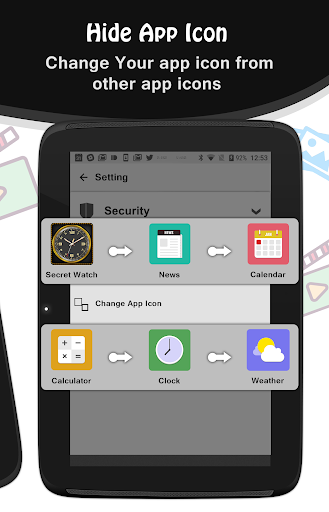
Clock Vault aka Secret Photo Video Locker Watch is a best privacy protection vault easily hide & to keep safe your private photos, videos & any other files that you do not want others to see on your phone. Clock Vault for protecting your privacy as hiding each of the media files using time in form of passcode! You can easily manage the folders or albums of gallery & view, move & export pictures. Important Features: • Hide Pictures: Handily hide pictures to our vault from your gallery with private photo locker. • Hide videos: Smoothly hide your private media to our vault from your gallery with private video locker. • Private Browser(Incognito Browser): Private web browser to download and Lock photos, videos and audios from Internet & leaves no tracks in your system. • Strong app latch : latch your Messenger, Gallery, Browser, Contacts, Email or any other apps you choose. You can also latch Wifi, Bluetooth & recent tasks. • Clock Vault Icon Replace: Replace your Clock Icon with other icons like Whether, Music, Calculator Lock, Calculator Vault etc for better disguise Vault. • Decoy Locker (Fake Passcode): Support Fake Locker system and show fake content when you input fake passcode to protect real gallery lock. • Fingerprint Protection : You can use your fingerprint to Unlock your secret Clock vault and App latch Fingerprint. • Break-in Alert: Capture a snapshot and mails to you the selfie of anyone who tries to unlock apps behind you. You can also See & save the snooper photo from inside Gallery Vault. • Video Player: Super Inbuilt Video player to watch videos inside video Vault. • Elegant Design: Smooth and beautiful user experience. • Easy Navigation: You can easily navigate to back screen from anywhere inside clock vault by swipe right from left edge. Extra Features: - App Disappears from recent apps list. - Protects clock vault from being uninstalled by kids or strangers. - Easy file management system. (Edit, Move, Rename, Create Folders etc) - Direct Hide files from gallery by share option. Share to Vault from your gallery to Instant hide multiple photos videos. How to Use Watch Lock? 1: Launch our Vault Clock and press the middle button of clock. 2: Set a desired time passcode by moving hour and minute hands and press middle button of clock. 3: Now repeat the passcode to confirm. IMPORTANT: Do not uninstall this app before restoring your personal files otherwise it will be lost forever. Watch vault app uses Device Administrator Permission. Clock Vault needs Device Administrator Permission to prevent it from being uninstalled by snoopers & this app never use this permission except for uninstall prevention. Watch vault app uses Accessibility services. Timer Vault need Accessibility services Permission for power saver & help users with disabilities to unlock apps. Call Info feature will let you know who is calling and manually search for numbers outside your contact book. FAQs: Can I take back my photos/videos from Clock Vault? Yes, just long press on video or photo which you want to back in your phone gallery & it will selected and then tap on topbar eye icon and it will come back to your phone gallery. this way you can also video download from cloud too. What are the way to hide photo video? local and cloud. Which one is most secure way to hide photo videos? cloud, because it is save photo video on server and accessible by you only. How to uninstall app? tap on top bar setting icon and set off Prevent accidentally uninstall app option. please refer above question answer before delete. How to recover passcode? set time 10:10 in watch. Our main goal is Full Privacy Protection and provide the most advanced Hide Picture and Hide Video app to keep safe your privacy!
More like this
- Top Video Players on Google Play by estimated revenue
- Vault clock : Photo Video Lock alternatives
- Vault clock : Photo Video Lock vs Vidube - Video Tube Player
- Vault clock : Photo Video Lock vs Meme Maker & Meme Creator
- All top charts and categories
Similar apps
Vidube - Video Tube PlayerPocket Code4.1 ★ (6.7K)
Meme Maker & Meme CreatorGalaxy studio apps4.3 ★ (6.7K)
Photo Map: GPS Camera LocationDictionaryAndTranslator4.4 ★ (6.7K)
AI Remove: Background EraserAvn Global Application4.2 ★ (6.6K)
Diff before after video photoBrain Vault4.0 ★ (6.6K)
Crop Video - Editor And CutterGeniusTools Labs4.4 ★ (6.7K)
LockMyPix Photo Vault PREMIUMfourchars4.5 ★ (6.7K)
Camera HD Pro: Ultra ZoomZamanIT4.3 ★ (6.6K)