
Markivaro: Marks Calculator
EXAMMARK LTDToolsGoogle PlayMarkivaro: Marks Calculator revenue and downloads, last 30 days
History
Daily readings as we observed them, last 30 days worldwide. Free shows the last 30 days.
One reading so far: history starts Nov 23, 2026, and a trend line appears after the next daily reading.
Monthly history: we have found no public-archive copy of this store page from the last 12 months, so monthly readings start with our own in Nov 2026.
Create a free account to save apps; Pro shows full history.
Chart positions
Where this app ranks on the top free, paid and grossing charts we capture.
Search terms
No search terms read for this app yet. Terms are read from its title and the searches it shows up in, and appear here once ranked.
In-app purchases
Prices
In-app purchase ladder, price changes and paywall terms
No in-app prices recorded yet. We read them from the store listing: either this app sells none, or its listing has not been read yet.
Ratings and reviews
Rating distribution
No rating distribution read yet.
Recent reviews
Marketing
Paid ads, organic videos and onboarding captured for this app.
Paid ads
No Meta, Google or TikTok ads tied to this app yet. We check the public ad libraries daily.
Change history
Versions, price changes, rank jumps and listing edits, as we observed them.
Details
- Developer
- EXAMMARK LTD, 6 apps
- Package
- com.markivaro.app
- Category
- Tools
- Price
- Free
- Released
- Oct 8, 2026
- Updated
- Oct 8, 2026
- Version
- 1.0
- Size
- -
- Content rating
- Everyone
- Website
- Not available
- Contact email
- elouisevictoriam847@gmail.com
- Privacy policy
- sites.google.com/view/exammark-ltd/home
- Languages
- Not available
- Charted in
- United States
- First seen
- Nov 23, 2026
- Listing read
- Nov 23, 2026
Show store descriptionShow less
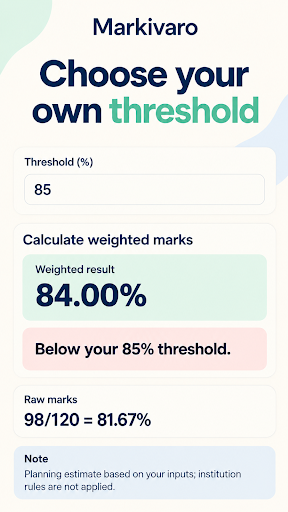
Understand how your assessment marks add up. Markivaro is an offline marks calculator for students planning their exam goals. Save the components of one course, enter each obtained mark, maximum mark and percentage weight, then calculate the weighted result. WEIGHTED RESULTS AND RAW MARKS An exam worth 60% and an assignment worth 40% contribute differently, even when their maximum marks differ. Markivaro shows both the weighted course result and the raw marks percentage, so you can see the distinction. Component weights must total exactly 100%. SET YOUR OWN THRESHOLD Choose a pass or target threshold from 0 to 100%. See whether the exact weighted result meets it. Displayed percentages are rounded to two decimal places; threshold comparisons use the exact calculation. PLAN A REMAINING ASSESSMENT Enter weighted points already earned, the remaining assessment weight and your target course percentage. See the percentage needed in the remaining assessment, whether the target is already reached, or whether it would require more than 100%. For example, 42 weighted points earned with 40% remaining requires 45% on that assessment to reach a 60% course result. FEATURES • Save, edit and delete up to 50 components for one course. • Different maximum marks and weights for each component. • Values with up to four decimal places. • Weighted percentage and raw marks percentage. • Your own pass or target threshold. • Required remaining-score calculator. • Components and valid calculator settings saved locally. Required scores are planning estimates rounded up to two decimal places so the displayed requirement is not understated. The app treats all remaining work as one assessment. It does not apply exam-specific pass conditions, institutional curves, letter grades, GPA rules or official result predictions. Always use your institution's assessment rules and accurate input values. No ads, accounts, purchases or internet permission. Your components stay on this device without cloud sync, import/export or saved result-report history. Clear app data or uninstall to remove the local data.


More like this
- Top Tools on Google Play by estimated revenue
- Markivaro: Marks Calculator alternatives
- Markivaro: Marks Calculator vs FF Sensi Max
- Markivaro: Marks Calculator vs Tesor
- All top charts and categories


