
SnapCARE: Parental Control
DownlabsParentingGoogle PlayIn-app purchasesSnapCARE: Parental Control revenue and downloads, last 30 days
How we got this (13 inputs)
- signals
- Play installs ÷ age; lifetime→current drift ×/÷4.12 (135278 measured Play counter deltas)
- spread
- measured on downloads ground truth (downloads ground truth: 48 App Store milestones, 33 platform splits, 13 drift points)
- installs
- 121
- age days
- 127
- note
- install counter moved once in 1.84 day(s); one step can hold several days of installs, so it is not read as a daily rate yet
- bound
- at most the lifetime installs counter (121) over 30 days: the listing is 127 days old, so its last 30 days cannot hold more installs than it ever had
- range scale
- ×0.88 (coverage scale on 9 ground-truth rows; publication is decided before it)
- likelyLow
- 21
- likelyHigh
- 65
- confidence
- medium
- observed days (of 30)
- 2
- measured days
- 0
- scaling
- observed days, scaled to 30
As of Nov 21, 2026.
How we got this (12 inputs)
- method
- installs in the window (all active on install day) + earlier installers active in the month (published retention ÷ the category's DAU/MAU stickiness) + the retained base of installers older than two years
- downloads per day
- 1.3 (0.4 to 3, the published worldwide figure)
- retention
- day 1 / 7 / 30: 20.66% / 5.7% / 2.14% (Android benchmark × 1.02 for the category; AppsFlyer Q3 2024 day-1/7/30 retention, via getstream.io/blog/app-retention-guide (read 2026-11-16); category: OneSignal 2024 day-30 retention by category, via getstream.io/blog/app-retention-guide (read 2026-11-16))
- active days per install
- 3.1 over 127 days
- stickiness
- 12.6% DAU/MAU, Education & Knowledge median (MWM DAU/MAU medians, US iOS, May 2026 (mwm.ai/glossary/dau-mau, read 2026-11-16))
- parts
- window installs 39 (the published 30-day downloads), earlier installers 12, retained base 0
- spread
- downloads ×/÷2.74, retention ×/÷3, tail ×/÷1.3, stickiness ×/÷1.8 (assumptions; not fitted)
- chart persistence (recorded, not used)
- 0 day(s) on a chart in the window; fewer than 7 live days exist
- bound
- at most the listing's 121 lifetime installs
- tier
- modelled: retention and stickiness are published benchmarks, not measured on this listing
- confidence
- low
- rough
- order of magnitude
As of Nov 21, 2026.
Daily active users
Modelled from this app's downloads and a published retention curve for its store and category, not measured. Read it as an order of magnitude.
History
Daily readings as we observed them, last 30 days worldwide. Free shows the last 30 days.
Downloads per day
Observed by us since Nov 19, 2026.
Installs, Play counter
Observed by us since Nov 19, 2026.
Monthly history: we have found no public-archive copy of this store page from the last 12 months, so monthly readings start with our own in Nov 2026.
Create a free account to save apps; Pro shows full history.
Chart positions
Where this app ranks on the top free, paid and grossing charts we capture.
Search terms
No search terms read for this app yet. Terms are read from its title and the searches it shows up in, and appear here once ranked.
In-app purchases
Google Play shows one in-app price range per storefront, not each product's price. The range over time, as the store published it:
United States, USD
- $1.99 - $49.99 per itemNov 21, 2026 to now
Prices
In-app purchase ladder, price changes and paywall terms
No itemised in-app prices yet. Google Play publishes only the price range shown above, not each product; the individual products and their prices have not been read.
Ratings and reviews
Rating distribution
No rating distribution read yet.
Recent reviews
Marketing
Paid ads, organic videos and onboarding captured for this app.
Paid ads
No Meta, Google or TikTok ads tied to this app yet. We check the public ad libraries daily.
Organic videos
No YouTube, TikTok or Instagram videos tied to this app yet.
Onboarding
No store screenshots, web funnel or in-app recording captured for this app yet.
Change history
Versions, price changes, rank jumps and listing edits, as we observed them.
Details
- Developer
- Downlabs, 4 apps
- Package
- com.mhtech.snapcare
- Category
- Parenting
- Price
- Free
- Released
- Jul 17, 2026
- Updated
- Nov 8, 2026
- Version
- 3.0.0
- Size
- -
- Content rating
- Everyone
- Website
- Not available
- Contact email
- downlabs2028@gmail.com
- Privacy policy
- getsnapcare.co/privacy-policy.html
- Languages
- Not available
- Charted in
- United States
- First seen
- Nov 19, 2026
- Listing read
- Nov 21, 2026
Show store descriptionShow less
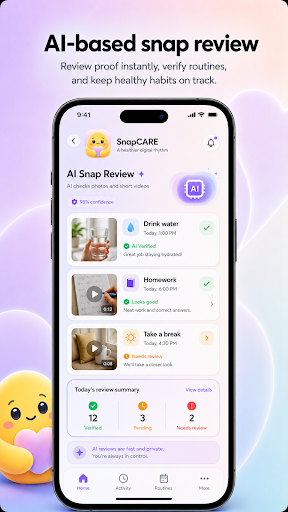
SnapCARE is a family safety and parental control app designed to help families build healthier digital habits together. Manage screen time, block distracting apps, track real-time location, create healthy routines, and stay connected with the people you care about. With SnapCARE, parents and caregivers can: • Set daily screen-time goals and app limits • Block distracting or harmful apps • Track family member location with real-time GPS • Lock devices remotely when focus or bedtime begins • Create tasks and routines for homework, sleep, hydration, and more • Review app usage and digital wellbeing progress • Receive unblock requests and approve extra screen time • Connect family members using a simple 6-digit pairing code • Verify task photos and videos with AI Snap Review • Monitor requests, progress, routines, and safety activity in one place Children receive a simple, supportive experience focused on habits, progress, tasks, and requests. Caregivers can help manage goals, safety settings, and family updates, while caretakers can focus on daily support and routines. SnapCARE is built to support communication and healthy boundaries instead of constant conflict. Clear explanations, flexible controls, and helpful progress updates make digital safety easier for the whole family. Whether you need a screen-time tracker, app blocker, family locator, child safety app, or digital wellbeing tool, SnapCARE brings essential family care features together in one connected platform. IMPORTANT DISCLOSURES & PERMISSIONS AccessibilityService API Usage SnapCARE is a parental control app that requires the AccessibilityService API to function. We use this API for the following core features: App Blocking & Screen Time: To detect the active foreground app so we can block restricted apps and enforce parent-set daily limits. Anti-Bypass Protection: As permitted by Google Play policy for parental control apps, we use this service to prevent the child from disabling, force-stopping, or uninstalling SnapCARE through Android Settings without parent authorization. Data Collection & Privacy: SnapCARE does not use the AccessibilityService API to read your private messages, capture passwords, record your screen, or collect personal/sensitive data. All data is used strictly for parental control features. Affirmative user consent is required before this service is activated. Usage Access and Installed-App Visibility Usage Access calculates app screen time. Installed-app visibility identifies launchable apps so parents can choose which to manage. App names, package names, icons, and usage totals are securely synced to the parent dashboard. This data is not sold or used for advertising. Display Over Other Apps Overlay access is required to display the block screen, remaining time, task reason, and unblock options over a restricted app. Background Location SnapCARE collects and transmits location data to the linked parent to enable live family location tracking and geofence alerts even when the app is closed. Location data is strictly used for child safety and never used for advertising. Camera and Proof Videos Camera access is requested only to record a 5–10 second proof snap. Videos are uploaded securely for review. SnapCARE does not request microphone access. Notifications and Background Operation Notifications provide safety alerts. Foreground services and battery-optimization exemptions help schedules and location tracking continue reliably. PRIVACY & FAMILY USE SnapCARE is a family safety utility exclusively for parents or legal guardians. It is not a spying app and must not be used to monitor any adult. Build better habits. Stay connected. Keep your family safe with SnapCARE.




More like this
- Top Parenting on Google Play by estimated revenue
- SnapCARE: Parental Control alternatives
- SnapCARE: Parental Control vs 한국사 능력
- SnapCARE: Parental Control vs LearnPal: AI English Tutor
- All top charts and categories


