
Button Master: Assistive Touch
MozStudioPersonalizationGoogle PlayIn-app purchasesContains adsButton Master: Assistive Touch revenue and downloads, last 30 days
History
Daily readings as we observed them, last 30 days worldwide. Free shows the last 30 days.
One reading so far: history starts Nov 23, 2026, and a trend line appears after the next daily reading.
Monthly history: we have found no public-archive copy of this store page from the last 12 months, so monthly readings start with our own in Nov 2026.
Create a free account to save apps; Pro shows full history.
Chart positions
Where this app ranks on the top free, paid and grossing charts we capture.
Search terms
In-app purchases
Google Play shows one in-app price range per storefront, not each product's price. The range over time, as the store published it:
Thailand, THB
- THB 12.00 - THB 575.00 per itemNov 23, 2026 to now
Prices
In-app purchase ladder, price changes and paywall terms
No itemised in-app prices yet. Google Play publishes only the price range shown above, not each product; the individual products and their prices have not been read.
Ratings and reviews
Rating distribution
Store histogram
1,629 ratings
Recent reviews
Marketing
Paid ads, organic videos and onboarding captured for this app.
Paid ads
No Meta, Google or TikTok ads tied to this app yet. We check the public ad libraries daily.
Organic videos
No YouTube, TikTok or Instagram videos tied to this app yet.
Onboarding
No store screenshots, web funnel or in-app recording captured for this app yet.
Change history
Versions, price changes, rank jumps and listing edits, as we observed them.
Details
- Developer
- MozStudio, 3 apps
- Package
- com.mozapps.buttonmaster.free
- Category
- Personalization
- Price
- Free
- Released
- Nov 7, 2023
- Updated
- Nov 17, 2026
- Version
- 6.0
- Size
- -
- Content rating
- Rated for 3+
- Website
- mozstudio.net
- Contact email
- mozstudio2023@gmail.com
- Privacy policy
- mozstudio.net/button_master_privacy/
- Languages
- Not available
- Charted in
- Thailand
- First seen
- Nov 23, 2026
- Listing read
- Nov 23, 2026
Show store descriptionShow less
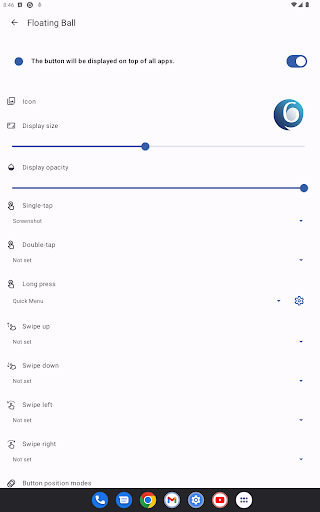
Button Master is Assistive Touch for Android: a floating button and edge gestures that replace a broken back button, home button or navigation bar. Lock the screen, take screenshots, record the screen and remap volume keys, one-handed, in one app. 🎛 Multiple Ways to Control Your Phone: ⭐️ Floating Buttons – Assistive Touch: ▫ Create multiple floating buttons like iOS Assistive Touch. ▫ Personalize each button with custom icons, battery, clock, or network info. ▫ Intuitive gesture controls: Supports tap, double-tap, long press, and 8-direction swipe. ▫ Smart Visibility: Auto-hide or auto-show buttons based on active apps. ⭐️ Edge Gestures – Gesture Navigation: ▫ Full-Screen Edge Triggers: Turn your screen edges into powerful command zones for Back button, Home button, and Recent Apps. ▫ Invisible & Space-Saving: The perfect navigation bar replacement. Keep your screen 100% clear — no floating ball needed. ▫ Highly Customizable: Set unique actions for swipe-inward, swipe-up/down, tap, and long press on any screen edge. ▫ One-Handed Mode: Easily control large phones with simple side gestures and shortcuts. ■ Physical Button Mapper: Remap volume buttons or any physical button into custom actions — a handy fix for a broken power button or volume button. ■ Home Screen Shortcuts: Add personalized shortcuts directly to your home screen. ■ Shake to Trigger: Shake the phone to lock the screen, toggle flashlight, or run custom actions. ■ Notification Bar Shortcuts: Display quick-access shortcuts in the notification shade. ■ Dynamic Island-style Capsule: A small capsule at the top of your screen shows charging and silent / vibrate / ring updates. Tap it to open your shortcuts. (Android 10+) ■ Air Gestures: Wave your hand to lock the screen, wake your phone, or launch apps. ■ Smart Flip Cover: Auto-lock or wake your phone when opening the cover. ■ Quick Settings Button: One-tap access to screen recorder, flashlight, QR scanner, and more. 🔧 100+ Built-in Tools – One App, Not Many: ■ Lock Screen: Screen off and lock instantly with one touch — preserves your power button's lifespan. Supports fingerprint, iris, and face unlock. ■ Quick Menu: A fully customizable iOS Assistive Touch-style hub. Organize shortcuts, settings, and themes in one place. ■ System Navigation Bar: Perform Home, Back, and Recent Apps actions via on-screen buttons. ■ Touch Lock: Disable touch input while watching videos to prevent accidental taps. ■ Keep Screen On: Prevent the display from sleeping. ■ Screen Recorder & Screenshots: Capture anything on screen instantly. ■ Phone Cleaner, Flashlight, QR Scanner, Slow Jogging Metronome. ■ Media Control: Play, pause, next/previous, volume — all from your button. ■ Create Shortcuts: Launch any app or website with a single tap. ■ Settings Shortcuts: ▫ Open Power menu or Notification panel ▫ Display: Brightness, Timeout, Auto-rotate ▫ Connectivity: Bluetooth, Wi-Fi, NFC, Mobile Data, Hotspot, Airplane mode, GPS 🔒 Privacy & Permissions: The app uses accessibility services only for core features — navigation gestures, screen lock, and screenshots. We always ask for your explicit consent before enabling sensitive features. The free version shows ads and, like most apps, collects anonymous usage and crash data to improve stability. Revoke any permission anytime in system settings. ───────────────────────────── 📲 Ready to take control of your Android? Edge gestures, floating buttons, button mapper, and 100+ tools — all in one powerful app. 👉 Download Button Master free and unlock your Android experience today!




More like this
- Top Personalization on Google Play by estimated revenue
- Button Master: Assistive Touch alternatives
- Button Master: Assistive Touch vs Cool Notification Sounds
- Button Master: Assistive Touch vs Jesus Christ HD Wallpaper
- All top charts and categories
Similar apps
Cool Notification SoundsYellow Bolt Labs3.6 ★ (1.6K)
Jesus Christ HD WallpaperLife Time Infotech4.6 ★ (1.6K)
Simple Theme-Space Feather-+HOME by Ateam Entertainment4.8 ★ (1.6K)
America Wallpapermuskloftsoft4.6 ★ (1.6K)
Chill Live WallpaperChill Live4.2 ★ (1.6K)
Hyper Bridged4viddf4.6 ★ (1.6K)
iOS Emoji for SnapEditDharmisoft3.9 ★ (1.6K)
Finger Touch Water DropletPsii4.5 ★ (1.6K)