
Dots Watch Face
NeoPlayLabsPersonalizationGoogle Play$0.59Dots Watch Face revenue and downloads, last 30 days
History
Daily readings as we observed them, last 30 days worldwide. Free shows the last 30 days.
Installs, Play counter
Observed by us since Nov 22, 2026.
Monthly history: we have found no public-archive copy of this store page from the last 12 months, so monthly readings start with our own in Nov 2026.
Create a free account to save apps; Pro shows full history.
Chart positions
Where this app ranks on the top free, paid and grossing charts we capture.
Search terms
No search terms read for this app yet. Terms are read from its title and the searches it shows up in, and appear here once ranked.
In-app purchases
Prices
In-app purchase ladder, price changes and paywall terms
No in-app prices recorded yet. We read them from the store listing: either this app sells none, or its listing has not been read yet.
Ratings and reviews
Rating distribution
No rating distribution read yet.
Recent reviews
Marketing
Paid ads, organic videos and onboarding captured for this app.
Paid ads
No Meta, Google or TikTok ads tied to this app yet. We check the public ad libraries daily.
Change history
Versions, price changes, rank jumps and listing edits, as we observed them.
Details
- Developer
- NeoPlayLabs, 5 apps
- Package
- com.neolabs.dots
- Category
- Personalization
- Price
- $0.59
- Released
- Sep 26, 2026
- Updated
- Oct 19, 2026
- Version
- 1.7
- Size
- -
- Content rating
- Everyone
- Website
- www.neohome.casa
- Contact email
- nishantkumar713@gmail.com
- Languages
- Not available
- Charted in
- United States
- First seen
- Nov 22, 2026
- Listing read
- Nov 23, 2026
Show store descriptionShow less
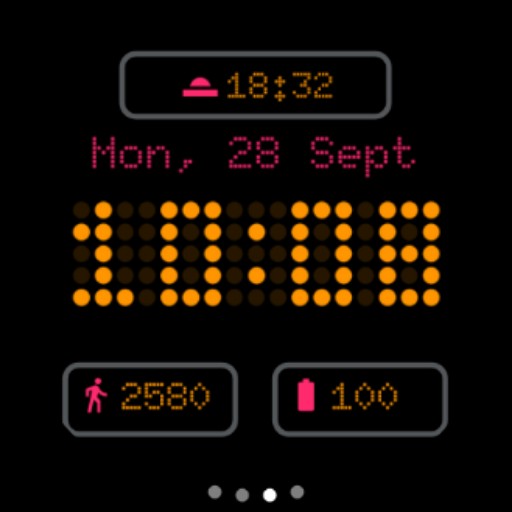
Bring the iconic retro-futuristic aesthetic of classic LED and VFD dot-matrix displays to your wrist! Dots Watch Face combines a sharp 17×5 dot matrix digital clock with modern Wear OS features, dual-color customization, and 3 customizable complications. Designed using the official Watch Face Format (WFF) for Wear OS, Dots Watch Face offers battery efficiency, smooth performance, and high-contrast Always-On Display (AOD) modes. ✨ KEY FEATURES •📟 Authentic 17×5 Dot Matrix Display: Features a 17-column by 5-row dot grid with distinct 1-column spacing gaps for maximum digit readability and classic retro aesthetics. •💡 Visible Unlit LED Grid: Simulates a physical LED panel with subtle, dim unlit background dots that glow underneath active digits. •🎨 Dual Independent Color Customization: ◦ Clock & Text Color: Customize the main matrix clock and complication data text. ◦ Accent & Icon Color: Independently color the complication icons and the top Day & Date display! ◦ 6 Iconic Retro Palette Options: Matrix Green, Cyber Cyan, Retro Amber, Neon Red, Electric Violet, and Classic White. •🔤 Doto Bold Typography: Uses the distinctive Doto Bold font for crisp, glanceable dates and complication data. •🧩 3 Customizable Complications: ◦ Top Slot: Defaulted to Sunrise/Sunset. ◦ Bottom-Left Slot: Defaulted to Daily Step Count / Day of Week. ◦ Bottom-Right Slot: Defaulted to Watch Battery. ◦ Fully customizable to any Wear OS provider (Heart Rate, Weather, World Clock, Next Alarm, Notifications, and more). • 🌙 Minimal Always-On Display (AOD): ◦ Minimal AOD Toggle: Enable in the customization menu to hide complications and date in AOD mode, leaving ONLY the main dot matrix time display in high-contrast off-white for maximum battery savings and zero burn-in risk. ⚙️ CUSTOMIZATION OPTIONS Press and hold the watch face, then tap Customize (or edit via your phone's companion app): 1. Clock & Text Color: Choose from 6 vibrant color themes. 2. Accent & Icon Color: Choose an accent color for icons and date. 3. Minimal AOD: Toggle ON/OFF to switch between a ultra-clean Minimal AOD or Full AOD mode. 4. Complications: Tap any of the 3 slots to assign your favorite Wear OS complication data. ⌚ COMPATIBILITY Compatible with all smartwatch devices running Wear OS 4 (API 33+) and Wear OS 5+, including: • Samsung Galaxy Watch: Galaxy Watch 7 / Ultra, Galaxy Watch 6 / 6 Classic, Galaxy Watch 5 / 5 Pro, Galaxy Watch 4 / 4 Classic • Google Pixel Watch: Pixel Watch 3, Pixel Watch 2, Pixel Watch 1 • OnePlus Watch: OnePlus Watch 2 / 2R • TicWatch: Pro 5 / Pro 5 Enduro • Fossil, Xiaomi, and other Wear OS 4+ smartwatches 💡 INSTALLATION & TROUBLESHOOTING 1. Ensure your watch is connected to your phone via Bluetooth. 2. Install the watch face from the Google Play Store. 3. On your watch, press and hold the active watch face, scroll right, and select Add watch face -> Dots Watch Face. 4. Tap Customize to adjust colors, AOD modes, and complications.



More like this
- Top Personalization on Google Play by estimated revenue
- Dots Watch Face alternatives
- Dots Watch Face vs SamWatch Digital Themis 2024
- Dots Watch Face vs [69D] Virtue Analog Watch
- All top charts and categories
Similar apps
SamWatch Digital Themis 2024Samtree
[69D] Virtue Analog Watch69 Design
Breitling Premier Watch FacePrestige Watch Faces Studio
BLZ SEAVOR - Diver Watch FaceBALLOZI Watch Faces
Verge Watch Faceamoledwatchfaces™
Node N1 Analog Watch FaceFutorum
JJ Carbon GT Watch FaceJJ-Design
BREITLING AVENGER Watch FaceLIBERTY WATCH FACES™