FitGIF: Video to GIF Maker
ONLYAPPS StudioVideo PlayersGoogle PlayIn-app purchasesContains adsFitGIF: Video to GIF Maker revenue and downloads, last 30 days
History
Daily readings as we observed them, last 30 days worldwide. Free shows the last 30 days.
One reading so far: history starts Nov 22, 2026, and a trend line appears after the next daily reading.
Monthly history: we have found no public-archive copy of this store page from the last 12 months, so monthly readings start with our own in Nov 2026.
Create a free account to save apps; Pro shows full history.
Chart positions
Where this app ranks on the top free, paid and grossing charts we capture.
Search terms
No search terms read for this app yet. Terms are read from its title and the searches it shows up in, and appear here once ranked.
In-app purchases
Google Play shows one in-app price range per storefront, not each product's price. The range over time, as the store published it:
United States, USD
- $3.99 per itemNov 22, 2026 to now
Prices
In-app purchase ladder, price changes and paywall terms
No itemised in-app prices yet. Google Play publishes only the price range shown above, not each product; the individual products and their prices have not been read.
Ratings and reviews
Rating distribution
No rating distribution read yet.
Recent reviews
Marketing
Paid ads, organic videos and onboarding captured for this app.
Paid ads
No Meta, Google or TikTok ads tied to this app yet. We check the public ad libraries daily.
Organic videos
No YouTube, TikTok or Instagram videos tied to this app yet.
Change history
Versions, price changes, rank jumps and listing edits, as we observed them.
Details
- Developer
- ONLYAPPS Studio, 3 apps
- Package
- com.onlyapps.videotogif
- Category
- Video Players
- Price
- Free
- Released
- Oct 22, 2026
- Updated
- Nov 8, 2026
- Version
- 1.0.0
- Size
- -
- Content rating
- Everyone
- Website
- onlyapps.work
- Contact email
- support@onlyapps.work
- Privacy policy
- onlyapps.work/apps/video-to-gif/privacy
- Languages
- Not available
- Charted in
- United States
- First seen
- Nov 22, 2026
- Listing read
- Nov 22, 2026
Show store descriptionShow less
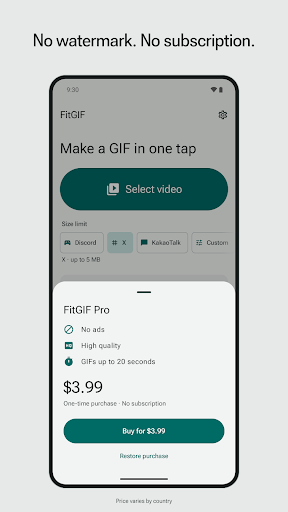
Make a GIF that actually fits. FitGIF turns a video from your phone into a GIF sized to the limit you choose, so you stop seeing "file too big." Select a video, choose a size limit and a quality, tap Make GIF. No watermark. WHY FITGIF - Sized to your limit: under Size limit, choose Discord, X, KakaoTalk, your own limit, or no limit. FitGIF estimates the file size first and shrinks the GIF to fit. - Pick a quality: High quality (Pro), Medium (the default) or Small file for the smallest GIF. - No surprises: an estimated-size gauge tells you "Optimized" or "Too big" while you trim, before you make anything. - No watermark on any GIF. No subscription. No sign-in. - No ads while your GIF is being made. Free version: before you make a GIF, you watch one short ad that you start yourself (not for your first GIFs), or you make GIFs without ads with Pro. HOW IT WORKS 1. Tap Select video. FitGIF uses Android's system picker, so it only sees the video you choose. 2. Drag the handles to trim the part you want, or tap a length of 3, 5 or 10 seconds (20 seconds with Pro). Then fine-tune in 0.1-second steps. A GIF can be up to 10 seconds long, or 20 seconds with Pro. 3. Choose a size limit and a quality. Add one line of text if you like. 4. Tap Make GIF. On the result screen, tap Save to keep it in your gallery, or Share to send it. PRICING, HONESTLY - Free: Medium and Small file quality for every size limit, GIFs up to 10 seconds, no watermark. The free version shows a small banner on the home screen. Before a GIF is made, you watch one short ad that you start yourself (not for your first GIFs, and skipped if no ad is available), or you make GIFs without ads with Pro. There are no ads while a GIF is being made. - Pro: a one-time purchase that removes all ads, unlocks High quality, and allows GIFs up to 20 seconds. No subscription and no recurring charges. You can see the price in the app before you buy. Your purchase belongs to your Google Play account. GOOD TO KNOW (LIMITS) - A tight size limit means lower picture quality. If a clip cannot fit, FitGIF tells you how short to trim it. - Other apps change their upload limits from time to time. We update our sizes when we learn of a change, but if a file is rejected, check the limit in that app. - Keep FitGIF open while it makes your GIF. If you leave the app, the job stops and you can start it again. - Some videos use formats that certain phones cannot open. - Requires Android 10 or later. PRIVACY - Your videos, text and GIFs stay on your phone. FitGIF has no account and sends your files to no server. - FitGIF does not ask for access to your photos or storage. - The free version shows ads from Google AdMob, which can use your device's advertising ID. Where required, the app asks for your consent first, and you can change your choice in Settings. Pro shows no ads. - Basic usage statistics (for example, whether a GIF was made) help us fix problems. They never include your file names, videos or text. - Payments are handled by Google Play. Questions or a GIF that will not fit? Contact us at support@onlyapps.work. We do our best to read and reply. Discord, X and KakaoTalk are trademarks of their respective owners. FitGIF is an independent app and is not made by, affiliated with, or endorsed by them.
More like this
- Top Video Players on Google Play by estimated revenue
- FitGIF: Video to GIF Maker alternatives
- FitGIF: Video to GIF Maker vs YoungPhoto - Aesthetic Camera
- FitGIF: Video to GIF Maker vs GIKA - Vintage Phone Cam
- All top charts and categories
Similar apps
YoungPhoto - Aesthetic CameraImagine_Works
GIKA - Vintage Phone CamNoahProject Inc.
SANGSANGLYEOG iY2K상상력
IPTV Smart Player - Live TVOxylab Studio
AI Photo Effects: Face EditorINFINITE HILLS PRODUCTIONS INC
MySafeFrameSafe Frame Technologies FZCO
AI Face Editor: Photo StudioLeilani Rogers
Velora: AI Photo & VideoPIZZA DI LUNA, LLC