PDF Reader Plus-Viewer&Editor
PDF Reader Plus TeamProductivityGoogle PlayIn-app purchasesContains adsPDF Reader Plus-Viewer&Editor revenue and downloads, last 30 days
History
Daily readings as we observed them, last 30 days worldwide. Free shows the last 30 days.
One reading so far: history starts Nov 22, 2026, and a trend line appears after the next daily reading.
Monthly history: we have found no public-archive copy of this store page from the last 12 months, so monthly readings start with our own in Nov 2026.
Create a free account to save apps; Pro shows full history.
Chart positions
Where this app ranks on the top free, paid and grossing charts we capture.
Search terms
In-app purchases
Google Play shows one in-app price range per storefront, not each product's price. The range over time, as the store published it:
Brazil, BRL
- R$79.99 per itemNov 22, 2026 to now
Prices
In-app purchase ladder, price changes and paywall terms
No itemised in-app prices yet. Google Play publishes only the price range shown above, not each product; the individual products and their prices have not been read.
Ratings and reviews
Rating distribution
Store histogram
3,292 ratings
Recent reviews
Marketing
Paid ads, organic videos and onboarding captured for this app.
Paid ads
No Meta, Google or TikTok ads tied to this app yet. We check the public ad libraries daily.
Organic videos
No YouTube, TikTok or Instagram videos tied to this app yet.
Change history
Versions, price changes, rank jumps and listing edits, as we observed them.
Details
- Developer
- PDF Reader Plus Team, 1 app
- Package
- com.pdf.reader.viewer.editor.free
- Category
- Productivity
- Price
- Free
- Released
- Apr 8, 2019
- Updated
- Sep 13, 2024
- Version
- google_1.4.3
- Size
- -
- Content rating
- All ages
- Contact email
- pdfreaderplus@gmail.com
- Privacy policy
- sites.google.com/view/pdf-reader-plus-privacy-policy
- Languages
- Not available
- Charted in
- Brazil
- First seen
- Nov 18, 2026
- Listing read
- Nov 22, 2026
Show store descriptionShow less
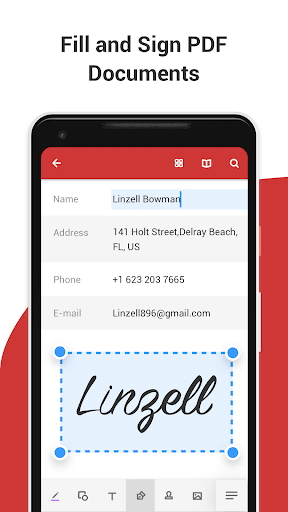
PDF Reader Plus is the best PDF manager, reader and editor app for viewing, commenting, editing, filling out forms, signing and sharing on your Android. With the fast, robust and powerful PDF Editor, PDF Reader Plus enables you to freely markup professional PDF documents with highlights, underline, strikeout, squiggly, handwriting, shapes, anchored notes, text box, signatures, stamps, images, links and much more. PDF Viewer - Quick display: PDF Reader Plus uses the most advanced technology available today to speed the loading and display of PDF files quickly even with large PDF files - Display mode: Choose single page, two page, book mode or full-screen reading mode to view PDF - PDF orientation: Vertical and horizontal views provide the most convenient experience for you - Flatten copy: Support the creation of a flattened copy, so that the contents remain static - PDF search: Enable full text search, scroll, zoom in and out - Quick page moving: Go to a specific page number, fast page navigation return, lector PDF - Bookmarks: Make Bookmarks when it comes to intuitive navigation through PDF files - Outline: PDF Reader will list the chapters of the PDF file. You can easily move to that chapter - Change screen brightness: Adjust the brightness of the screen to suit different lighting conditions - Theme color: Customize themes by choosing from 4 different colors. - HD Printer: Support HD printing to make the file clearer; support printing together with annotations to easily share comments - Open password-protected PDF files and remove password from PDF Annotate PDF - Mark important information in books, journals or documents with the first class annotation tools: highlight, underline, strikeout, squiggly, freehand, shapes, anchored note, text box and more - Add text comments on the annotations like highlight, underline, strikeout, freehand, shapes, etc. - Create multiple signatures with handwritten and image signatures. Use signatures to sign contracts and agreements on the go. - Now linking any part of the text to a different page or even a website is fast. (URL, Email & Pages) - Insert predesigned stamps or customize text and image stamps - Insert images on the PDF files and place where you want it to be - Remove all annotations with just one click Fill Forms - Work with static PDF forms created in Adobe Acrobat - Fill out any PDF forms with interactive fields such as text fields, checkboxes and etc PDF Editor - Organize Pages: Reorder PDF pages easily by drag and drop - Insert: Insert a blank/ruled/music/squared page in the existing PDF - Rotate: Rotate one or more pages casually - Split / Extract: Smoothly extract pages from the PDF document and automatically save in a new folder PDF Watermark - Add watermark to PDF files with texts or images on any position and adjust the size, color, transparency, orientation, etc. PDF Merger - Combine and merge 2 or more PDFs into a new single, searchable PDF. PDF Manager - Rename, copy, move, share or delete files and folders with PDF Reader’s built-in file manager - Enable to read the Adobe & Foxit PDF files, documents, and books stored in your SD card and USB flash disk PDF Converter & Scanner - Image to PDF: Use free PDF scanner to turn images, receipts, notes and more into PDFs - PDF to JPG: Convert PDF to images with annotations for better sharing - PDF Creator: Create a PDF file from multiple images (PNG, JPG, TIFF, GIF). Share - Take advantage of WiFi Transfer tools to share files across devices - Easily share files via skype, bluetooth, email and other apps Support multiple formats - Office Reader: PDF Reader Plus enables you to view Word, Excel, PowerPoint - EPUB book reader, free to read comic books and other e-books - Other formats: text (TXT), pictures (PNG, JPG), etc. Have any feedback, comments or suggestions? please feel free to drop a line at pdfreaderplus@gmail.com
More like this
- Top Productivity on Google Play by estimated revenue
- PDF Reader Plus-Viewer&Editor alternatives
- PDF Reader Plus-Viewer&Editor vs Sync2 Outlook Google Companion
- PDF Reader Plus-Viewer&Editor vs Smart Data Transfer: Clone It
- All top charts and categories
Similar apps
Sync2 Outlook Google Companion4Team Corporation4.0 ★ (3.3K)
Smart Data Transfer: Clone ItWallet Passes Alliance3.8 ★ (3.3K)
Order List -Quote Invoice MgmtEONSOFT4.1 ★ (3.3K)
Kalender Sembahyang + AlarmMataPanda5.0 ★ (3.3K)
ProcoreProcore Technologies Inc4.2 ★ (3.3K)
Habit Tracker n Pets: HabitYouSupYup Habit Tracker Day Planner and Calendar4.3 ★ (3.3K)
Fuse: Clock - Alarm - TimerJetkite4.7 ★ (3.3K)
BizConnect - Card ScannerATMAS SOFTWARES PRIVATE LIMITED4.4 ★ (3.3K)