
PDF Reader And Viewer
Diaval StudiosProductivityGoogle PlayIn-app purchasesContains adsPDF Reader And Viewer revenue and downloads, last 30 days
History
Daily readings as we observed them, last 30 days worldwide. Free shows the last 30 days.
One reading so far: history starts Nov 23, 2026, and a trend line appears after the next daily reading.
Monthly history: we have found no public-archive copy of this store page from the last 12 months, so monthly readings start with our own in Nov 2026.
Create a free account to save apps; Pro shows full history.
Chart positions
Where this app ranks on the top free, paid and grossing charts we capture.
Search terms
No search terms read for this app yet. Terms are read from its title and the searches it shows up in, and appear here once ranked.
In-app purchases
Google Play shows one in-app price range per storefront, not each product's price. The range over time, as the store published it:
United States, USD
- $2.49 - $28.99 per itemNov 23, 2026 to now
Prices
In-app purchase ladder, price changes and paywall terms
No itemised in-app prices yet. Google Play publishes only the price range shown above, not each product; the individual products and their prices have not been read.
Ratings and reviews
Rating distribution
Store histogram
32 ratings
Recent reviews
Marketing
Paid ads, organic videos and onboarding captured for this app.
Paid ads
No Meta, Google or TikTok ads tied to this app yet. We check the public ad libraries daily.
Onboarding
No store screenshots, web funnel or in-app recording captured for this app yet.
Change history
Versions, price changes, rank jumps and listing edits, as we observed them.
Details
- Developer
- Diaval Studios, 3 apps
- Package
- com.pdffileviewer.imagetopdfscan
- Category
- Productivity
- Price
- Free
- Released
- Jun 26, 2025
- Updated
- May 21, 2026
- Version
- 1.11
- Size
- -
- Content rating
- Everyone
- Contact email
- badriranat@gmail.com
- Languages
- Not available
- Charted in
- United States
- First seen
- Nov 23, 2026
- Listing read
- Nov 23, 2026
Show store descriptionShow less
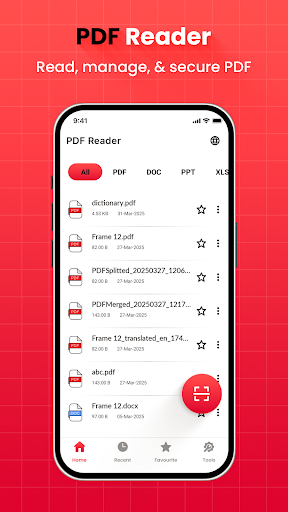
PDF Reader And Viewer is a powerful, easy-to-use, and lightweight tool designed to help you read, manage, and convert PDF files efficiently.PDF Reader And Viewer app supports various formats including PDF, DOC, PPT, and TXT, making it your ideal document companion on the go. With the built-in PDF viewer, you can quickly open and navigate PDF files through a clean and modern interface. Browse documents, mark important files as favorites, access recent files instantly, and read PDFs anytime with ease. It offers a smooth and optimized experience as a mobile PDF viewer tailored for performance and simplicity. The app functions as a full-featured PDF maker, enabling users to create PDFs from text, images, or scanned documents.adjust formatting and layout, and easily save or share files in just a few taps. PDF Reader And Viewer lets you take full control over your files. Merge multiple PDFs using the built-in Merge PDF feature or split large documents into manageable parts for easy access and sharing. For added security, you can lock your files with passwords to keep confidential content safe. Want to turn images into documents? With the Image to PDF tool, you can convert photos, scanned pages, or screenshots into PDF format in seconds. This is especially helpful for students and freelancers managing visual documents. Choose your preferred image quality—low, medium, high, or original—before saving. The versatile Text to PDF converter allows you to paste or type text, apply formatting such as bold, italic, or underlined styles, and instantly turn your text into a PDF. It’s ideal for creating notes, letters, reports, or any typed content in PDF form. Use the built-in PDF scanner to digitize paper documents using your phone’s camera. Capture and save receipts, forms, ID cards, or handwritten notes as clean, high-quality PDF files. This feature transforms your phone into a mobile scanner for personal or professional use. Additionally, you can compress and organize your PDFs efficiently. Create ZIP files from multiple documents to save space and share collections via email, messaging apps, or cloud services—making file transfer quick and simple.


More like this
- Top Productivity on Google Play by estimated revenue
- PDF Reader And Viewer alternatives
- PDF Reader And Viewer vs Fast PDF Viewer
- PDF Reader And Viewer vs 찰칵이체
- All top charts and categories
Similar apps
Fast PDF ViewerL & D WELLNESS CENTER, INC3.6 ★ (34)
찰칵이체AXIS.Dev3.8 ★ (34)
Bark for AIPInfoArmor, Inc2.3 ★ (34)
Circuit Wiring ColorsBeige Unicorn4.6 ★ (34)
Aster: 24/7 Personal SafetyLogicMark, Inc.4.2 ★ (34)
Nixie ClocksPrismatiX4.4 ★ (34)
MySignifySignify Health, Inc.4.0 ★ (34)
DMP - Tech APPDigital Monitoring Products, Inc4.2 ★ (34)