
Network Tools
Pavel KhorenyanToolsGoogle PlayNetwork Tools revenue and downloads, last 30 days
How we got this (12 inputs)
- signals
- Play installs ÷ age; lifetime→current drift ×/÷4.12 (135278 measured Play counter deltas)
- spread
- measured on downloads ground truth (downloads ground truth: 48 App Store milestones, 33 platform splits, 13 drift points)
- installs
- 36
- age days
- 10
- note
- install counter moved once in 2.76 day(s); one step can hold several days of installs, so it is not read as a daily rate yet
- range scale
- ×0.88 (coverage scale on 9 ground-truth rows; publication is decided before it)
- likelyLow
- 57
- likelyHigh
- 234
- confidence
- medium
- observed days (of 30)
- 3
- measured days
- 0
- scaling
- observed days, scaled to 30
As of Nov 21, 2026.
How we got this (12 inputs)
- method
- installs in the window (all active on install day) + earlier installers active in the month (published retention ÷ the category's DAU/MAU stickiness) + the retained base of installers older than two years
- downloads per day
- 3.83 (1.03 to 14.73, the published worldwide figure)
- retention
- day 1 / 7 / 30: 23.7% / 6.54% / 2.45% (Android benchmark × 1.17 for the category; AppsFlyer Q3 2024 day-1/7/30 retention, via getstream.io/blog/app-retention-guide (read 2026-11-16); category: OneSignal 2024 day-30 retention by category, via getstream.io/blog/app-retention-guide (read 2026-11-16))
- active days per install
- 1.44 over 10 days
- stickiness
- 17.5% DAU/MAU, Productivity & Tools median (MWM DAU/MAU medians, US iOS, May 2026 (mwm.ai/glossary/dau-mau, read 2026-11-16))
- parts
- window installs 38 (the published 30-day downloads), earlier installers 0, retained base 0
- spread
- downloads ×/÷3.78, retention ×/÷3, tail ×/÷1, stickiness ×/÷1.8 (assumptions; not fitted)
- chart persistence (recorded, not used)
- 0 day(s) on a chart in the window; fewer than 7 live days exist
- bound
- at most the listing's 36 lifetime installs
- tier
- modelled: retention and stickiness are published benchmarks, not measured on this listing
- confidence
- low
- rough
- order of magnitude
As of Nov 21, 2026.
Daily active users
Modelled from this app's downloads and a published retention curve for its store and category, not measured. Read it as an order of magnitude.
History
Daily readings as we observed them, last 30 days worldwide. Free shows the last 30 days.
Downloads per day
Observed by us since Nov 18, 2026.
Installs, Play counter
Observed by us since Nov 18, 2026.
Monthly history: we have found no public-archive copy of this store page from the last 12 months, so monthly readings start with our own in Nov 2026.
Create a free account to save apps; Pro shows full history.
Chart positions
Where this app ranks on the top free, paid and grossing charts we capture.
Search terms
In-app purchases
Prices
In-app purchase ladder, price changes and paywall terms
No in-app prices recorded yet. We read them from the store listing: either this app sells none, or its listing has not been read yet.
Ratings and reviews
Rating distribution
No rating distribution read yet.
Recent reviews
Marketing
Paid ads, organic videos and onboarding captured for this app.
Paid ads
No Meta, Google or TikTok ads tied to this app yet. We check the public ad libraries daily.
Organic videos
No YouTube, TikTok or Instagram videos tied to this app yet.
Onboarding
No store screenshots, web funnel or in-app recording captured for this app yet.
Change history
Versions, price changes, rank jumps and listing edits, as we observed them.
Details
- Developer
- Pavel Khorenyan, 1 app
- Package
- com.pkd.nettools
- Category
- Tools
- Price
- Free
- Released
- Nov 11, 2026
- Updated
- Nov 11, 2026
- Version
- 1.0
- Size
- -
- Content rating
- Everyone
- Website
- Not available
- Contact email
- pavelkhorenyan@gmail.com
- Languages
- Not available
- Charted in
- United States
- First seen
- Nov 18, 2026
- Listing read
- Nov 21, 2026
Show store descriptionShow less
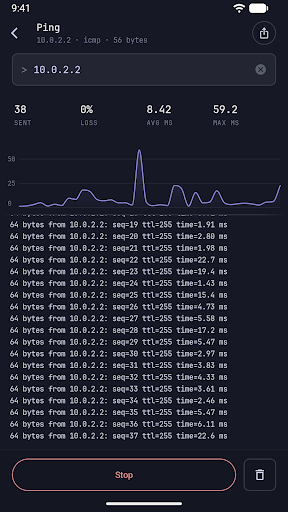
A network engineer's toolkit on your phone. Nineteen tools, no account, no ads, no analytics, and no backend operated by the developer. THE TOOLS • Ping — ICMP latency and packet loss, with a live chart • Traceroute — the hop-by-hop path, each router named • LAN scan — discover devices on your subnet, including those ignoring ping, with model and MAC where announced • Port scan — scan up to 65535 ports, distinguish open, closed and filtered, and identify services by their replies; long scans run in the background • DNS — record types, custom resolvers, DNS-over-HTTPS, reverse lookups, and comparison across five public resolvers • HTTP check — status, redirect chain, the DNS/connect/TLS/TTFB split, security headers • TLS — the full certificate chain, expiry, SANs, cipher suite, and whether the system trusts it • WHOIS — follow referrals to the registrar holding the record • Wi-Fi — signal, band, channel and link rate; a walking survey; nearby channels, router details, security and channel recommendations • Speed test — download, upload, latency and jitter, against Cloudflare or a URL you name • iperf3 — throughput against your own iperf3 server, up or down, multi-stream • IP calculator — CIDR maths, masks, host ranges, binary, and subnet division including VLSM • MAC lookup — 39,000 vendor prefixes, fully offline • Wake on LAN — send a magic packet to wake a sleeping machine • Network interfaces — addresses, subnets, flags and live throughput • App traffic — per-app data usage, live connections and DNS lookups, and optional packet recording for Wireshark • Cellular — the serving cell, its band and frequency, signal over time, neighbours, handovers, and whether you are behind carrier NAT • Telnet — a raw TCP terminal for switches, PDUs and console servers • SSH — see below SSH CLIENT • Jump hosts — connect through one bastion or a chain, confirming each host key • Port forwarding — open a remote service through a local port in any browser • scp — upload files or download them to your Download folder • ssh-copy-id — install your public key on a server • Keys — generate ed25519 or import ed25519, ECDSA and RSA in OpenSSH or PEM form. Private keys are encrypted with Android Keystore protection, excluded from backups, and exportable under a passphrase • Snippets — saved commands above the keyboard • VT/xterm terminal for vim and htop, with esc, ctrl, alt, arrows and F-keys APP TRAFFIC AND VPN USE Network Tools uses Android's VpnService for App traffic's live network diagnostics. A local VPN is needed to observe other apps' connections and DNS lookups, identify the originating app, and count sent and received bytes without root access. Everything mode monitors internet connections; Lookups only mode monitors DNS queries alone. Traffic is forwarded to its original destinations, with DNS queries sent to your network's DNS servers. There is no remote VPN server, and encrypted application content is not decrypted. This is a diagnostic tool, not a VPN for anonymity or changing your location. Monitoring starts only when you tap Start watching and approve Android's VPN permission, and you can stop it at any time. Connection and DNS logs stay in memory on your device. If you enable Record packets, packets are saved in a private local pcapng file; encrypted content stays encrypted, while plain HTTP and DNS may be readable. Recordings leave the app only when you choose Save or Share. No monitored traffic or logs are uploaded to the developer. Android allows one active VPN, so monitoring replaces another VPN while running. SIX THEMES Four dark and two light, including true-black for sunlight and green phosphor for the terminal. HONEST ABOUT ITS LIMITS LAN discovery depends on device replies; inferred results show their evidence. Sessions, forwards and transfers keep running in the background, with a notification to end them.


More like this
- Top Tools on Google Play by estimated revenue
- Network Tools alternatives
- Network Tools vs FF Sensi Max
- Network Tools vs Tesor
- All top charts and categories


