QP WIFI QR Code Scanner
Mahmoud AlnuaiziToolsGoogle PlayContains adsQP WIFI QR Code Scanner revenue and downloads, last 30 days
History
Daily readings as we observed them, last 30 days worldwide. Free shows the last 30 days.
One reading so far: history starts Nov 22, 2026, and a trend line appears after the next daily reading.
Monthly history: we have found no public-archive copy of this store page from the last 12 months, so monthly readings start with our own in Nov 2026.
Create a free account to save apps; Pro shows full history.
Chart positions
Where this app ranks on the top free, paid and grossing charts we capture.
Search terms
No search terms read for this app yet. Terms are read from its title and the searches it shows up in, and appear here once ranked.
In-app purchases
Prices
In-app purchase ladder, price changes and paywall terms
No in-app prices recorded yet. We read them from the store listing: either this app sells none, or its listing has not been read yet.
Ratings and reviews
Rating distribution
Store histogram
4,019 ratings
Recent reviews
Marketing
Paid ads, organic videos and onboarding captured for this app.
Paid ads
No Meta, Google or TikTok ads tied to this app yet. We check the public ad libraries daily.
Organic videos
No YouTube, TikTok or Instagram videos tied to this app yet.
Change history
Versions, price changes, rank jumps and listing edits, as we observed them.
Details
- Developer
- Mahmoud Alnuaizi, 2 apps
- Package
- com.qr.wifi
- Category
- Tools
- Price
- Free
- Released
- Feb 12, 2022
- Updated
- Sep 30, 2026
- Version
- 3.3
- Size
- -
- Content rating
- Everyone
- Contact email
- mahmoud.alnuaizi.apps@gmail.com
- Privacy policy
- sites.google.com/view/wifiqrcode-scanner/home
- Languages
- Not available
- Charted in
- United States
- First seen
- Nov 22, 2026
- Listing read
- Nov 22, 2026
Show store descriptionShow less
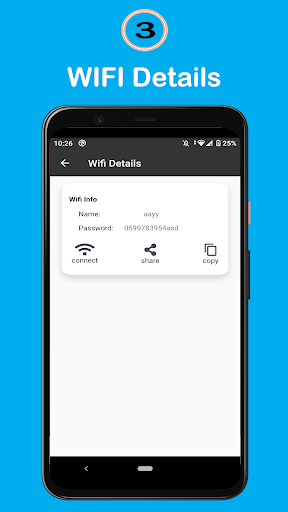
Do you want to know the WIFI password? Through the application, you can find out the WIFI password and share it with your friends. If your mobile phone is Xiaomi, follow these steps to display the network password: 1. Click on the Show Wi-Fi password option ,you will be taken to the list of network. 2. Click on the network you are connected to the QR code will be displayed. Click on the App notification at the top and Wait a second, Wi-Fi password will be shown 3. Or another way, go to the list of networks, click on the network you are connected to, a QR code will appear. Take a screenshot and go to the application, click on the option, choose QR code, and choose the screenshot from the gallery. The password will appear directly. If your mobile phone is Samsung, follow these steps to display the network password: 1. Click on the Show Wi-Fi password option, you will be taken to the list of networks and a notification will appear at the top. 2. Click on the network settings button it is connected to. 3. You will be taken to the network settings. 4. Click on the QR code at the bottom of the interface, the QR code will be displayed, then Click on the App notification at the top and Wait a second, Wi-Fi password will be shown 5. Or another way, go to the list of networks, click on the network settings button to which it is connected, you will be taken to the network settings, click on the QR code at the bottom of the interface, the QR code will be displayed, then take a screenshot and go to the application, click on the option choose QR code and choose Screenshot from gallery will show the password directly. It's free, fast, simple and easy to use! 👍 The app does not need root 😎 Watch the video and photos above ☝️ to find out how to use the app. How to Use ✅ The app has three ways of use: 1. Scan QR code Point the camera at the QR code and get the network password, then connect to it and share it with one click. 💰. 2. Choose a QR code Select the QR code image from the gallery, the application will display the network name and password. 3. View the password of the network you are connected to After clicking on this option, you will be taken to the list of Wi-Fi networks, click on the name of the network you are connected to, the QR code will be displayed, then click on the application notification that appeared at the top, after clicking on the notification will display the password of the network connected to it. Features ✅ • Attention to design and distribution of items to be easy to use. • Copy, share and reveal the password. • Read QR code, connect to and share WIFI. • Read all types of QR code. • List of saved networks. • The app does not need Root. If you like the app, rate it five stars ⭐ ⭐ ⭐ ⭐ ⭐ Disclaimer: The function of this app is not to hack WIFI, the function of the app is to read the QR code of WIF. Contact: 📧 If you have any doubts using this app or if you want to give suggestions to improve this app, please contact us mahmoud.alnuaizi.apps@gmail.com
More like this
- Top Tools on Google Play by estimated revenue
- QP WIFI QR Code Scanner alternatives
- QP WIFI QR Code Scanner vs Movily Pro: HD Movies Online
- QP WIFI QR Code Scanner vs 5G/4G LTE : Cellular Tower
- All top charts and categories
Similar apps
Movily Pro: HD Movies OnlineAnimeTV & Movily Studio4.2 ★ (4K)
5G/4G LTE : Cellular TowerDinal Inc3.9 ★ (4K)
Gold Detector Camera DetectorTown apps7863.9 ★ (4K)
NETGEAR ArmorBitdefender Services4.9 ★ (4K)
프리콘 - 가장 쉬운 이모티콘 리워드 앱mrtest
Pathbuilder 1eDavid Wilson (Redrazors)4.5 ★ (4K)
Phone Dialer & Caller IDAM Infotech4.3 ★ (4K)
LunarCal(中國農曆)bitartist4.4 ★ (4K)