Photo Scan - Quisquee
CJSVMPhotographyGoogle PlayIn-app purchasesContains adsPhoto Scan - Quisquee revenue and downloads, last 30 days
How we got this (8 inputs)
- signals
- ratings ÷ age
- ratings/day
- 2.22
- monetisation
- photo ARPD 1; has IAP
- range
- 80% interval from out-of-fold residuals (×1.12 scale, 90 products)
- likelyLow
- 3835.23
- likelyHigh
- 18684.21
- confidence
- medium
- observed days (of 30)
- 3
As of Nov 21, 2026.
How we got this (13 inputs)
- signals
- Play installs ÷ age; lifetime→current drift ×/÷4.12 (135278 measured Play counter deltas)
- spread
- measured on downloads ground truth (downloads ground truth: 48 App Store milestones, 33 platform splits, 13 drift points)
- installs
- 934092
- age days
- 3673
- bound
- at most the lifetime installs counter (934092) over 30 days: the listing is 3673 days old, so its last 30 days cannot hold more installs than it ever had
- range scale
- ×0.88 (coverage scale on 9 ground-truth rows; publication is decided before it)
- bound
- below the free chart threshold
- likelyLow
- 4900
- likelyHigh
- 18688
- confidence
- medium
- observed days (of 30)
- 3
- measured days
- 0
- scaling
- observed days, scaled to 30
As of Nov 21, 2026.
How we got this (13 inputs)
- method
- installs in the window (all active on install day) + earlier installers active in the month (published retention ÷ the category's DAU/MAU stickiness) + the retained base of installers older than two years
- downloads per day
- 316.97 (89.47 to 1136.37, the published worldwide figure)
- retention
- day 1 / 7 / 30: 20.3% / 5.6% / 2.1% (Android benchmark × 1 for the category; AppsFlyer Q3 2024 day-1/7/30 retention, via getstream.io/blog/app-retention-guide (read 2026-11-16); category: OneSignal 2024 day-30 retention by category, via getstream.io/blog/app-retention-guide (read 2026-11-16))
- active days per install
- 5.43 over 730 days (age 3673 days; the curve is used to 730)
- stickiness
- 15% DAU/MAU, Media & Entertainment median (MWM DAU/MAU medians, US iOS, May 2026 (mwm.ai/glossary/dau-mau, read 2026-11-16))
- parts
- window installs 9509 (the published 30-day downloads), earlier installers 7476, retained base 33678
- retained base
- 702753 installers older than 730 days (lifetime from the listing's Play installs counter) × 4.79% active in a month (between 1.63%, the benchmark curve held flat, and 14.1%, median disclosed MAU ÷ lifetime installs of Duolingo, Snapchat and Grindr (company filings, data/ground-truth-active-users.csv; chosen on these rows, scored leave-one-product-out)); range ×/÷2 past each (widened after the leave-one-product-out check)
- spread
- downloads ×/÷3.56, retention ×/÷3, tail ×/÷1.57, stickiness ×/÷1.8, retained base ×/÷5.89 (assumptions; not fitted)
- ratings per download (recorded, not used)
- 0.00704
- chart persistence (recorded, not used)
- 0 day(s) on a chart in the window; fewer than 7 live days exist
- tier
- modelled: retention and stickiness are published benchmarks, not measured on this listing
- confidence
- low
- rough
- order of magnitude
As of Nov 21, 2026.
Daily active users
Modelled from this app's downloads and a published retention curve for its store and category, not measured. Read it as an order of magnitude.
History
Daily readings as we observed them, last 30 days worldwide. Free shows the last 30 days.
Downloads per day
Observed by us since Nov 18, 2026.
Revenue per day
Observed by us since Nov 18, 2026.
Ratings (worldwide)
Observed by us since Nov 18, 2026.
Installs, Play counter
Observed by us since Nov 18, 2026.
Monthly history: we have found no public-archive copy of this store page from the last 12 months, so monthly readings start with our own in Nov 2026.
Create a free account to save apps; Pro shows full history.
Chart positions
Where this app ranks on the top free, paid and grossing charts we capture.
Search terms
In-app purchases
Google Play shows one in-app price range per storefront, not each product's price. The range over time, as the store published it:
United States, USD
- $0.99 per itemNov 22, 2026 to now
Prices
In-app purchase ladder, price changes and paywall terms
No itemised in-app prices yet. Google Play publishes only the price range shown above, not each product; the individual products and their prices have not been read.
Ratings and reviews
Rating distribution
Store histogram
8,103 ratings
Recent reviews
Marketing
Paid ads, organic videos and onboarding captured for this app.
Paid ads
No Meta, Google or TikTok ads tied to this app yet. We check the public ad libraries daily.
Organic videos
No YouTube, TikTok or Instagram videos tied to this app yet.
Change history
Versions, price changes, rank jumps and listing edits, as we observed them.
Details
- Developer
- CJSVM, 3 apps
- Package
- com.quisque
- Category
- Photography
- Price
- Free
- Released
- Oct 31, 2016
- Updated
- Aug 9, 2024
- Version
- 4.9.l
- Size
- -
- Content rating
- Everyone
- Website
- rapidscanner.net
- Contact email
- hritika.narula.jmd@gmail.com
- Privacy policy
- rapidscanner.net/Quisquee/privacy_policy.html
- Languages
- Not available
- Charted in
- United States, India, Brazil, Japan, United Kingdom, Germany, South Korea
- First seen
- Nov 16, 2026
- Listing read
- Nov 22, 2026
Show store descriptionShow less
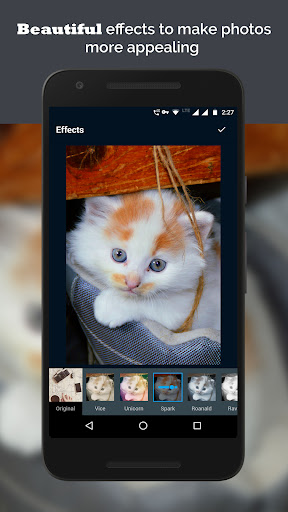
Photo Scan and Photo Editor - Quisquee is one of the most useful, reliable and professional Photo Scanner and Photo Editor. It is pre loaded with powerful Photo Scanner having optimized photo scan algorithm along with Photo editor with number of Frames, Stickers, Effects, Enhancements and many other tools that user can use to make photo editing more fun. Its very easy to use because it has been developed by consideration of rich user experience as first priority. MAIN FEATURES :- Photo Scan :- Photo Scan is feature which enables user to take photo from either Camera or Gallery and scan it by using 8 points multi selection tool. It also auto fix perspective of photo after scan. Photo Scan can scan unlimited photos there is no restriction on counting. Photo Editor :- Photo editor is powerful that is very enhanced and core component of Quisquee which is packed with number of tools and effects to play. Photos :- In Photos user will get all the edited photos using Quisquee. Users can view edited photos any time in this section. Here are following operation that can be performed :- * Multi select photos to delete on main page of photos. Drag to select photos to delete option is embedded. * User can view photos like a Gallery. * Share photo. * Delete photo. * Set as wallpaper. Slideshow :- User can see Slideshow of edited photos. Slideshow is also manual flip able that user can flip current photo to next or previous. Auto flip timing is adjustable in settings. PHOTO EDITING FEATURES :- Crop :- Crop photo using predefined ratios like square, custom, 2:3, 3:4, 3:5, 4:5, 4:6, 5:6, 5:7 and more. Blur :- Manual blur is available which makes editing more practical. Transform :- Advanced Transform tool which can transform image horizontal,straighten and vertical. Enhance :- To enhance quality of picture like High Definition ,Scenery, Food, Portrait, Night etc. Effects :- Quisquee offers multiple effects to apply on Image which makes editing more vivid. Frames :- Multi type frames are available like Gold, Whimsy, Zigzag. Stickers :- Stickers are the best way to express fellings. Quisquee has stickers like Love, BFF, Flora, Costume, Alphabet, Food etc. Overlays :- Overlay is one which draws itself on image and app has grids, adore, linework, countdown, adventure and more. Adjust:- Adjustable brightness, contrast, exposure, warmth, saturation of photo. Draw :- User can draw anything on photo using draw tool. Text :- Text can be written over the photo with select able color. Blemish :- Blemishes can be reduced using this tool. Redeye :- This tool reduce red eye present in photo captured using flash mode On. More :- Sharpness,Focus,Vignette,Orientation,Splash,Meme,Whiten. # How to perform photo scan :- 1. Open app then click on bottom right corner button to open menu. 2. Click on Photo scan then choose either Scan or Pick from gallery. 3. Choose area of photo by selecting 8 points. 4. Click on scan. that's it. # How to use photo editor :- 1. Choose photo from CAMERA or GALLERY. 2. User tools to perform various actions. 3. Click on done button. thats it. License For Open Source Libraries are used. Check "About" section in the app. * Quisquee is made for its users to provide hassle free experience. Please provide feedback and suggestions in order to keep development consistent. Happy Photo Scanning and Editing!!!
More like this
- Top Photography on Google Play by estimated revenue
- Photo Scan - Quisquee alternatives
- Photo Scan - Quisquee vs HD Camera Beauty: Selfie Cam
- Photo Scan - Quisquee vs Eye Color Changer
- All top charts and categories
Similar apps
HD Camera Beauty: Selfie CamTrinity Technologies Global Limited3.8 ★ (8.1K)
Eye Color ChangerNextGen Apps Studio4.5 ★ (8.1K)
Mirror PhotoPhoto Video Audio Editor & Utility Apps4.7 ★ (8.1K)
Video Downloader & mp3 saverHU WEI4.4 ★ (8.1K)
Any Video Downloader App | SSSAny_Video_Downloader4.7 ★ (8.1K)
Video Player - OPlayer LiteOLIMSOFT4.3 ★ (8.2K)
FUJIFILM XAppFUJIFILM Corporation4.0 ★ (8.2K)
Gallery: Album & Photo VaultGallery Photo Galeria Album4.3 ★ (8.2K)