
SketchSpace: Trace & Draw
AppsForgeArt & DesignGoogle PlaySketchSpace: Trace & Draw revenue and downloads, last 30 days
How we got this (13 inputs)
- signals
- Play installs ÷ age; lifetime→current drift ×/÷4.12 (135278 measured Play counter deltas)
- spread
- measured on downloads ground truth (downloads ground truth: 48 App Store milestones, 33 platform splits, 13 drift points)
- installs
- 167
- age days
- 163
- note
- install counter moved once in 1.98 day(s); one step can hold several days of installs, so it is not read as a daily rate yet
- bound
- at most the lifetime installs counter (167) over 30 days: the listing is 163 days old, so its last 30 days cannot hold more installs than it ever had
- range scale
- ×0.88 (coverage scale on 9 ground-truth rows; publication is decided before it)
- likelyLow
- 21
- likelyHigh
- 69
- confidence
- medium
- observed days (of 30)
- 2
- measured days
- 0
- scaling
- observed days, scaled to 30
As of Nov 21, 2026.
How we got this (11 inputs)
- method
- installs in the window (all active on install day) + earlier installers active in the month (published retention ÷ the category's DAU/MAU stickiness) + the retained base of installers older than two years
- downloads per day
- 1.33 (0.4 to 3.4, the published worldwide figure)
- retention
- day 1 / 7 / 30: 20.3% / 5.6% / 2.1% (Android benchmark × 1 for the category; AppsFlyer Q3 2024 day-1/7/30 retention, via getstream.io/blog/app-retention-guide (read 2026-11-16); category: OneSignal 2024 day-30 retention by category, via getstream.io/blog/app-retention-guide (read 2026-11-16))
- active days per install
- 3.31 over 163 days
- stickiness
- 15% DAU/MAU, Media & Entertainment median (MWM DAU/MAU medians, US iOS, May 2026 (mwm.ai/glossary/dau-mau, read 2026-11-16))
- parts
- window installs 40 (the published 30-day downloads), earlier installers 13, retained base 0
- spread
- downloads ×/÷2.92, retention ×/÷3, tail ×/÷1.35, stickiness ×/÷1.8 (assumptions; not fitted)
- chart persistence (recorded, not used)
- 0 day(s) on a chart in the window; fewer than 7 live days exist
- tier
- modelled: retention and stickiness are published benchmarks, not measured on this listing
- confidence
- low
- rough
- order of magnitude
As of Nov 21, 2026.
Daily active users
Modelled from this app's downloads and a published retention curve for its store and category, not measured. Read it as an order of magnitude.
History
Daily readings as we observed them, last 30 days worldwide. Free shows the last 30 days.
Downloads per day
Observed by us since Nov 19, 2026.
Installs, Play counter
Observed by us since Nov 19, 2026.
Monthly history: we have found no public-archive copy of this store page from the last 12 months, so monthly readings start with our own in Nov 2026.
Create a free account to save apps; Pro shows full history.
Chart positions
Where this app ranks on the top free, paid and grossing charts we capture.
Search terms
No search terms read for this app yet. Terms are read from its title and the searches it shows up in, and appear here once ranked.
In-app purchases
Prices
In-app purchase ladder, price changes and paywall terms
No in-app prices recorded yet. We read them from the store listing: either this app sells none, or its listing has not been read yet.
Ratings and reviews
Rating distribution
No rating distribution read yet.
Recent reviews
Marketing
Paid ads, organic videos and onboarding captured for this app.
Paid ads
No Meta, Google or TikTok ads tied to this app yet. We check the public ad libraries daily.
Organic videos
No YouTube, TikTok or Instagram videos tied to this app yet.
Onboarding
No store screenshots, web funnel or in-app recording captured for this app yet.
Change history
Versions, price changes, rank jumps and listing edits, as we observed them.
Details
- Developer
- AppsForge, 4 apps
- Package
- com.rigelapps.sketchspace
- Category
- Art & Design
- Price
- Free
- Released
- Jun 11, 2026
- Updated
- Jul 22, 2026
- Version
- 1.1.0
- Size
- -
- Content rating
- Everyone
- Website
- Not available
- Contact email
- support@rigelapps.com
- Privacy policy
- sketchspace-8632a.web.app/privacy
- Languages
- Not available
- Charted in
- United States
- First seen
- Nov 19, 2026
- Listing read
- Nov 23, 2026
Show store descriptionShow less
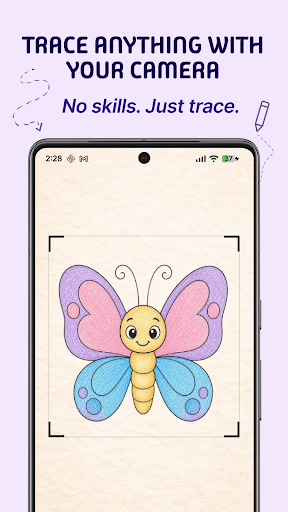
SketchSpace: Trace & Draw turns your phone into a simple camera-based drawing assistant. Choose a sketch or import your own photo, position it over paper, adjust the reference, and trace what you see. Whether you're learning to draw, practicing proportions, creating portraits, or simply want an easier way to transfer an image onto paper, SketchSpace helps you get started. 🎨 TRACE PHOTOS ONTO PAPER Choose any image from your phone and use it as a transparent reference over your drawing surface. Trace: • Portraits and selfies • Pets • Anime and characters • Cars and objects • Landscapes • Illustrations • Your own artwork Adjust the image until it fits your paper, then follow the reference while drawing with a pencil, pen, marker, or brush. 📷 EASY CAMERA TRACING SketchSpace displays your reference image over the live camera view so you can see both the image and your paper at the same time. Position your phone above the paper using a stand, tripod, cup, or another stable support and start tracing. Use simple controls to prepare your reference: • Adjust transparency • Resize the image • Move and position the reference • Rotate using gestures • Zoom the camera • Lock the image in place • Turn on the flashlight • Hide controls for a cleaner drawing view 🖼️ USE YOUR OWN PHOTOS You're not limited to built-in sketches. Import an image directly from your photo library and turn it into a tracing reference in seconds. Want to draw your pet? A portrait? A favorite character? A building? A car? Choose the image, position it on your paper, adjust the transparency, and start drawing. ✏️ BUILT-IN SKETCH LIBRARY Not sure what to draw? Browse a collection of ready-to-trace sketches organized into different categories. Find simple drawings for practice or choose more detailed references as your skills improve. Save the sketches you like and return to them whenever you want. 🏆 BUILD YOUR DRAWING SKILLS Practice regularly and keep track of the drawings you complete. Progress through five drawing levels: • Novice • Apprentice • Artist • Master • Virtuoso Your completed drawings are saved in your history, making it easy to revisit previous sketches or start them again. ⭐ FAVORITES & RECENT DRAWINGS Save your favorite references for quick access. Use the Recent section to find drawings you've already completed and return to sketches you want to practice again. 📴 DRAW OFFLINE Built-in sketches are stored on your device, so you can browse and use them without an internet connection. Take SketchSpace with you and practice drawing wherever you are. 🌍 AVAILABLE IN MULTIPLE LANGUAGES SketchSpace supports: English, Spanish, Portuguese (Brazil), Japanese, Korean, Russian, Ukrainian, Italian, French, German, Indonesian, Polish, and Hindi. 🔒 YOUR PRIVACY MATTERS SketchSpace uses your camera only to display the live tracing view. Your camera feed and physical drawings are not recorded or uploaded. Images you choose from your device remain under your control. 💎 FREE TO USE Enjoy SketchSpace without: • Ads • Subscriptions • Premium paywalls • Watermarks No complicated setup. Choose an image, position your phone over the paper, adjust your reference, and start tracing. Turn photos and sketches into drawings with SketchSpace: Trace & Draw.


More like this
- Top Art & Design on Google Play by estimated revenue
- SketchSpace: Trace & Draw alternatives
- SketchSpace: Trace & Draw vs AI Home: Home Decor & Design
- SketchSpace: Trace & Draw vs Tattoo AI: Design & Try On
- All top charts and categories
Similar apps
AI Home: Home Decor & DesignDog Games
Tattoo AI: Design & Try OnCleverMindAI
Corvia: AI Face Swap & PhotosPT INDOCORR PACKAGING CIKARANG
SketchSpark: AR Drawing TraceLokifyy
Vona: Swap & PhotosPT YOUNGIL LEATHER INDONESIA
Tracey: AI Drawing & AR TraceMobGame Pte. Ltd.
ParentPay - ai appYeteamapps
Design Home - AI Home MakeoverINFINITE HILLS PRODUCTIONS INC