
Cast Timer: Chromecast Limit
smartpositiveParentingGoogle PlayCast Timer: Chromecast Limit revenue and downloads, last 30 days
How we got this (12 inputs)
- signals
- Play installs ÷ age; lifetime→current drift ×/÷4.12 (135278 measured Play counter deltas)
- spread
- measured on downloads ground truth (downloads ground truth: 48 App Store milestones, 33 platform splits, 13 drift points)
- installs
- 19
- age days
- 57
- bound
- at most the lifetime installs counter (19) over 30 days: the listing is 57 days old, so its last 30 days cannot hold more installs than it ever had
- range scale
- ×0.88 (coverage scale on 9 ground-truth rows; publication is decided before it)
- likelyLow
- 4
- likelyHigh
- 13
- confidence
- medium
- observed days (of 30)
- 3
- measured days
- 0
- scaling
- observed days, scaled to 30
As of Nov 21, 2026.
How we got this (12 inputs)
- method
- installs in the window (all active on install day) + earlier installers active in the month (published retention ÷ the category's DAU/MAU stickiness) + the retained base of installers older than two years
- downloads per day
- 0.27 (0.07 to 0.53, the published worldwide figure)
- retention
- day 1 / 7 / 30: 20.66% / 5.7% / 2.14% (Android benchmark × 1.02 for the category; AppsFlyer Q3 2024 day-1/7/30 retention, via getstream.io/blog/app-retention-guide (read 2026-11-16); category: OneSignal 2024 day-30 retention by category, via getstream.io/blog/app-retention-guide (read 2026-11-16))
- active days per install
- 2.37 over 57 days
- stickiness
- 12.6% DAU/MAU, Education & Knowledge median (MWM DAU/MAU medians, US iOS, May 2026 (mwm.ai/glossary/dau-mau, read 2026-11-16))
- parts
- window installs 8 (the published 30-day downloads), earlier installers 1, retained base 0
- spread
- downloads ×/÷2.83, retention ×/÷3, tail ×/÷1.14, stickiness ×/÷1.8 (assumptions; not fitted)
- chart persistence (recorded, not used)
- 0 day(s) on a chart in the window; fewer than 7 live days exist
- bound
- at most the listing's 20 lifetime installs
- tier
- modelled: retention and stickiness are published benchmarks, not measured on this listing
- confidence
- low
- rough
- order of magnitude
As of Nov 21, 2026.
Daily active users
Modelled from this app's downloads and a published retention curve for its store and category, not measured. Read it as an order of magnitude.
History
Daily readings as we observed them, last 30 days worldwide. Free shows the last 30 days.
Downloads per day
Observed by us since Nov 18, 2026.
Installs, Play counter
Observed by us since Nov 18, 2026.
Monthly history: we have found no public-archive copy of this store page from the last 12 months, so monthly readings start with our own in Nov 2026.
Create a free account to save apps; Pro shows full history.
Chart positions
Where this app ranks on the top free, paid and grossing charts we capture.
Search terms
No search terms read for this app yet. Terms are read from its title and the searches it shows up in, and appear here once ranked.
In-app purchases
Prices
In-app purchase ladder, price changes and paywall terms
No in-app prices recorded yet. We read them from the store listing: either this app sells none, or its listing has not been read yet.
Ratings and reviews
Rating distribution
No rating distribution read yet.
Recent reviews
Marketing
Paid ads, organic videos and onboarding captured for this app.
Paid ads
No Meta, Google or TikTok ads tied to this app yet. We check the public ad libraries daily.
Organic videos
No YouTube, TikTok or Instagram videos tied to this app yet.
Onboarding
No store screenshots, web funnel or in-app recording captured for this app yet.
Change history
Versions, price changes, rank jumps and listing edits, as we observed them.
Details
- Developer
- smartpositive, 3 apps
- Package
- com.smartpositive.casttimer
- Category
- Parenting
- Price
- Free
- Released
- Sep 25, 2026
- Updated
- Oct 29, 2026
- Version
- 1.0.1
- Size
- -
- Content rating
- Everyone
- Website
- Not available
- Contact email
- contact@smartpositive.com
- Privacy policy
- smartpositive.com/apps/cast-timer/privacy.html
- Languages
- Not available
- Charted in
- United States
- First seen
- Nov 18, 2026
- Listing read
- Nov 22, 2026
Show store descriptionShow less
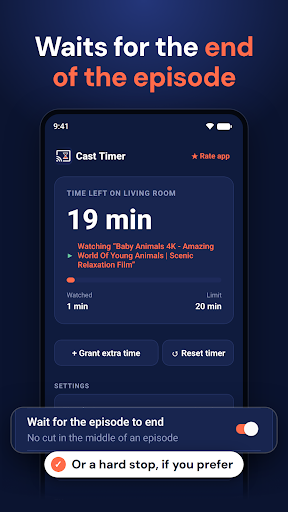
The TV stops by itself when screen time is up. No more "just one more episode", no more arguing in front of the TV. Cast Timer sets a screen time limit on everything cast to the TV. It counts the real watching time, waits for the episode to end, then stops the TV with a calm "That's all for now" screen. You set the rule once; the app enforces it. Works with Chromecast, Google TV, Android TV and all TVs with Chromecast built-in. Free, no ads, no account, nothing to install on the TV. For the kids' cartoons, or for yourself: Cast Timer also helps adults keep binge-watching in check, and works as a sleep timer for casting: fall asleep in front of a series, and the cast stops at the end of the episode. WHY CAST TIMER Casting to the TV slips through most parental controls and screen time apps. The limits you set on a phone or a tablet stop counting the moment the video moves to the big screen, and the TV has no timer of its own. Cast Timer closes that gap: it follows what is cast to the TV, from any phone or tablet in the house. NOTHING TO INSTALL ON THE TV Most TV parental controls need an app on the TV itself, a pairing step, and only work on some smart TVs. Cast Timer runs on your phone and talks to the Chromecast directly, so it works with any Chromecast, including older models. SET A TV TIME LIMIT Choose how long the TV can be watched: from 1 minute up to 8 hours. Only real watching time counts: pauses, menus, music and radio don't eat into the limit. WAITS FOR THE EPISODE TO END Cutting a cartoon in the middle of the story is the fastest way to start a meltdown. By default, when the time is up, Cast Timer waits for the current episode to end before stopping the TV. Prefer a hard stop? Turn this option off and the TV stops as soon as the limit is reached. A GENTLE GOODBYE ON THE TV Instead of a sudden black screen, the TV shows a calm end screen, "That's all for now", with soft music. Everyone sees clearly that screen time is over, and it makes it easier to move on to something else. TIME COMES BACK AFTER A BREAK When nobody has watched anything for a while, the counter resets on its own, and the full watching time is available again for the next session. You choose how long that break must be (10 minutes by default). GRANT MORE TIME IN ONE TAP Rainy day, sick day, movie night? Add extra time for the current session, or reset the counter, from your phone in one tap. RUNS FROM YOUR PHONE Cast Timer runs on your phone, in the background. Nothing to install on the TV, nothing to set up on the other phones or tablets, and no account to create. The notification shows the remaining time at a glance. HOW IT WORKS 1. Install Cast Timer on your phone. 2. Pick your Chromecast or TV from the list. 3. Set the time limit. That's it. Cast Timer keeps an eye on the TV and steps in when the time is up. GOOD TO KNOW • Your phone must be on the same Wi-Fi network as the TV, and stay at home while the TV is on. • Works with Chromecast, Google TV, Android TV and TVs with Chromecast built-in, and with most video apps that support casting. • Only content cast to the TV from a phone or tablet is counted. Apps opened directly on the TV with the remote are not covered. • Your settings stay on your phone. No account, no ads, no personal data collected. Cast Timer is a simple screen time tool for the TV: a TV time limit for kids, a timer for cartoons, a parental control for casting, and a way to limit your own binge-watching, all in one small app. --- Chromecast, Google TV and Android TV are trademarks of Google LLC. Cast Timer is an independent app, not affiliated with or endorsed by Google. Music on the end screen: "Local Forecast – Elevator" by Kevin MacLeod (incompetech.com), licensed under CC BY 4.0 (creativecommons.org/licenses/by/4.0).




More like this
- Top Parenting on Google Play by estimated revenue
- Cast Timer: Chromecast Limit alternatives
- Cast Timer: Chromecast Limit vs 한국사 능력
- Cast Timer: Chromecast Limit vs LearnPal: AI English Tutor
- All top charts and categories


