Smart Watch Clock Wallpaper
Wallet Passes AlliancePersonalizationGoogle PlayIn-app purchasesContains adsSmart Watch Clock Wallpaper revenue and downloads, last 30 days
How we got this (8 inputs)
- signals
- ratings ÷ age
- ratings/day
- 0.88
- monetisation
- stickers ARPD 0.3; IAP max $99.99 ×2.5
- range
- 80% interval from out-of-fold residuals (×1.12 scale, 90 products)
- likelyLow
- 2898.85
- likelyHigh
- 14032.63
- confidence
- medium
- observed days (of 30)
- 2
As of Nov 21, 2026.
How we got this (14 inputs)
- signals
- Play installs ÷ age; lifetime→current drift ×/÷4.12 (135278 measured Play counter deltas)
- spread
- measured on downloads ground truth (downloads ground truth: 48 App Store milestones, 33 platform splits, 13 drift points)
- installs
- 124455
- age days
- 578
- note
- install counter moved once in 1.97 day(s); one step can hold several days of installs, so it is not read as a daily rate yet
- bound
- at most the lifetime installs counter (124455) over 30 days: the listing is 578 days old, so its last 30 days cannot hold more installs than it ever had
- range scale
- ×0.88 (coverage scale on 9 ground-truth rows; publication is decided before it)
- bound
- below the free chart threshold
- likelyLow
- 5072
- likelyHigh
- 17131
- confidence
- medium
- observed days (of 30)
- 2
- measured days
- 0
- scaling
- observed days, scaled to 30
As of Nov 21, 2026.
How we got this (12 inputs)
- method
- installs in the window (all active on install day) + earlier installers active in the month (published retention ÷ the category's DAU/MAU stickiness) + the retained base of installers older than two years
- downloads per day
- 311.8 (96.9 to 975.83, the published worldwide figure)
- retention
- day 1 / 7 / 30: 20.3% / 5.6% / 2.1% (Android benchmark × 1 for the category; AppsFlyer Q3 2024 day-1/7/30 retention, via getstream.io/blog/app-retention-guide (read 2026-11-16); category: OneSignal 2024 day-30 retention by category, via getstream.io/blog/app-retention-guide (read 2026-11-16))
- active days per install
- 5.03 over 578 days
- stickiness
- 15% DAU/MAU, Media & Entertainment median (MWM DAU/MAU medians, US iOS, May 2026 (mwm.ai/glossary/dau-mau, read 2026-11-16))
- parts
- window installs 9354 (the published 30-day downloads), earlier installers 6521, retained base 0
- spread
- downloads ×/÷3.17, retention ×/÷3, tail ×/÷1.54, stickiness ×/÷1.8 (assumptions; not fitted)
- ratings per download (recorded, not used)
- 0.00283
- chart persistence (recorded, not used)
- 0 day(s) on a chart in the window; fewer than 7 live days exist
- tier
- modelled: retention and stickiness are published benchmarks, not measured on this listing
- confidence
- low
- rough
- order of magnitude
As of Nov 21, 2026.
Daily active users
Modelled from this app's downloads and a published retention curve for its store and category, not measured. Read it as an order of magnitude.
History
Daily readings as we observed them, last 30 days worldwide. Free shows the last 30 days.
Downloads per day
Observed by us since Nov 19, 2026.
Revenue per day
Observed by us since Nov 19, 2026.
Ratings (worldwide)
Observed by us since Nov 19, 2026.
Installs, Play counter
Observed by us since Nov 19, 2026.
Monthly history: we have found no public-archive copy of this store page from the last 12 months, so monthly readings start with our own in Nov 2026.
Create a free account to save apps; Pro shows full history.
Chart positions
Where this app ranks on the top free, paid and grossing charts we capture.
Search terms
No search terms read for this app yet. Terms are read from its title and the searches it shows up in, and appear here once ranked.
In-app purchases
Google Play shows one in-app price range per storefront, not each product's price. The range over time, as the store published it:
United States, USD
- $0.99 - $99.99 per itemNov 22, 2026 to now
Prices
In-app purchase ladder, price changes and paywall terms
No itemised in-app prices yet. Google Play publishes only the price range shown above, not each product; the individual products and their prices have not been read.
Ratings and reviews
Rating distribution
Store histogram
510 ratings
Recent reviews
Marketing
Paid ads, organic videos and onboarding captured for this app.
Paid ads
No Meta, Google or TikTok ads tied to this app yet. We check the public ad libraries daily.
Organic videos
No YouTube, TikTok or Instagram videos tied to this app yet.
Change history
Versions, price changes, rank jumps and listing edits, as we observed them.
Details
- Developer
- Wallet Passes Alliance, 122 apps
- Package
- com.smartwatch.liveclock
- Category
- Personalization
- Price
- Free
- Released
- Apr 22, 2025
- Updated
- Nov 16, 2026
- Version
- 2.0
- Size
- -
- Content rating
- Everyone
- Contact email
- support.clockwallpaper@walletpasses.me
- Privacy policy
- walletpasses.me/clockwallpaper/privacy/
- Languages
- Not available
- Charted in
- United States
- First seen
- Nov 19, 2026
- Listing read
- Nov 22, 2026
Show store descriptionShow less
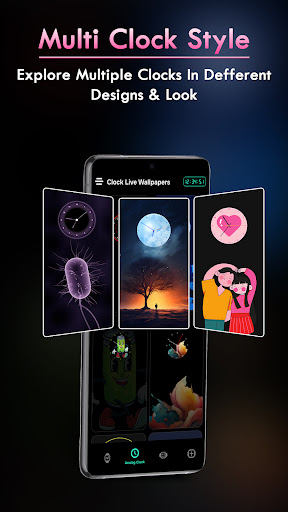
Smart Watch: Clock Wallpaper - Make Time Part of Your Style!Give your phone a watch-inspired look with moving faces and a time display that belongs in your background. Choose a modern, classic or luminous design and make the screen feel more personal without losing sight of the time. Explore Smart Clock Neon Wallpapers for a bright accent that draws attention to the display. Prefer a quieter look? The collection also includes familiar hands and clear numerical layouts, so you can choose a design that suits your everyday screen. App Features: ⌚Smart Watch: Clock Wallpaper - Explore faces inspired by the look of a wristwatch; 🌈Smart Clock Neon Wallpapers - Bring luminous styling to your phone background; 🔒Lock Screen Clock Widgets - Personalize a supported lock screen with a time-focused look; 🔢Digital Clock Wallpapers - View time alongside date and battery information; 🕰️Analog Clock Backgrounds - Enjoy traditional hands that move in real time; ✨Live Clock Wallpapers - Add animated timepieces to your screen; ⚙️Adjustable layout - Choose the size, style and position of the display; 📱Home screen styling - Fit a time-themed design into your phone's everyday appearance; A Face That Fits Your Screen!Start with the kind of display you enjoy reading. Digital Clock Wallpapers offer a numerical view, while other styles put the emphasis on the shape and movement of the hands. Think about where the time sits alongside your icons and background before deciding on a layout. With Analog Clock Backgrounds, a familiar dial becomes part of the design rather than a separate detail. Adjust the available layout controls to give the face enough space and keep the overall screen balanced. How To Use: 📲Open the app and browse the available designs; ⌚Choose a face in Smart Watch: Clock Wallpaper to match your preferred look; 🎨Explore Smart Clock Neon Wallpapers if you want a luminous style; ⚙️Adjust the available size and position settings; 🔎Check how the display fits with your screen layout; ✅Apply your chosen design using the options available on your device; 🔒Review Lock Screen Clock Widgets on a supported lock screen; 🔢Information at a Glance:Keep the details you use together in a time-themed background. Digital Clock Wallpapers combine a numerical display with date and battery information, making these details part of the screen's appearance. Choose a style that leaves the information easy for you to read. 🕰️A Classic Touch:Use Analog Clock Backgrounds when you prefer a dial to digits. Moving hands give the design its familiar character, while the size and position controls help you shape the layout around the rest of your screen. ✨Movement in the Background:Live Clock Wallpapers bring changing time into your chosen design. Pick a face for its appearance as well as its readability, whether you prefer a watch-inspired layout or a simple time display. 📱Choose the Right Placement:Consider your home screen and lock screen separately when personalizing your phone. Lock Screen Clock Widgets depend on the options your device supports. Available placement and display behavior may vary by device and system settings, so check the result on your own screen. Make Your Everyday View Your Own!Use Live Clock Wallpapers to combine a useful time display with a look you enjoy. Explore the available faces, adjust the layout and choose a design that feels at home on your phone.
More like this
- Top Personalization on Google Play by estimated revenue
- Smart Watch Clock Wallpaper alternatives
- Smart Watch Clock Wallpaper vs Dreamy Feathers Keyboard Theme
- Smart Watch Clock Wallpaper vs Phone caller screen-call theme
- All top charts and categories
Similar apps
Dreamy Feathers Keyboard ThemeFancy keyboard for theme apps4.8 ★ (510)
Phone caller screen-call themeAI.io4.5 ★ (511)
Water Bubbles Live Wallpaperlivephoto4.2 ★ (511)
OneUI Circle Icon PackJndWalls4.6 ★ (511)
Sea Beach Live Wallpaperlivephoto4.5 ★ (511)
GIF Live WallpaperIdeal Apps Coders4.0 ★ (509)
MD338 Hybrid watch faceMatteo Dini MD ® Watch Faces5.0 ★ (509)
Macaron Parade Theme +HOME+HOME by Ateam Entertainment4.9 ★ (509)