
Smart Flashlight & Sensors
SoAppsProToolsGoogle PlaySmart Flashlight & Sensors revenue and downloads, last 30 days
History
Daily readings as we observed them, last 30 days worldwide. Free shows the last 30 days.
One reading so far: history starts Nov 23, 2026, and a trend line appears after the next daily reading.
Monthly history: we have found no public-archive copy of this store page from the last 12 months, so monthly readings start with our own in Nov 2026.
Create a free account to save apps; Pro shows full history.
Chart positions
Where this app ranks on the top free, paid and grossing charts we capture.
Search terms
No search terms read for this app yet. Terms are read from its title and the searches it shows up in, and appear here once ranked.
In-app purchases
Prices
In-app purchase ladder, price changes and paywall terms
No in-app prices recorded yet. We read them from the store listing: either this app sells none, or its listing has not been read yet.
Ratings and reviews
Rating distribution
Store histogram
221 ratings
Recent reviews
Marketing
Paid ads, organic videos and onboarding captured for this app.
Paid ads
No Meta, Google or TikTok ads tied to this app yet. We check the public ad libraries daily.
Onboarding
No store screenshots, web funnel or in-app recording captured for this app yet.
Change history
Versions, price changes, rank jumps and listing edits, as we observed them.
Details
- Developer
- SoAppsPro, 2 apps
- Package
- com.soappspro.flashlightsensor
- Category
- Tools
- Price
- Free
- Released
- Dec 14, 2020
- Updated
- Sep 30, 2026
- Version
- 02.31.00
- Size
- -
- Content rating
- Everyone
- Contact email
- soappspro@gmail.com
- Languages
- Not available
- Charted in
- United States
- First seen
- Nov 23, 2026
- Listing read
- Nov 23, 2026
Show store descriptionShow less
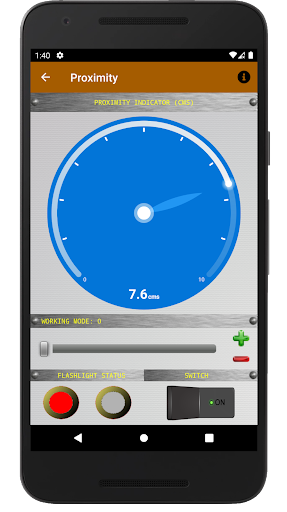
💰 THIS APP IS ▶ Free. ▶ No Ads. 🔓 COMMON PERMISSIONS ▶ android.permission.FLASHLIGHT: permission to turn the flash on and off. ▶ android.permission.VIBRATE: device vibration permission. ▶ android.permission.FOREGROUND_SERVICE: permission to launch a service as a notification. ▶ android.permission.POST_NOTIFICATIONS: permission to show notifications in Android 13. 🔐 SENSITIVE PERMISSIONS ▶ NONE. 💾 DOWNLOAD SIZE ▶ Less than 4 MB. 🖼 CURRENT FEATURES ▶ You can control the Flash of the device: ✸ Without sensor (by means of a simple button). ✸ With the light sensor (using natural or artificial ambient light, indoors or outdoors). ✸ With the accelerometer sensor (with shakes and movements) ✸ With the proximity sensor (with gestures and covering and uncovering the proximity sensor). ✸ With magnetic sensor. ▶ You can control the screen as a flashlight (in this mode the screen brightness is configurable a): ✸ Without sensor (by means of a simple button). ✸ With the light sensor (using natural or artificial ambient light, indoors or outdoors). ✸ With the accelerometer sensor (with jerks and movements). ✸ With the proximity sensor (with gestures and by covering and uncovering the proximity sensor). ▶ You can control the flash by using the service: ✸ With the light sensor (using natural or artificial ambient light, indoors or outdoors). ✸ With the accelerometer sensor (with jerks and movements). 📆 NEXT FEATURES ▶ Add other sensors to turn the flash on and off. ▶ Stereoscopic flashlight. ▶ Add stopwatch to keep the flashlight on for a certain time. ▶ Add a widget to launch the service quickly. 🌟 SERVICE ▶ Use the service to manage the flash with a sensor on your device such as the ambient light sensor, when the app is not in the foreground. ▶ Complete notification that informs the status. ▶ The service can be programmed to turn off after a certain time in hours and minutes. 📱 HARDWARE REQUIREMENTS ▶ Ambient light sensor: This sensor is usually installed on the front camera of the device. If your device does not have a front camera, it is very possible that you do not have this sensor. The measure of ambient light on Android devices is lux. Lux is the intensity of light in a space. ▶ Accelerometer sensor: this sensor is usually equipped in the vast majority of smartphone and tablet devices. The app tries to use the linear accelerometer sensor which gives the best results. If your device does not have this sensor, the app will automatically use the NON-linear accelerometer sensor, which is less accurate. ▶ Proximity sensor: this sensor is located on the front camera of the device. This type of sensor uses centimeters (cms) as distance to measure proximity, however most detect two states of NEAR and FAR, not being able to detect intermediate distances between 0 cm and, for example, 5 cm. ▶ Flash: the flash is equipped next to the rear camera. Despite having a rear camera, it is possible that your device does not have a flash, for example some tablets have a rear camera but do not have a flash. ▶ Magnetic Sensor: this sensor is found in more modern devices. 🔠 APP LANGUAGES ▶ 🇬🇧 English. ▶ 🇪🇸 Spanish. 🔗 WEB ▶ https://sites.google.com/view/soappspro-en/apps/ 📹 VIDEOS ▶ https://www.youtube.com/watch?v=w9a7pGeL018 ▶ https://www.youtube.com/watch?v=poiYFhk7NLM 🔏 PRIVACY POLICY ▶ https://sites.google.com/view/soappspro-en/apps/smart-flashlight-sensors/privacy-policy




More like this
- Top Tools on Google Play by estimated revenue
- Smart Flashlight & Sensors alternatives
- Smart Flashlight & Sensors vs aShell - Your Local ADB Shell
- Smart Flashlight & Sensors vs Red Energy
- All top charts and categories
Similar apps
aShell - Your Local ADB Shellsunilpaulmathew4.2 ★ (223)
Red EnergyRed Energy Australia3.4 ★ (223)
itel SoundTranssion Holdings2.4 ★ (223)
Pastebin: Create & View Pastespz64_3.6 ★ (223)
HW Info - Hardware CPU InfoBlueProject2.9 ★ (223)
QR Scannersuccess octobar
Fast Internet Speed Test NowAudacity IT Solutions Limited4.6 ★ (223)
NIL ClubYOKE Global Inc4.6 ★ (223)