Simple Clock Widget
SpacedancerPersonalizationGoogle PlayContains adsSimple Clock Widget revenue and downloads, last 30 days
How we got this (10 inputs)
- method
- Play install counter: total accepted delta ÷ elapsed days
- measured days
- 4.66
- window
- 2026-11-16..2026-11-21
- step spread
- ×/÷1.38 (the counter moves in steps; narrows with more days)
- likelyLow
- 165
- likelyHigh
- 317
- confidence
- high
- observed days (of 30)
- 5
- measured days
- 1
- scaling
- projected to 30 days from 4.7 measured days (2026-11-16..2026-11-21, counter 519 → 581) plus 25.3 modelled days
As of Nov 21, 2026.
How we got this (11 inputs)
- method
- installs in the window (all active on install day) + earlier installers active in the month (published retention ÷ the category's DAU/MAU stickiness) + the retained base of installers older than two years
- downloads per day
- 7.57 (4.13 to 14.27, the published worldwide figure)
- retention
- day 1 / 7 / 30: 20.3% / 5.6% / 2.1% (Android benchmark × 1 for the category; AppsFlyer Q3 2024 day-1/7/30 retention, via getstream.io/blog/app-retention-guide (read 2026-11-16); category: OneSignal 2024 day-30 retention by category, via getstream.io/blog/app-retention-guide (read 2026-11-16))
- active days per install
- 3.04 over 126 days
- stickiness
- 15% DAU/MAU, Media & Entertainment median (MWM DAU/MAU medians, US iOS, May 2026 (mwm.ai/glossary/dau-mau, read 2026-11-16))
- parts
- window installs 227 (the published 30-day downloads), earlier installers 58, retained base 0
- spread
- downloads ×/÷1.86, retention ×/÷3, tail ×/÷1.3, stickiness ×/÷1.8 (assumptions; not fitted)
- chart persistence (recorded, not used)
- 0 day(s) on a chart in the window; fewer than 7 live days exist
- tier
- modelled: retention and stickiness are published benchmarks, not measured on this listing
- confidence
- low
- rough
- order of magnitude
As of Nov 21, 2026.
Daily active users
Modelled from this app's downloads and a published retention curve for its store and category, not measured. Read it as an order of magnitude.
History
Daily readings as we observed them, last 30 days worldwide. Free shows the last 30 days.
Downloads per day
Observed by us since Nov 16, 2026.
Installs, Play counter
Observed by us since Nov 16, 2026.
Monthly history: we have found no public-archive copy of this store page from the last 12 months, so monthly readings start with our own in Nov 2026.
Create a free account to save apps; Pro shows full history.
Chart positions
Where this app ranks on the top free, paid and grossing charts we capture.
Search terms
No search terms read for this app yet. Terms are read from its title and the searches it shows up in, and appear here once ranked.
In-app purchases
Prices
In-app purchase ladder, price changes and paywall terms
No in-app prices recorded yet. We read them from the store listing: either this app sells none, or its listing has not been read yet.
Ratings and reviews
Rating distribution
No rating distribution read yet.
Recent reviews
Marketing
Paid ads, organic videos and onboarding captured for this app.
Paid ads
No Meta, Google or TikTok ads tied to this app yet. We check the public ad libraries daily.
Organic videos
No YouTube, TikTok or Instagram videos tied to this app yet.
Change history
Versions, price changes, rank jumps and listing edits, as we observed them.
Details
- Developer
- Spacedancer, 6 apps
- Package
- com.space.simpleclockwidget
- Category
- Personalization
- Price
- Free
- Released
- Jul 18, 2026
- Updated
- Sep 8, 2026
- Version
- 1.10
- Size
- -
- Content rating
- Everyone
- Website
- spacedancer.org
- Contact email
- space.dancer@gmail.com
- Privacy policy
- spacedancer.org/simple-clock-widget/
- Languages
- Not available
- Charted in
- United States
- First seen
- Nov 16, 2026
- Listing read
- Nov 23, 2026
Show store descriptionShow less
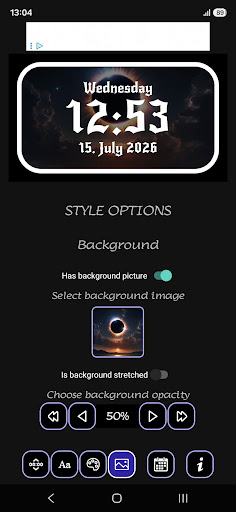
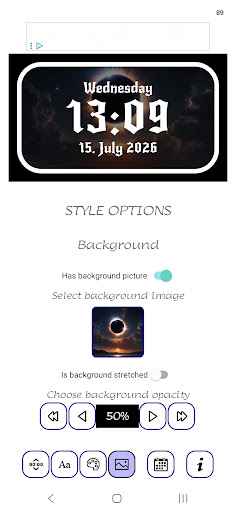
Simple Clock Widget: Customize Your Time Transform your home screen with a clean, elegant, and highly customizable Android widget that displays the time, date, and day of the week. This application is fast, clean, and allows you to create the perfect look for your device with an instant live preview system. Key Features: • No intrusive pop-up ads. Advertisement banners are strictly limited to the top of the settings screens to ensure a completely uninterrupted experience. • One-tap shortcut. Set a custom application of your choice to launch instantly whenever you tap the left side of the widget. • Deep text customization. Adjust fonts, text sizes, and fine-tune vertical text positioning independently for the day, time, and date displays. • Flexible time and date formats. Choose between 12-hour and 24-hour time formats, select custom separator characters, and toggle leading zeros or weekday displays. • Extensive styling options. Use solid colors or custom gallery images for the background, adjust widget opacity, and customize borders and corner rounding. • Built-in calendar view. Navigate through months and years with an integrated calendar that visually distinguishes weekends. • Offline functionality. All features and customization options work fully offline without requiring an internet connection or any account. • Strict data privacy. All settings, background images, and app choices are stored securely and exclusively on your local device. How to Use: To start, long-press your home screen, select Widgets, find Simple Clock Widget, and drag it to your screen. Day and month names automatically adapt to your device's system language. IMPORTANT: Smooth Performance & Prevent Freezing: Modern Android systems and battery savers may delay background widget updates during gaming or heavy device usage. To ensure instant real-time clock updates: 1) App Settings: • Go to Settings > Apps > Simple Clock Widget • Set Battery to "Unrestricted" • Turn OFF "Manage app if unused" (or "Remove permissions if app is unused") 2) Samsung Devices: • Go to Settings > Battery > Background usage limits • Open "Sleeping apps" and "Deep sleeping apps" — if Simple Clock Widget is listed, long-press it to select and tap "Remove" 3) Xiaomi / Redmi / Huawei: • Enable "Autostart" and set Battery Saver to "No restrictions"
More like this
- Top Personalization on Google Play by estimated revenue
- Simple Clock Widget alternatives
- Simple Clock Widget vs SamWatch Digital Themis 2024
- Simple Clock Widget vs [69D] Virtue Analog Watch
- All top charts and categories
Similar apps
SamWatch Digital Themis 2024Samtree
[69D] Virtue Analog Watch69 Design
Breitling Premier Watch FacePrestige Watch Faces Studio
BLZ SEAVOR - Diver Watch FaceBALLOZI Watch Faces
Verge Watch Faceamoledwatchfaces™
Node N1 Analog Watch FaceFutorum
JJ Carbon GT Watch FaceJJ-Design
BREITLING AVENGER Watch FaceLIBERTY WATCH FACES™