MDScan + OCR
MIXAImagingBusinessGoogle Play¥580MDScan + OCR revenue and downloads, last 30 days
History
Daily readings as we observed them, last 30 days worldwide. Free shows the last 30 days.
Ratings (worldwide)
Observed by us since Nov 22, 2026.
Installs, Play counter
Observed by us since Nov 22, 2026.
Monthly history: we have found no public-archive copy of this store page from the last 12 months, so monthly readings start with our own in Nov 2026.
Create a free account to save apps; Pro shows full history.
Chart positions
Where this app ranks on the top free, paid and grossing charts we capture.
Search terms
In-app purchases
Prices
In-app purchase ladder, price changes and paywall terms
No in-app prices recorded yet. We read them from the store listing: either this app sells none, or its listing has not been read yet.
Ratings and reviews
Rating distribution
Store histogram
21,868 ratings
Recent reviews
Marketing
Paid ads, organic videos and onboarding captured for this app.
Paid ads
No Meta, Google or TikTok ads tied to this app yet. We check the public ad libraries daily.
Organic videos
No YouTube, TikTok or Instagram videos tied to this app yet.
Change history
Versions, price changes, rank jumps and listing edits, as we observed them.
Details
- Developer
- MIXAImaging, 8 apps
- Package
- com.stoik.mdscan
- Category
- Business
- Price
- ¥580
- Released
- Sep 23, 2011
- Updated
- Feb 17, 2026
- Version
- 3.9.97
- Size
- -
- Content rating
- Rated for 3+
- Website
- www.mixaimaging.com
- Contact email
- stoiksoft32@gmail.com
- Privacy policy
- www.mixaimaging.com/appprivacypolicy
- Languages
- Not available
- Charted in
- Japan, Brazil
- First seen
- Nov 21, 2026
- Listing read
- Nov 23, 2026
Show store descriptionShow less
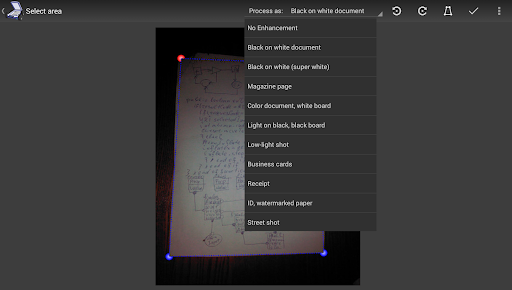
All image processing is done only on your device! No documents will go online without your desire! "MDScan, or Mobile Doc Scanner for Android, is one of the best I have found." TJ McCue, Senior Contributor, Forbes (https://www.forbes.com/sites/tjmccue/2020/04/24/no-desktop-scanner-use-this-android-mobile-document-scanner-for-personal-and-work) Take a picture with your camera, edit it using the many enhancing features, save into a preferred format and share on social media, email, cloud services. Not satisfied? We’ll refund you! MDScan is a mobile doc scanner that allows you to scan any type of document using your phone camera. This could be receipts, text pages, coupons, posters, magazine articles, invoices, pictures, and any printed documents. How does it work? 1. Take a picture with your camera 2. Choose an editing option (you can select “unenhanced”) 3. Easily adjust the scan area using the 4 borders on the page 4. Confirm the scan to the set dimensions (ready presets available) 5. Choose filters to enhance the quality (optional) 6. Save and Export into a PDF or JPG 7. Share on Social Media, Email, Cloud Servers More detailed information: This mobile scanner is perfect to use on the go - anywhere and anytime. With a variety of presets, MDScan guarantees great experience and its automatized functions are suitable for the busiest users looking to scan PDF documents with their mobile device’s camera. If you are looking for a mobile scanning application that automatically detects borders, corrects distortion, and equalizes brightness to create clear, legible documents, you are definitely on the right page. Speaking of great user experience and automatic functions, the MDScan integrates seamlessly with cloud storage services such as Google Drive and Dropbox. In addition, you can send your scanned documents with email services, Facebook (Messenger), Twitter, and other apps if installed on your device. This scanner app shines in terms of uploading but has no second when it comes to converting pictures taken from your phone's camera into legitimate documents you can use for business purposes. With the Mobile Doc Scanner (MDScan) + OCR, you can now add multiple pages easier than ever. Whenever you want to scan a new page, you just need to press the caption button and you’re all set! All of the scanned documents and pages are stored and available under the “My Scans” field. You can also try the Batch mode, which allows you to scan multiple pages within seconds! There is a feature called “Process page laters (spy mode)” that allows you to scan as many documents as you want to without facing any processing delays. Of course, you can work with a photo or document that is already saved in your file system. Whether a PDF file or a regular picture, you can use the same editing options as if you just scanned a picture with your camera. Another great feature this document scanner app offers is OCR (Optical Character Recognition) which stands for the electronic conversion of images of typed, handwritten or printed text into machine-encoded text. Whether scanned from a PDF file or a photo you just took, this new version of Mobile Doc Scanner (MDScan) + OCR guarantees fast performance, user-friendly interface, and professional results. Let’s sum up what you get downloading the MDScan: * Convert any image into a PDF format. * Document edge detection and perspective correction. * Improved image quality * Quick scan and multi-page documents * Share easily and upload instantly * Money-back guarantee User satisfaction is our main goal and if you have any questions or suggestions on how we can improve the Mobile Doc Scanner (MDScan) + OCR, contact us at our support email. We do our best to respond as soon as possible!
More like this
- Top Business on Google Play by estimated revenue
- MDScan + OCR alternatives
- MDScan + OCR vs Waseet | الوسيط
- MDScan + OCR vs AnyDesk plugin ad1
- All top charts and categories
Similar apps
Waseet | الوسيطAlsahab Global General Trading WLL4.3 ★ (22.1K)
AnyDesk plugin ad1AnyDesk Software GmbH3.0 ★ (22.4K)
Fill and Sign Docs: SigneasyGlykka LLC (dba Signeasy)3.5 ★ (22K)
My Verizon For BusinessVerizon Consumer Group4.7 ★ (22K)
File Reader - PDF, Word, ZIPMegaSoftApp4.1 ★ (22K)
DATEV SmartLoginDATEV eG4.4 ★ (22.5K)
Bayer FarmRiseFarmrise4.3 ★ (21.8K)
Resume Builder: CV maker PDFTools for Daily Use3.6 ★ (21.8K)